









Best Graphics Cards for Gaming in 2026
Here are the best graphics cards for gaming, for every monitor resolution and budget.
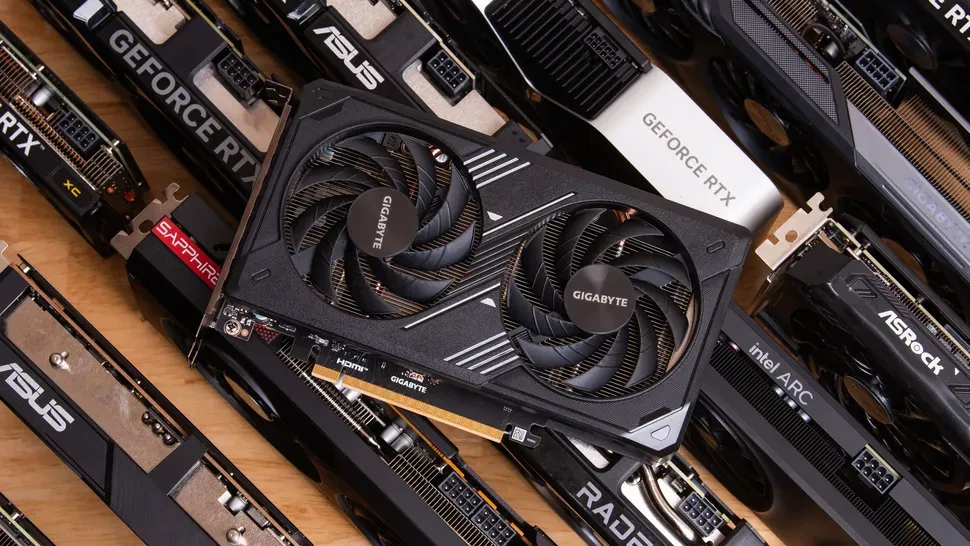
This article covers our picks for the best graphics cards for gaming in 2026. Amid the AI gold rush and consequent supply crunch for consumer silicon, no truly new gaming GPUs have been introduced in almost a year. If you haven't already upgraded your graphics card after the GeForce RTX 50-series and Radeon RX 9000-series launches in 2025, well, you're still looking at the exact same products now.
AMD did make its formerly China-only Radeon RX 9070 GRE available globally after Computex 2026, but in our review, we found that $549 product to be too expensive given the level of performance it delivers and the compromises made to hit its price point, so it isn't joining the list here. Check out that coverage for all the details.
We recently completed retesting for over 50 graphics cards for our 2026 GPU Hierarchy update. With completely fresh data at our disposal and hundreds of hours of testing behind us, we're confident in our picks for the best GPUs for gaming in mid-2026.
Most of the products we recommend remain at elevated prices compared to their MSRPs, but this is just life in mid-2026.
It's admittedly cold comfort, but unless you're shopping for an RTX 5090, graphics card prices haven't risen much more than they already did earlier this year. Compared to the doubling or tripling of prices we've seen for RAM kits and SSDs in 2026 versus last year, a GPU upgrade remains a relatively affordable (and self-contained) option, either as a boost for an existing PC or part of an all-new parts list.
Even if you can’t build an all-new system, you can just put a new graphics card in an older PC and still enjoy boosts to gaming performance, image quality, or both—especially if you can upgrade your monitor at the same time.
As we discuss in further depth below, the arrival of DLSS 4.5 upscaling (for RTX 40-series and 50-series cards, at least) and expanded multipliers for Multi-Frame Generation, which now can boost frame rates by up to 5x or 6x, means that driving a high-resolution, high-refresh-rate monitor is now easier than ever if you're considering a GeForce RTX 50-series graphics card.
Read on to see our picks in today's gaming graphics card market.
Best graphics cards for gaming, at a glance
Graphics Card |
1080p FPS |
1440p FPS |
4K FPS |
Median street price (vs. MSRP) |
|---|---|---|---|---|
166.3 |
135.15 |
88.02 |
$4,299 ($1999) |
|
123.7 |
92.0 |
52.8 |
$1,099 ($749) |
|
116.7 |
85.3 |
47.4 |
$759 ($599) |
|
103.4 |
74.8 |
41.1 |
$634 ($549) |
|
103.8 |
74.0 |
37.6 |
$659 ($549) |
|
70.9 |
48.6 |
24.5 |
$464 ($349) |
|
64.0 |
41.2 |
13.4 |
$369 ($299) |
|
49.5 |
31.2 |
11.1 |
$309 ($249) |
The above list shows all the latest-gen graphics cards we feel stand out in their segments. If you want to see how all of the current and prior generation GPUs stack up, check our GPU benchmarks hierarchy. We also have performance benchmarks further below.
When accounting for pricing, we perform our own research to find the midpoint of current prices for a given graphics card, rather than taking a vendor's MSRP at face value. We feel this method tends to be most representative of the price you're likely to see for products in stock.
If you can find a card for less than this midpoint, it's likely closer to (or even less than) a vendor's MSRP and a better value. Conversely, if you find one for more than this midpoint, it could be a worse value (or too close in price to a more powerful card that's a step up). Tread carefully.
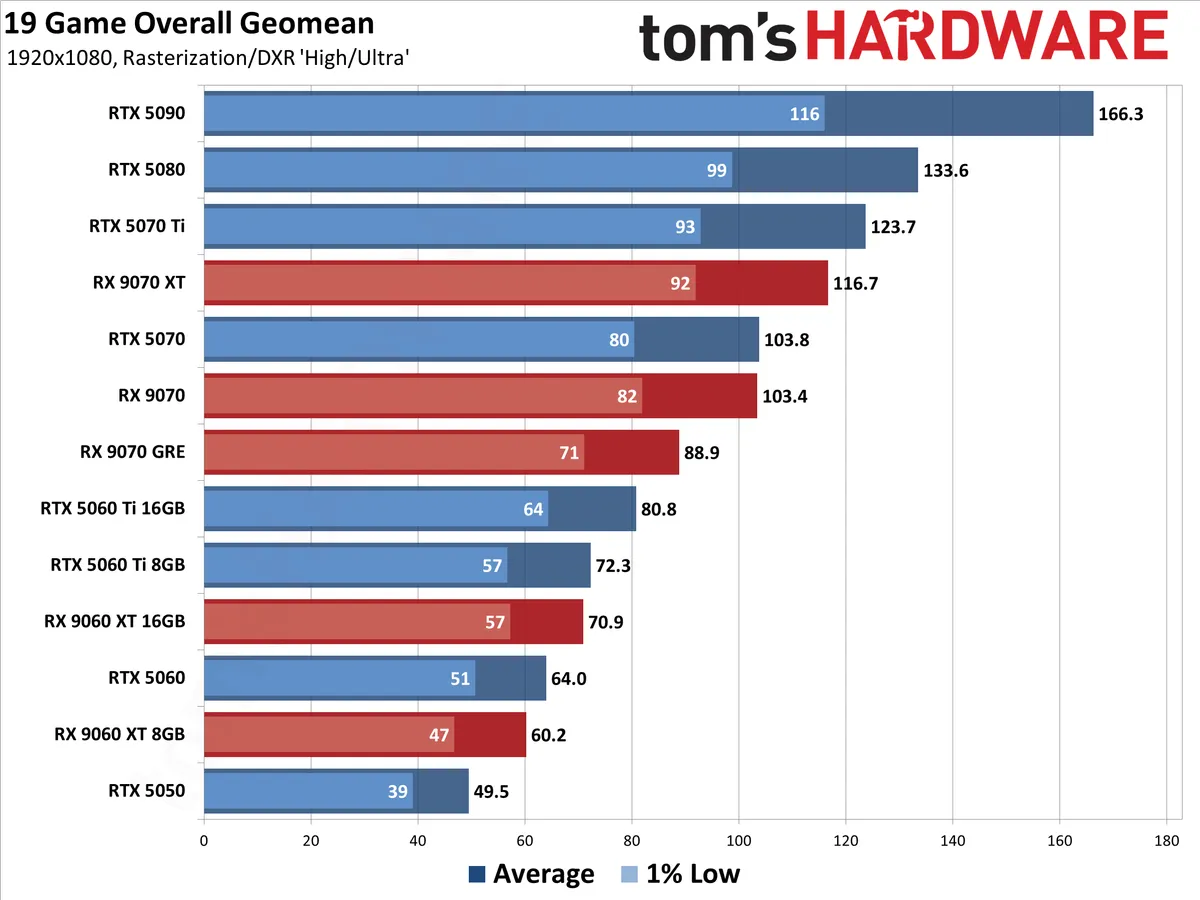
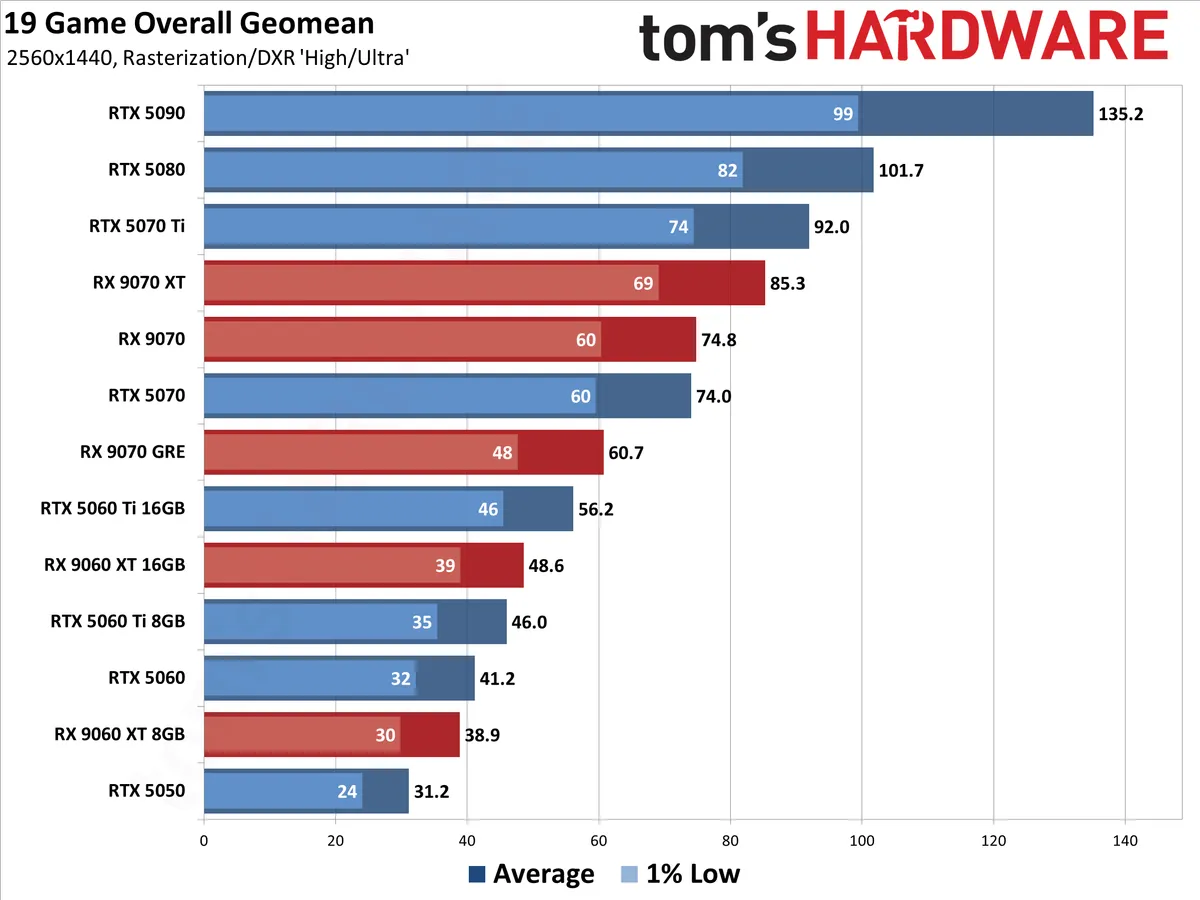
The overall performance ranking incorporates 19 games from our 2026 test suite, which takes the geometric mean (i.e., equal weighting) for both rasterization and ray tracing games. Note that we are not including any upscaling or frame generation results in the table.
Raw performance may be the most important consideration for most gamers, but it's not the only metric that matters. Our subjective rankings below factor in price, power usage, and power efficiency, and features colored by our own years of experience. Others may offer a slightly different take, but all of the cards on this list are worthy of your consideration.
Upscaling and frame generation mean GPUs are more than just a chip
GPU performance goes beyond the hardware these days. Choosing a particular GPU vendor means you're buying into a complex software stack that includes upscaling, frame generation, and (more rarely) AI-powered RT denoising technologies.
In Nvidia's corner, the DLSS 4.5 upscaling model and its second-generation transformer architecture offer superior image quality to other upscaling tech (and with lower input resolutions, meaning higher potential performance), but it's more computationally expensive than past DLSS models and works best on RTX 50-series and 40-series cards.
The DLSS 4 model and its first-gen transformer architecture still work with cards going all the way back to the RTX 20-series family. Not all games implement DLSS 4 natively, but Nvidia allows you to force the usage of that model in many older titles through the Nvidia App utility, so you can practically always get the latest and greatest.
Between native support and driver overrides, DLSS is available in virtually any modern game you might want to play. Nvidia recently marked DLSS feature availability in over 1000 titles.
RTX 50-series GPUs are Nvidia's first with support for multi-frame generation (MFG), which allows Blackwell GPUs to insert anywhere from one to five AI-generated intermediate frames between each native one (for a 2x, 3x, 4x, or even 5x or 6x frame rate boost). RTX 40-series GPUs also support framegen, but only with a 2x boost.
Meanwhile, AMD's FSR 4 offers AI-enhanced upscaling with superior image quality to other FSR versions, but official support for it is limited to RX 9000-series Radeons for now. AMD will bring FSR 4 upscaling to RX 7000-series cards in July 2026 and RX 6000-series cards in early 2027.
In the meantime, AMD's FSR 3.1 and earlier upscalers still work on any GPU, but the image quality tends to be noticeably lower than both DLSS and FSR 4.
AI-enhanced FSR framegen (aka ML Frame Generation) arrived on AMD cards as part of the FSR Redstone update late last year. Like FSR 4 upscaling, ML Frame Generation is limited to Radeon RX 9000 cards, and it can be enabled in compatible games using a control panel override for titles that don't natively have it.
Legacy FSR frame gen remains available, too. Its framerate-doubling boost remains cross-compatible with GPUs from all vendors, but its image quality can't keep up with the AI-powered frame gen tech of the latest AMD and Nvidia models.
Intel XeSS upscaling can be superior to FSR 3.x, but it isn't available in as many games as FSR or DLSS. It works best on Arc GPUs, but like FSR, it's cross-compatible with a wide range of graphics cards from AMD and Nvidia if you need it.
XeSS 2 with AI-enhanced frame generation is now available in 95 games as of this writing and requires an Arc GPU. XeSS 3 brings multi frame generation to the party through both native support and a driver override in compatible titles.
All that said, we don't think you should go out of your way to buy an Intel Arc card for gaming in 2026 for reasons we'll get into later.
1. Best high-end graphics card: GeForce RTX 5070 Ti, $1099.99

Specifications
Reasons to buy
Reasons to avoid
If you want the best blend of high performance and cutting-edge graphics tech out there for 1440p or 4K gaming, the GeForce RTX 5070 Ti is it. This card comes with full support for Nvidia’s latest DLSS 4.5 upscaling and Multi Frame Generation tech, and its 16GB of VRAM gives you full freedom to enable every DLSS 4 feature.
AMD’s closest competitor, the Radeon RX 9070 XT, is way cheaper than the RTX 5070 Ti right now, but the AMD card obviously doesn’t support DLSS 4 or MFG. For the privilege of those capabilities, you'll generally need to spend a whopping 45% more cash right now for just 5% more baseline performance than AMD’s best before you start enabling all the DLSS 4 features Blackwell supports.
Is that worth it? Yes, if you can swing it. Here's why: getting the best gaming performance on modern graphics cards is as much a software problem as a hardware one. Tuning your gaming experience to taste requires access to high-quality upscaling, frame generation, and (more infrequently) an AI-powered RT denoiser like DLSS Ray Reconstruction.
Even amid its shift to AI and data center products, Nvidia ensures that its full suite of DLSS tech is adopted in virtually every new game, whereas AMD's support of FSR 4 adoption has become rather hit-or-miss.
The RTX 5070 Ti also offers superior RT performance versus the RX 9070 XT across our 2026 test suite. Beyond that baseline, Nvidia is working with developers to enable impressive path-traced effects in many of the latest AAA releases.
In our recent experience, path-traced games play best with DLSS 4.5 upscaling and MFG at your disposal, and being able to consistently rely on the availability of those features makes the extra cash for the 5070 Ti worth it.
Our recent GPU Hierarchy retesting has shown that high-end graphics cards are becoming five- to eight-year investments, and Nvidia's ongoing commitment to developer relations and new software features means that you'll enjoy a first-class gaming experience throughout the life of your 5070 Ti no matter what games you want to play on it.
Spread out over that time span, the extra cost of the RTX 5070 Ti versus the RX 9070 XT is worth it for the better experience.
What about the RTX 5080? Nvidia's second-fastest Blackwell card is anywhere from 8% to 16% faster than the 5070 Ti, with the biggest gap at 4K. Prices for the 5080 in June 2026 remain insane, however, and at the midpoint of current prices, the 5080 is 33% more expensive than the 5070 Ti.
There's no way the RTX 5080 offers anywhere close to enough value for the money to justify the step up right now unless you're looking for the fastest thing this side of a 5090 for 4K gaming.
Read: Nvidia GeForce RTX 5070 Ti review
2. Best enthusiast value graphics card: Radeon RX 9070 XT, $759.99

Specifications
Reasons to buy
Reasons to avoid
The Radeon RX 9070 XT is AMD's most well-rounded graphics card in years. It delivers raw gaming performance within spitting distance of the GeForce RTX 5070 Ti for far less money, making it a strong value at first glance. But that appealing price tag comes with a number of asterisks in mid-2026 that mean it's no longer our first pick for high-end PC gaming.
AMD shored up two of its greatest weaknesses against Nvidia with the RX 9070 XT's RDNA 4 architecture: RT performance and AI acceleration, both of which are closer to Nvidia's latest and greatest. And AMD did all that while keeping power efficiency right there with Nvidia, too.
The FSR 4 upscaler is a big jump in image quality over FSR 3, and FSR ML Frame Generation now offers higher-quality framegen on the RX 9070 XT than FSR 3's approach, although it's still limited to a simple doubling of frame rates versus DLSS Multi Frame Generation's versatility.
The problem for the RX 9070 XT in mid-2026 is that FSR 4.x upscaling still trails Nvidia's flagship DLSS 4.5 in image quality, and AMD isn't driving the adoption of FSR 4 features nearly as aggressively as Nvidia is for DLSS. Driver-level overrides for those features can't entirely close the gap.
Worse, you might find the RX 9070 XT entirely shut out of features that you might want to enable in certain games. For just a couple of examples, Radeon gamers can't enable path-traced effects at all in recent titles like Pragmata and Resident Evil Requiem, and 007 First Light sticks you with FSR 3 upscaling that can't be overriden through a driver toggle due to the way it's implemented.
And in our latest GPU Hierarchy retesting with the RX 9070 XT, we saw major performance issues in Grand Theft Auto V Enhanced and minor visual corruptions in Stalker 2 that weren't present on GeForces or on RX 7000- or RX 6000-series cards. We don't think these issues should have slipped past any QA program, especially for such popular and high-profile games, but they sting especially hard on a current-gen product.
All that means the overall ownership experience of an RTX 5070 Ti and an RX 9070 XT is significantly different in mid-2026. We think that gamers shopping in this price class should be able to expect a consistently high level of software feature support and quality across all the games they might want to play, and Nvidia provides that assurance better than AMD does right now.
If you're willing to gamble with the availability of FSR 4 features, for RT or path-traced effects, and don't care to tune the smoothness of your gaming experience with frame generation, the RX 9070 XT's shortcomings versus the RTX 5070 Ti may be easier to overlook given the large amount of cash that will remain in your pocket.
But we also think that you should look closely at what you're giving up before reflexively choosing an RX 9070 XT over an RTX 5070 Ti, despite its strong value at a glance.
Read: AMD Radeon RX 9070 XT review
3. Best midrange graphics card: GeForce RTX 5070, $659.99

Specifications
Reasons to buy
Reasons to avoid
Until 2026 rolled around, the GeForce RTX 5060 Ti 16GB had been our entry-to-midrange Blackwell gaming favorite. But the $579 midpoint of current pricing puts the 5060 Ti 16GB's on-shelf price above that of the RTX 5070's $549 MSRP, and the 5070 is one of the least marked-up graphics cards out there at the moment.
As a result, it's possible to find RTX 5070s for about $670, and that makes it an easy call to step up for less than $100 more than 5060 Ti 16GBs.
The RTX 5070 is about 30% faster than the RTX 5060 Ti 16GB across our 2026 test suite, and that's a huge leap that you'll easily see on the right monitor for just 15% more money.
The advent of DLSS 4.5 upscaling, which makes it possible to achieve superior delivered image quality at lower input resolutions than older DLSS versions, also takes some VRAM pressure off the RTX 5070's 12GB of GDDR7, making the deployment of RT and DLSS MFG more practical on this card than it has been in the past.
And as with the RTX 5070 Ti, the universal availability of DLSS 4.5 (both natively and through app overrides) plus MFG makes this card a fast and flexible performer across all of the games you might want to play in 2026.
Given the image quality of DLSS 4.5 and the smoothness boost of MFG, along with the higher baseline RT performance of this card versus the 9070 in our 2026 testing, we think the 5070 should be your first pick for a midrange gaming card right now.
In an ideal world, the RTX 5070 would have more VRAM to allow for unhindered exploration of everything DLSS 4 and MFG have to offer, especially at a native 4K resolution. If you're pushing those limits, we'd still recommend the Radeon RX 9070 thanks to its 16GB of VRAM.
But if you're on a 1440p monitor where VRAM is less of an issue and want DLSS 4.5 over FSR 4, as most gamers do, the RTX 5070 is still a strong performer, and you're less likely to run into its limits.
Read: Nvidia GeForce RTX 5070 review
4. An AMD midrange alternative: Radeon RX 9070, $629.99

Specifications
Reasons to buy
Reasons to avoid
If you primarily play raster titles at native resolution and aren't on board with upscaling or framegen, the Radeon RX 9070 remains a strong midrange alternative to the RTX 5070. It's one of the least marked-up 16GB graphics cards available even with today's AI headwinds, and in a world where MSRPs have largely been forgotten, that makes the RX 9070 a strong value.
The GeForce RTX 5070 and RX 9070 go neck-and-neck in our test suite, but the RX 9070 has 16GB of VRAM and the RTX 5070 has just 12GB. Especially if you're trying to push 4K games at native resolution, that extra VRAM matters.
But the advent of DLSS 4.5 upscaling, which provides image quality that's practically indistinguishable from native rendering even at relatively low input resolutions, means that the RTX 5070 is a more potent midrange graphics card in 2026 than it was at launch.
On top of their inherent technical superiority, you can find DLSS 4 and MFG in most every game released today, which can't be said for FSR 4.x upscaling or ML framegen. AMD's driver overrides make up some of the gap, to be sure, but not all of it.
And as with the RX 9070 XT, AMD gamers may find themselves locked out of certain features like path tracing (in major releases like Pragmata and Resident Evil Requiem) or FSR overrides (in 007 First Light) entirely.
The RX 9070 is subject to the same minor image quality issues and performance hitches we saw with the RX 9070 XT, and those issues could certainly be overcome with future software updates. But we think that if you're looking for the best midrange graphics card, it should be free of those issues entirely, and so the RTX 5070 is our first pick for this price point right now.
Read: AMD Radeon RX 9070 review
5. Best enthusiast value graphics card: Radeon RX 9060 XT 16GB, $469.99

Specifications
Reasons to buy
Reasons to avoid
AMD's Radeon RX 9060 XT 16GB can handle basically anything the mainstream gamer can throw at it at 1920x1080 and 2560x1440, all at a price that comes in way under the sky-high markups on the RTX 5060 Ti 16GB as of this writing.
At a midpoint of $459.99 in mid-2026, prices for the RX 9060 XT 16GB are the highest we've ever seen, dulling the 9060 XT 16GB's reputation as the value-minded builder's GPU of choice. But with no cheaper Radeons worth recommending in the lineup, what can you do?
In any case, the RX 9060 XT enjoys the much-improved ray-tracing and AI performance of the RDNA 4 architecture, both of which bring Radeons a lot closer to the latest Nvidia competition. And its 16GB of VRAM gives mainstream gamers the assurance they'll basically never find VRAM a bottleneck in modern games at 1080p and 1440p resolutions.
Like the RX 9070 XT, the 9060 XT 16GB gives you access to AMD's much-improved FSR 4 upscaling tech, allowing you to boost performance with a small hit to image quality in the small but growing list of titles that support it.
Even with its new ML-powered model, FSR Frame Generation remains limited to a doubling of output frame rate at best, so it’s not a direct competitor to Nvidia’s DLSS 4 with MFG.
If you want more frames, AMD just launched the RX 9070 GRE globally for $549, and it provides a decent step up in performance for less than $100 more, especially if you're only gaming at 1080p or 1440p. But the more powerful RX 9070 can be found for just $50 more than the GRE, and then you're contemplating the even more powerful and versatile RTX 5070, too.
The RTX 5060 Ti 8GB is the RX 9060 XT 16GB's closest Nvidia competition, dollar for dollar, but we can’t recommend it at all. If you're spending over $350 on a GPU, we don't think you should have to fine-tune every setting to avoid running out of VRAM. The RX 9060 XT is easy to live with for a wide range of gamers in a wide range of titles, and that’s why it won our Editor’s Choice award.
Read: AMD Radeon RX 9060 XT 16GB review
6. The best graphics card for 1080p gaming: Nvidia GeForce RTX 5060, $369.99

Specifications
Reasons to buy
Reasons to avoid
If you want to get your game on at 1080p, we think the RTX 5060 is still your best bet in mid-2026. The midpoint of RTX 5060 prices is around $370 right now thanks to the AI crunch, but you can still find them for as little as $350 if you're willing to shop around.
The RTX 5060 has impressive baseline performance for 1080p gaming in wildly popular titles like Fortnite, Counter-Strike 2, Marvel Rivals, and Apex Legends that aren't hungry for giant pools of VRAM. And if you are trying to push higher output resolutions in demanding AAA games, the universal availability of DLSS 4.5 upscaling means that it's easy to achieve near-native image quality at lower input resolutions than before, making the RTX 5060 a more flexible performer than ever.
If you can tune your settings right, enabling DLSS 4 Multi-Frame Generation could make for an even smoother ride on this card, but we find that 8GB of VRAM isn't enough to consistently enable framegen in the titles where you'd really want it. The feature often doesn't work if you're already at the limits of the RTX 5060's memory pool (or that of any 8GB Blackwell card), since the MFG AI model needs some VRAM of its own to run.
AMD's toughest competition for the RTX 5060 is the RX 9060 XT 8GB, which also lists for $299 but is now selling for about the same $350 as you'll see RTX 5060s going for. Supply of those cards has largely dried up in mid-2026, however, and you're likely to see only a couple options for them from any e-tailer.
Despite its much-maligned 8GB of VRAM, the 9060 XT 8GB put in a strong showing in our 2026 GPU Hierarchy testing, but not consistently enough to beat out the RTX 5060 and take home our general recommendation.
When the RX 9060 XT can bring its full compute horsepower to bear in certain games, it can handily outpace the RTX 5060, so it's worth checking out results like those from our RX 9070 GRE review and seeing whether a game you love benefits from the Radeon's raw muscle.
But if you want a more consistently solid gaming experience, we'd still recommend the RTX 5060.
Read: Nvidia GeForce RTX 5060 Ti review
7. The best graphics card, period: GeForce RTX 5090, $4299

Specifications
Reasons to buy
Reasons to avoid
There's nothing else like the GeForce RTX 5090. If you want to turn on every bell and whistle in modern games at 4K (or beyond), the RTX 5090's sheer shader and Tensor Core horsepower, along with support for Nvidia's DLSS 4 upscaling and multi-frame generation, lets you tune your gaming experience to perfection even on high-refresh-rate 4K displays.
If you're a hardcore PC gamer who demands only the best, the hair will stand up on the back of your neck when you watch the RTX 5090 breeze through workloads that other graphics cards leak out all their thermal gel about.
Prices for the RTX 5090 have always been elevated, but they're stratospheric in early 2026. Major e-tailers only have a few different models listed, and prices start at $3500 or so and only go up from there. Nvidia's $1999 MSRP is pure imagination in current market conditions.
At those prices, an RTX 5090 is an indulgence of the highest order, but then again, it always has been. Without a compelling AMD alternative even on the horizon, considerations of value don't really apply here. If you truly need (or want) this class of gaming or AI performance, you're going to have to pay up.
This card needs a system with a massive power supply, one of our best gaming CPUs, and a top-shelf monitor to take full advantage of its astounding capabilities, and all those spendy components add up quick. But if you have a big enough bankroll to consider shopping for a graphics card of this caliber, you probably don't need us to tell you all that.
If Nvidia and its industry partners fixed the meltdown-prone ATX12V-2x6 connector, the RTX 5090 would be as close to gaming perfection as any graphics card that's ever been made. Guess that's something to improve on the RTX 6090, if it ever arrives.
Read: Nvidia GeForce RTX 5090 Founders Edition review
8. The cheapest graphics card worth buying: GeForce RTX 5050

Specifications
Reasons to buy
Reasons to avoid
If you have to save every penny on a new graphics card in 2026, you're hard up for good budget options. We previously recommended Intel's Arc B570 here, but after completing our 2026 GPU Hierarchy retesting, we're bumping it in favor of the RTX 5050, which is currently selling for about $300, or about $50 more than the B570.
Here's why: we think if you're spending any amount of money on a graphics card, it should just work. You should expect consistent feature support over time in games, universal support for upscaling and (optionally) frame generation when you need them, and consistently high performance in games.
The RTX 5050 unreservedly checks all those boxes, while we couldn't even complete our testing of the Arc B570 (or B580) for our 2026 GPU Hierarchy until the literal day before this guide update goes live, due to a months-long settings lockout with UE5's Nanite and Lumen in a little title you may have heard of called Fortnite.
We can't say when a similarly major issue might occur again with the Arc B570 in any game, and so we're no longer recommending it. Unless you're willing to gamble and need to save every possible dollar on a graphics card, we think you should just save up a bit more cash and buy an RTX 5050.
The RTX 5050 isn't the fastest GPU around, to be sure, and its 8GB of VRAM is a constraint for anything beyond 1080p gaming in mid-2026. But it delivers solid enough native raster performance at 1080p, and it beats out the Arc B570 even before you enable DLSS 4.5 upscaling. And if you do want the performance boost of DLSS, you're getting access to the best and most widely adopted upscaler on the market.
On top of that, the extra $50 over the Arc B570 means that you have the full strength of Nvidia's developer relations team and software support behind you when you go to play the latest games, and we think that reliable software support makes all the difference between a GPU that's fun and affordable and one that's merely cheap.
Read: GeForce RTX 5050 review
How we test the best graphics cards
Determining pure graphics card performance is best done by eliminating all other bottlenecks — as much as possible, at least. To that end, we've selected components for our test rig , most notably AMD's Ryzen 7 9800X3D CPU, one of the best CPUs for gaming.
We test across the three most common gaming resolutions, 1080p, 1440p, and 4K, using a mix of high and ultra settings, depending on the title. Where possible, we use 'reference' cards for all of these tests, like Nvidia's Founders Edition models and AMD's reference designs. Most midrange and lower GPUs don't get reference models, however, and in some cases we only have factory-overclocked cards for testing. We do our best to select cards that are close to the reference specs in such cases.
For each graphics card, we follow the same testing procedure. We run one pass of each benchmark to "warm up" the GPU after launching the game, then perform our actual test runs across each resolution.
We carefully review our test data and check for anomalies. For example, we always expect the RTX 5080 to be faster than the RTX 5070 Ti. If it's not, and we're not in a CPU limited situation, we'll recheck both cards to ensure that our standings our accurate. We also check and retest in cases of subtler issues, as when a transient hitch or frame-time spike causes a large dip in 1% low FPS.
Due to the length of time required for testing each GPU, updated drivers and game patches inevitably come out that can impact performance. We periodically retest a few sample cards to verify our results are still valid, and if not, we go through and retest the affected game(s) and GPU(s). We may also add games to our test suite over time, if one comes out that is popular and conducive to testing. See what makes a good game benchmark for our selection criteria.
Best graphics cards performance results
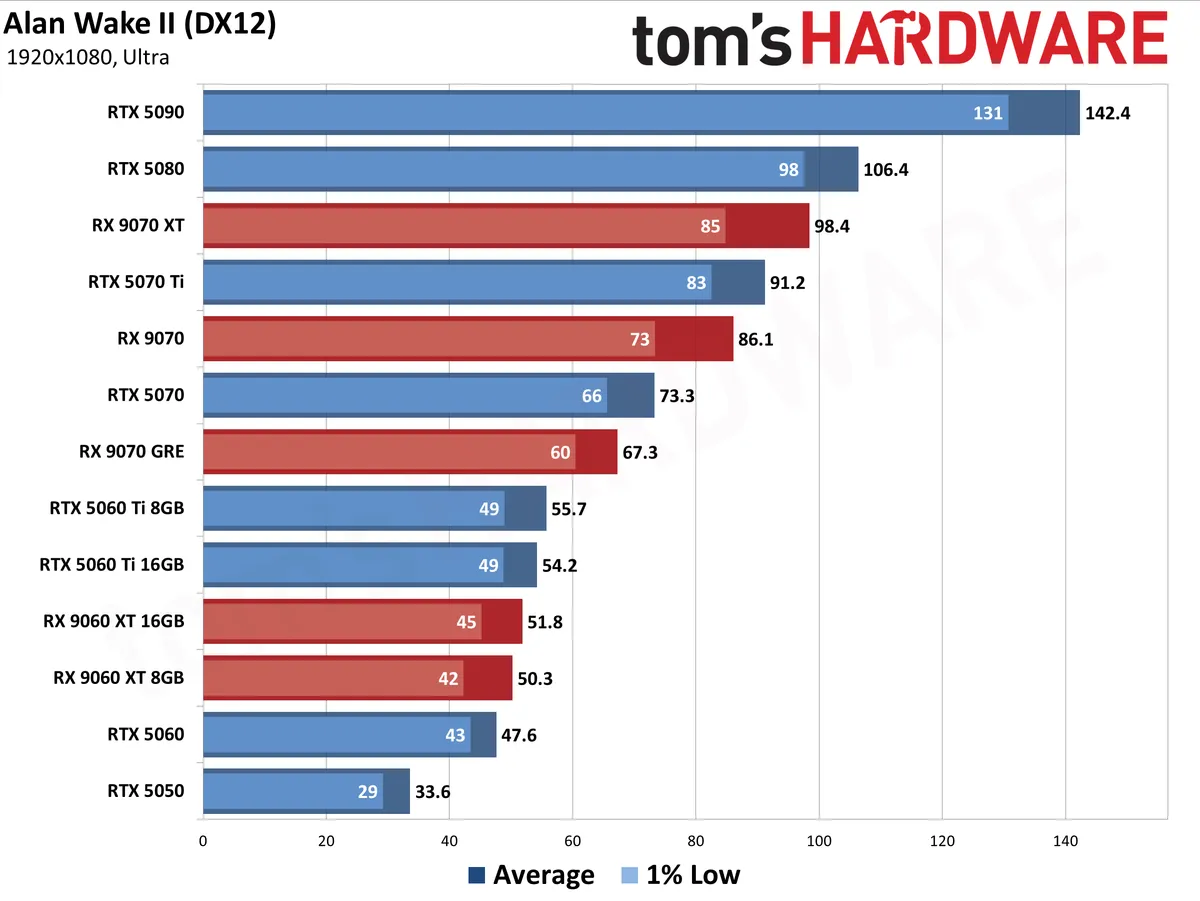
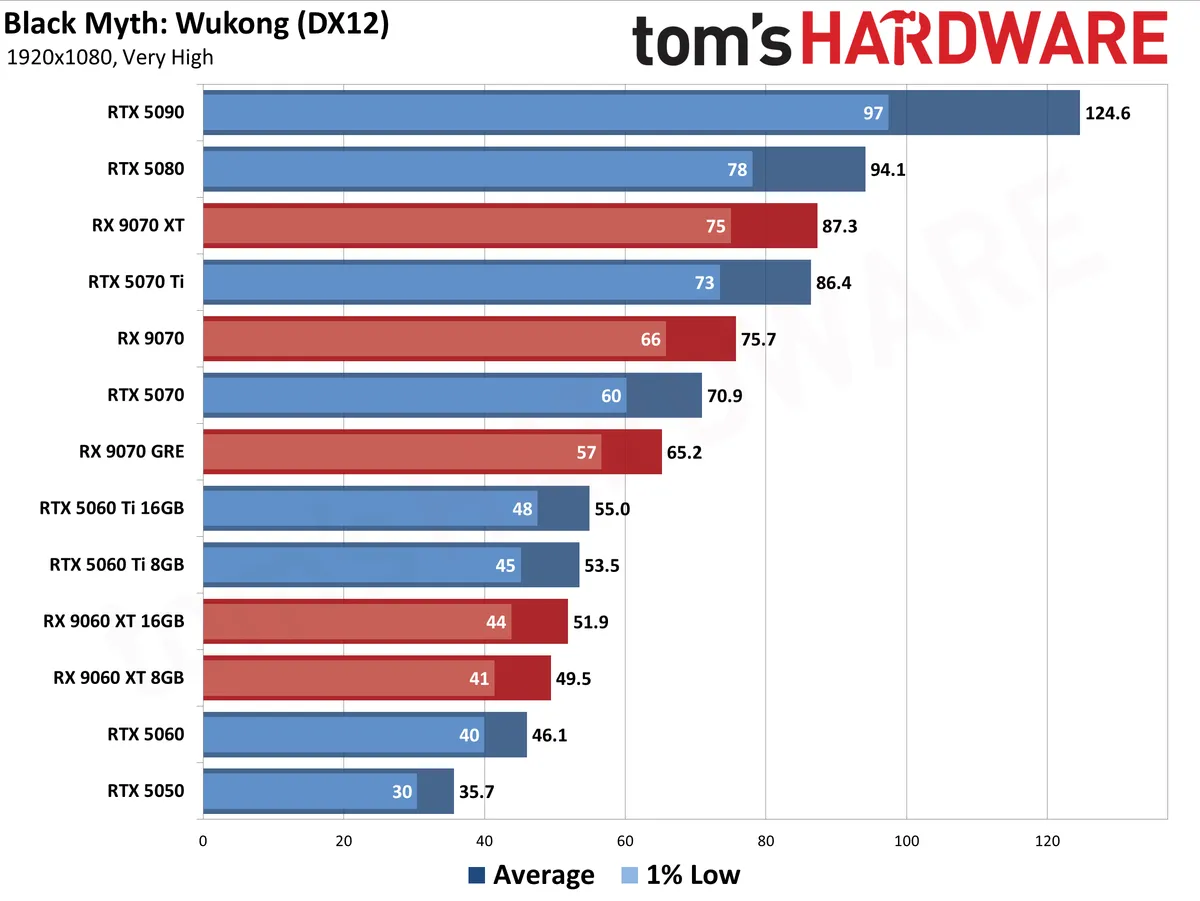
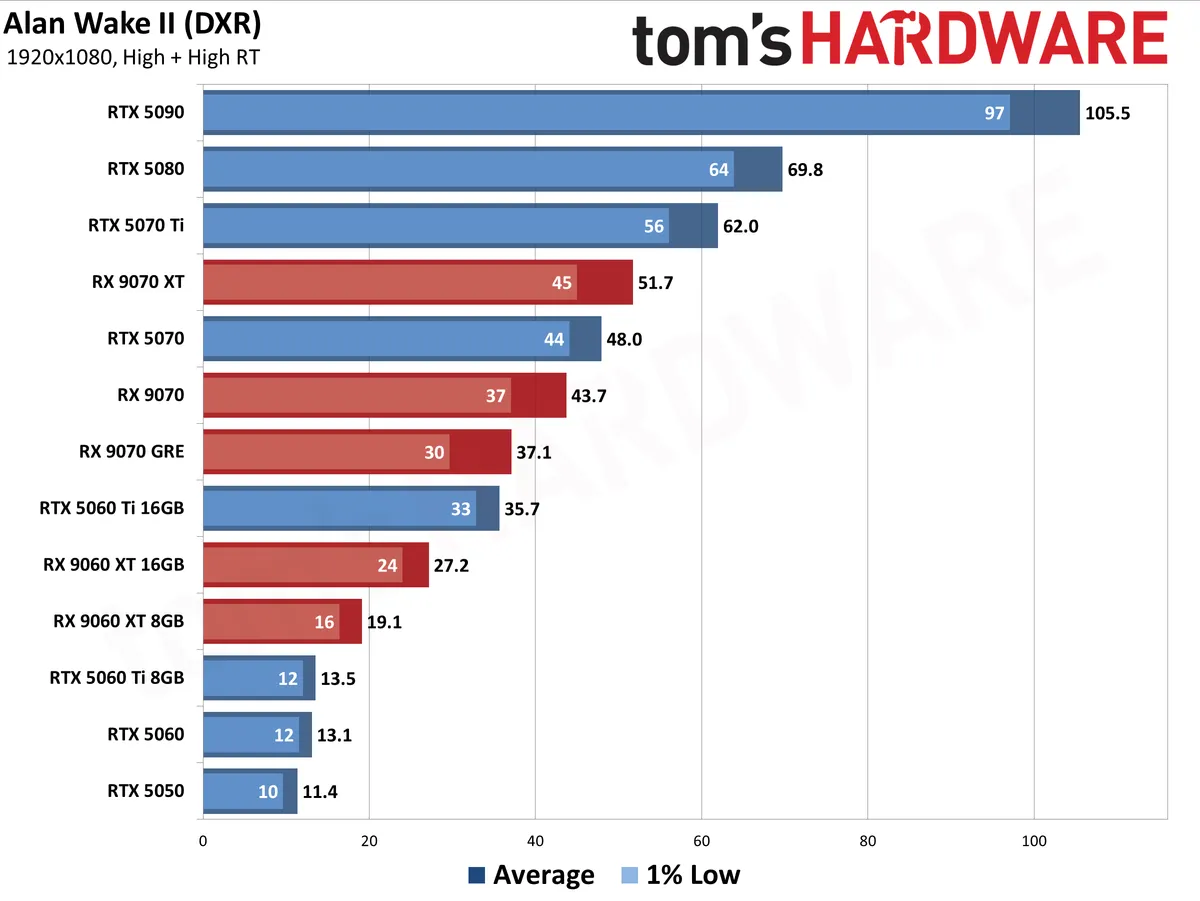
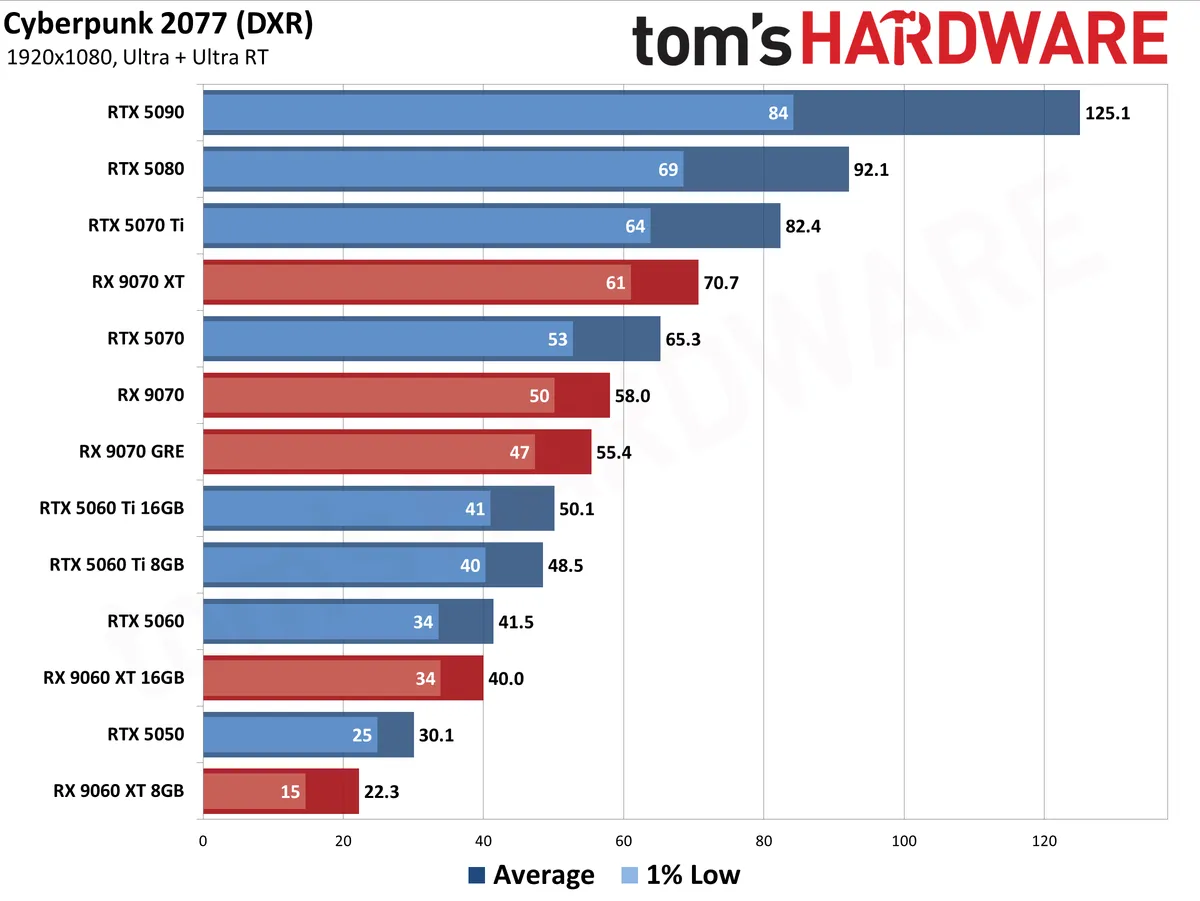
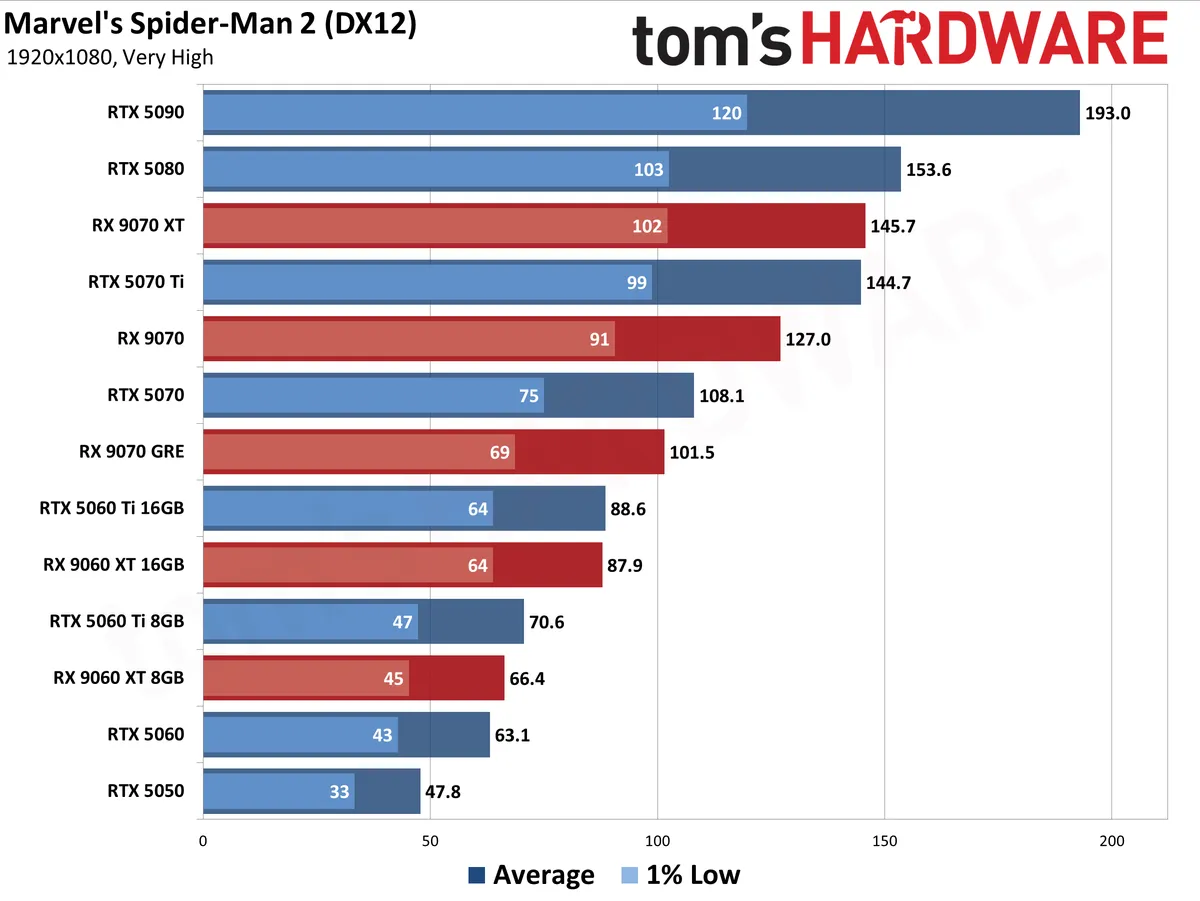
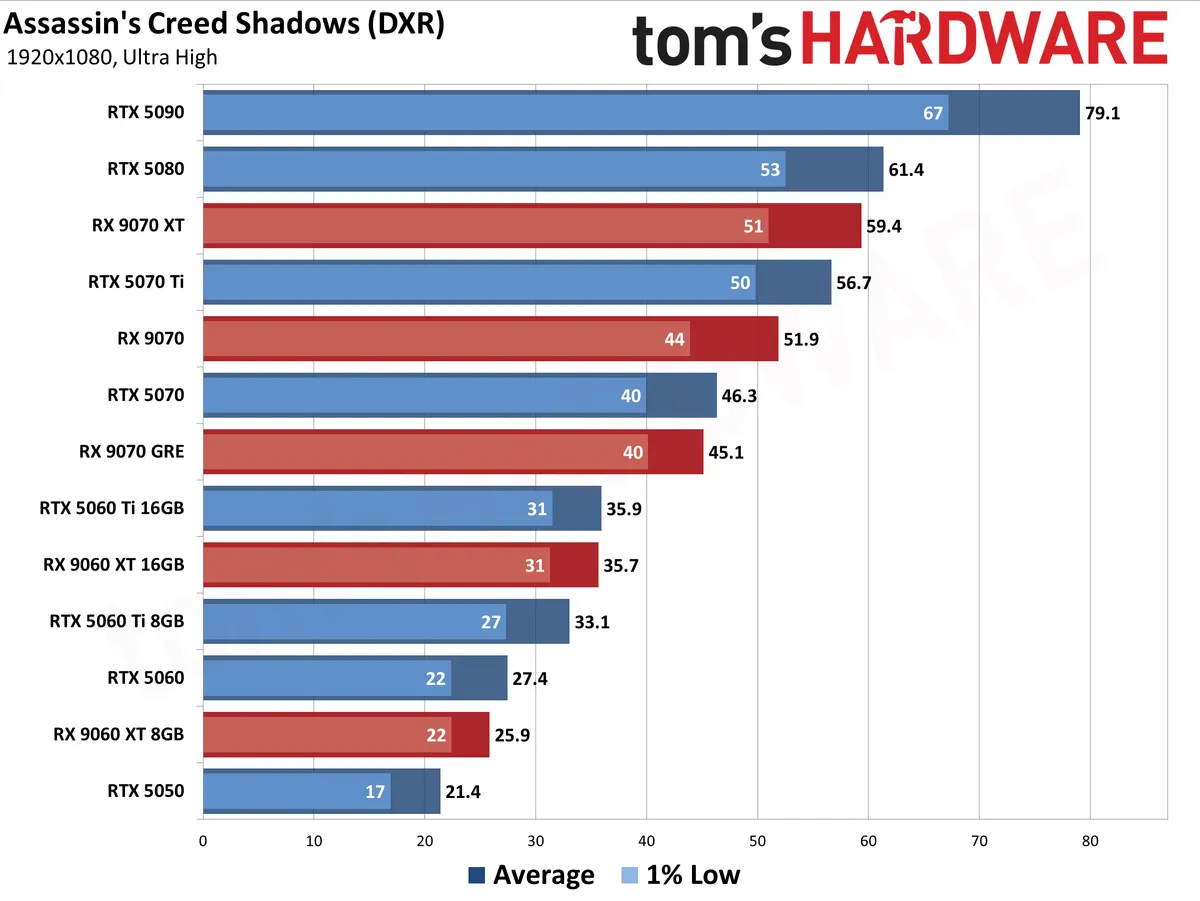
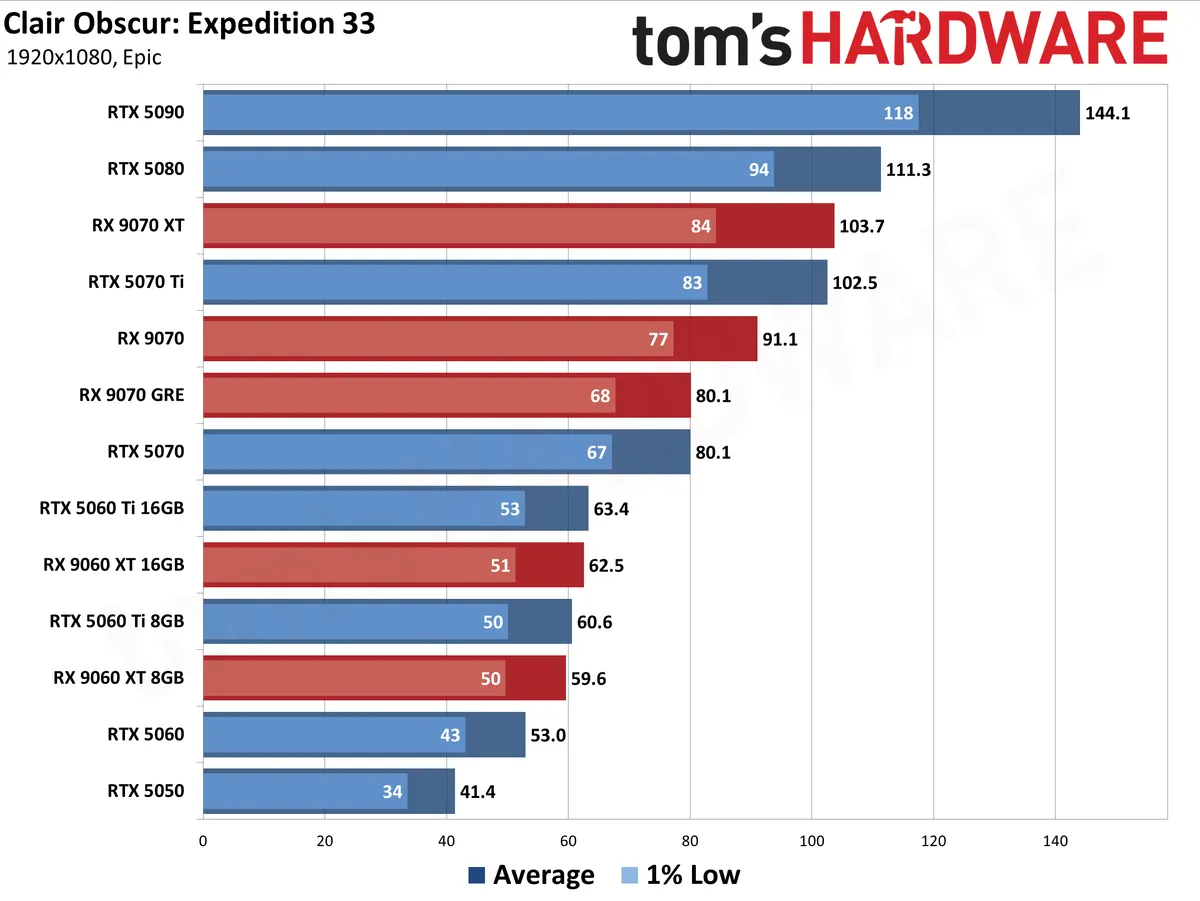
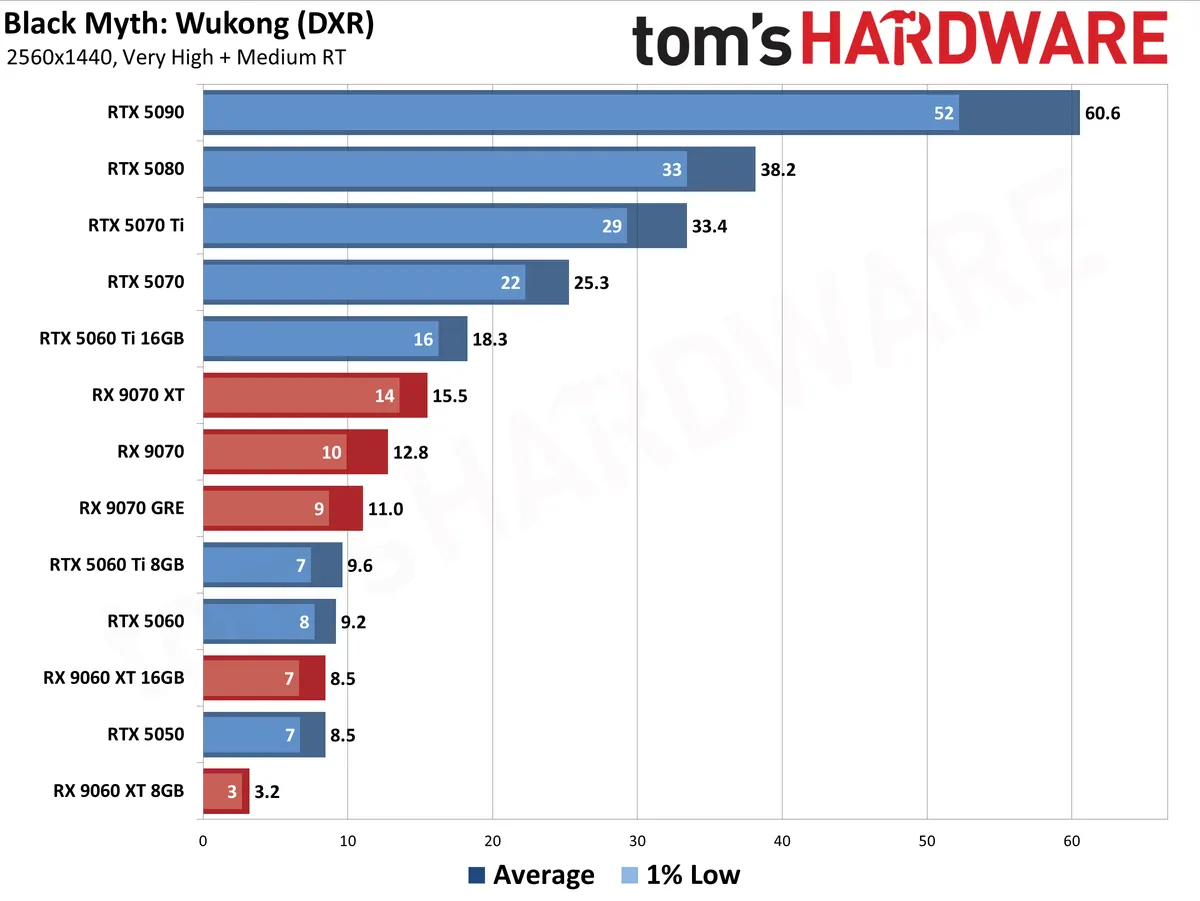
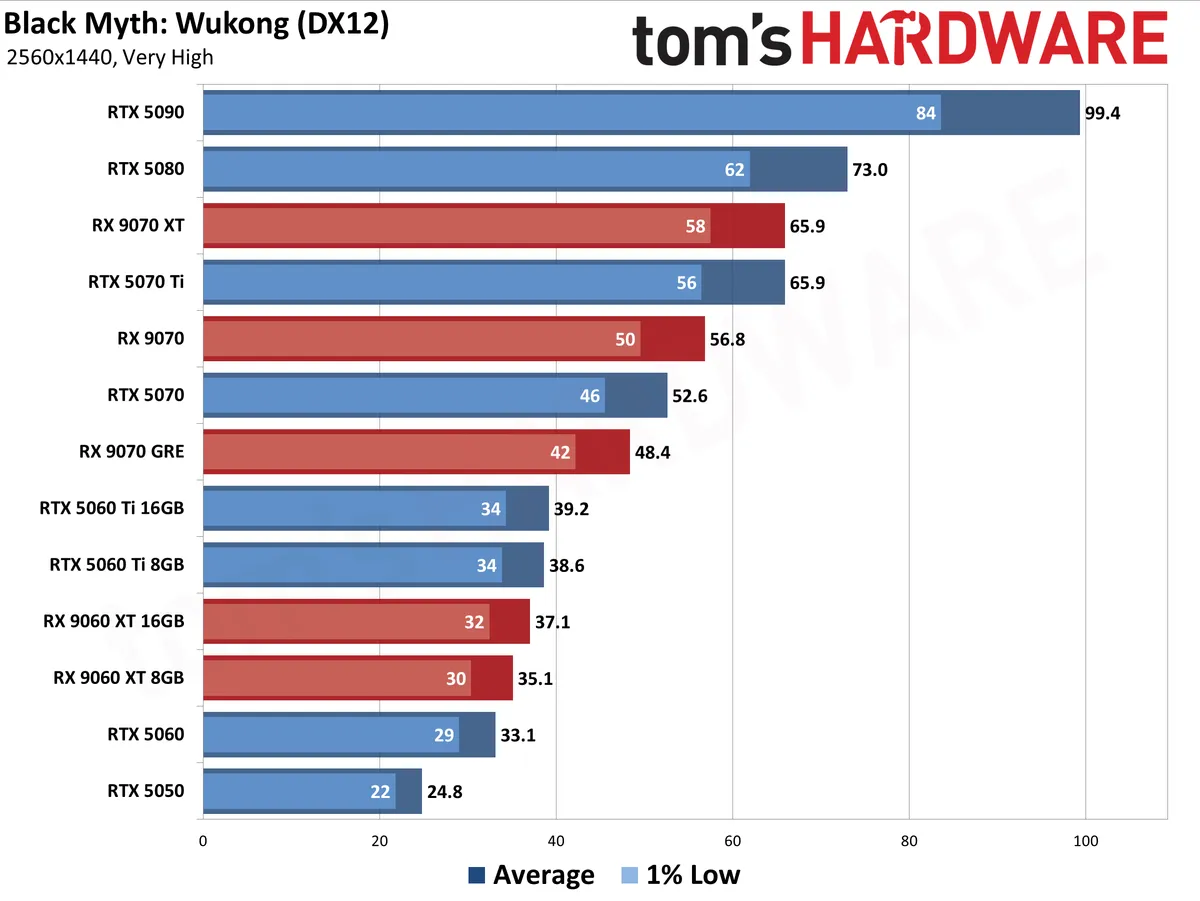
Our updated test suite of games consists of 19 games at present, eight of which have ray tracing enabled (or require RT to run at all).
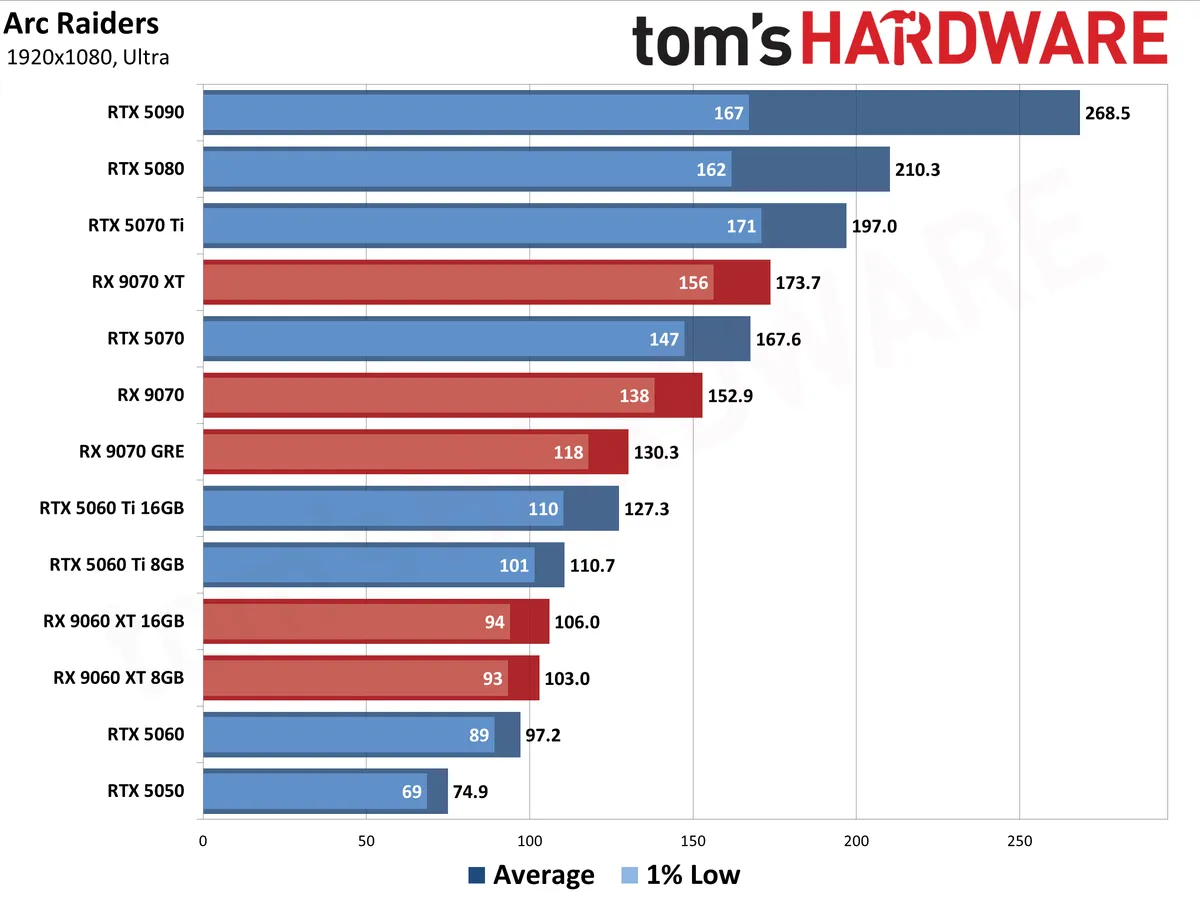
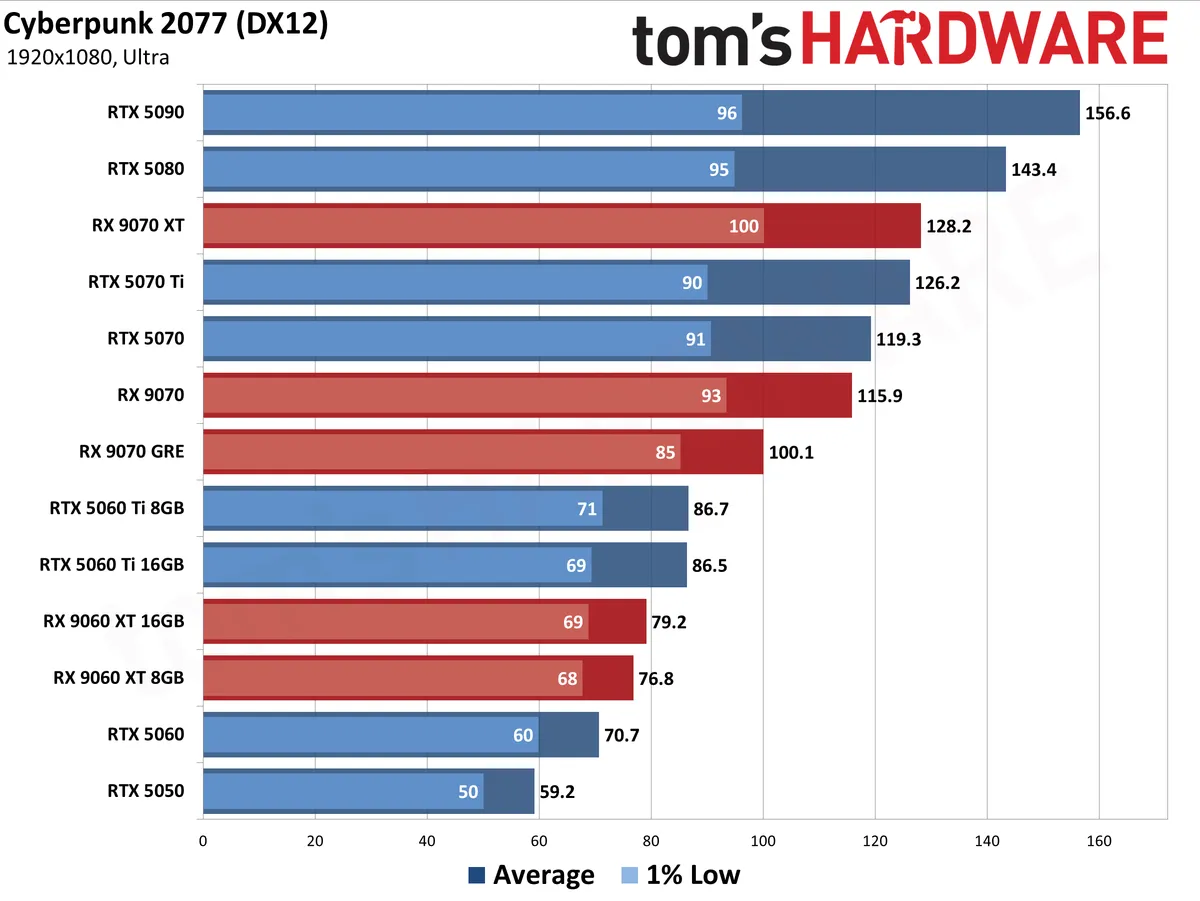
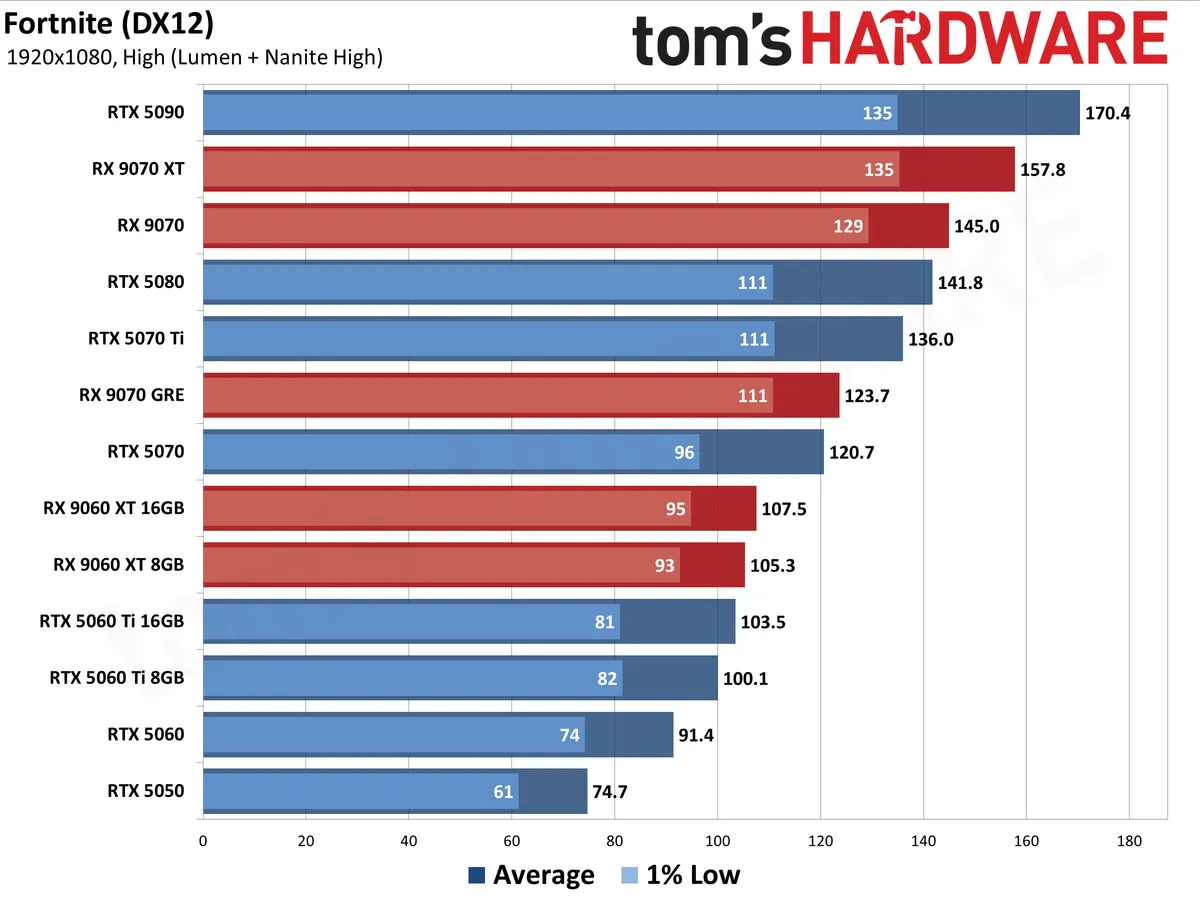
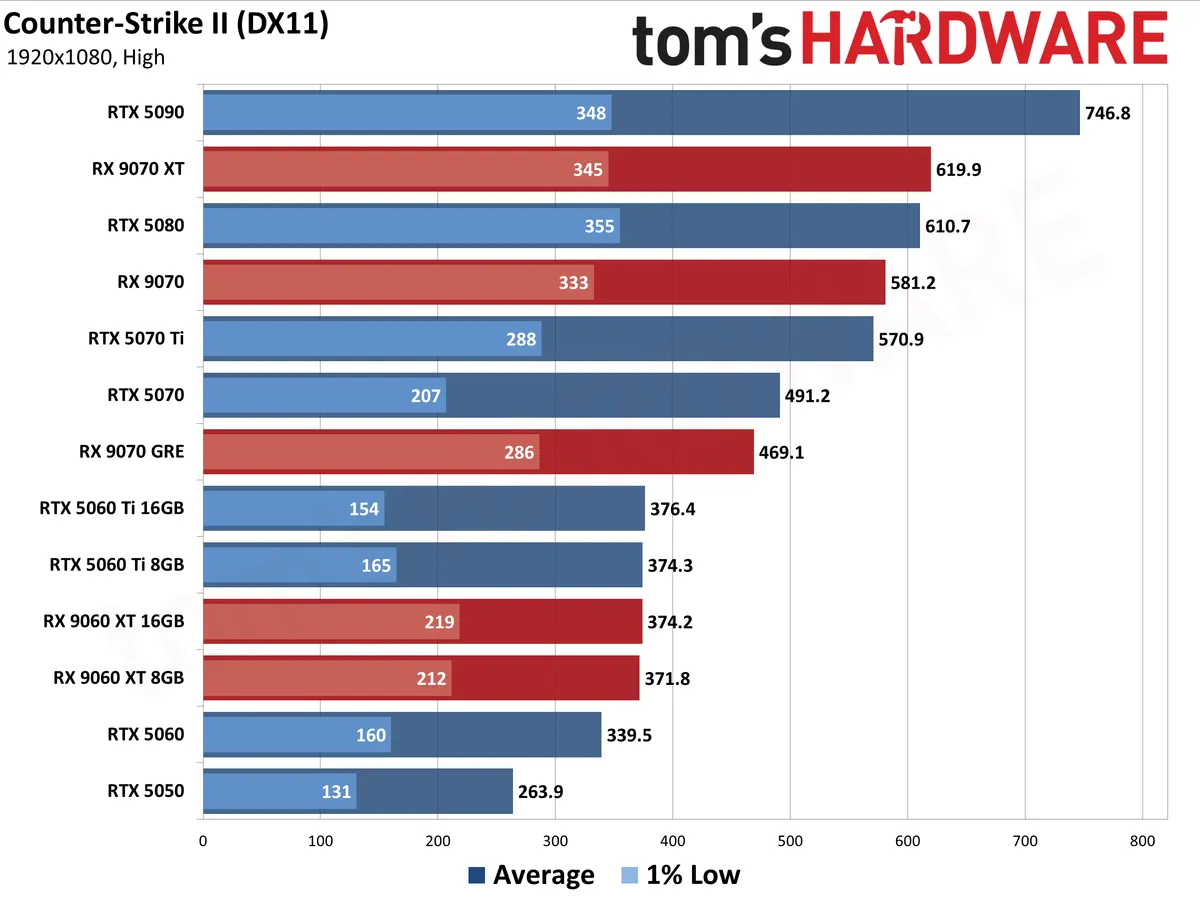
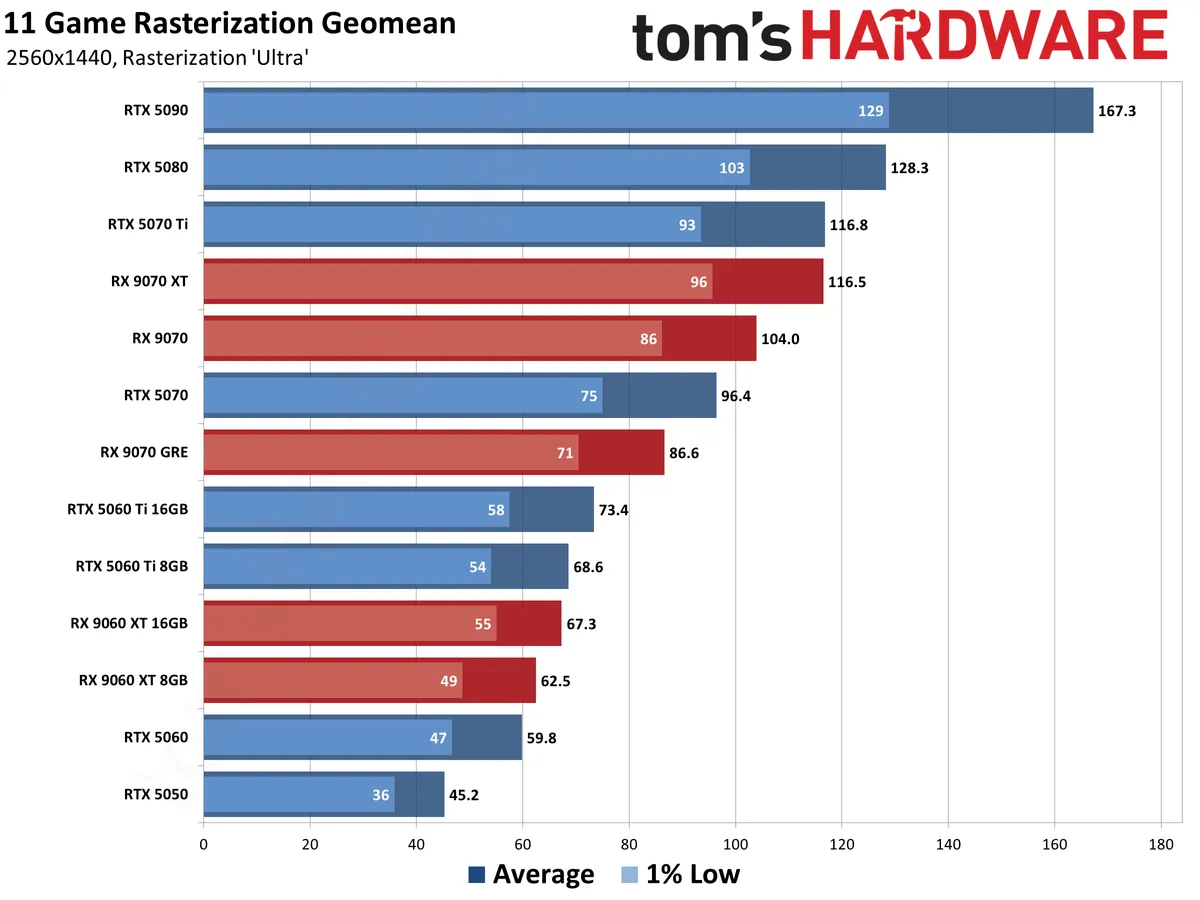
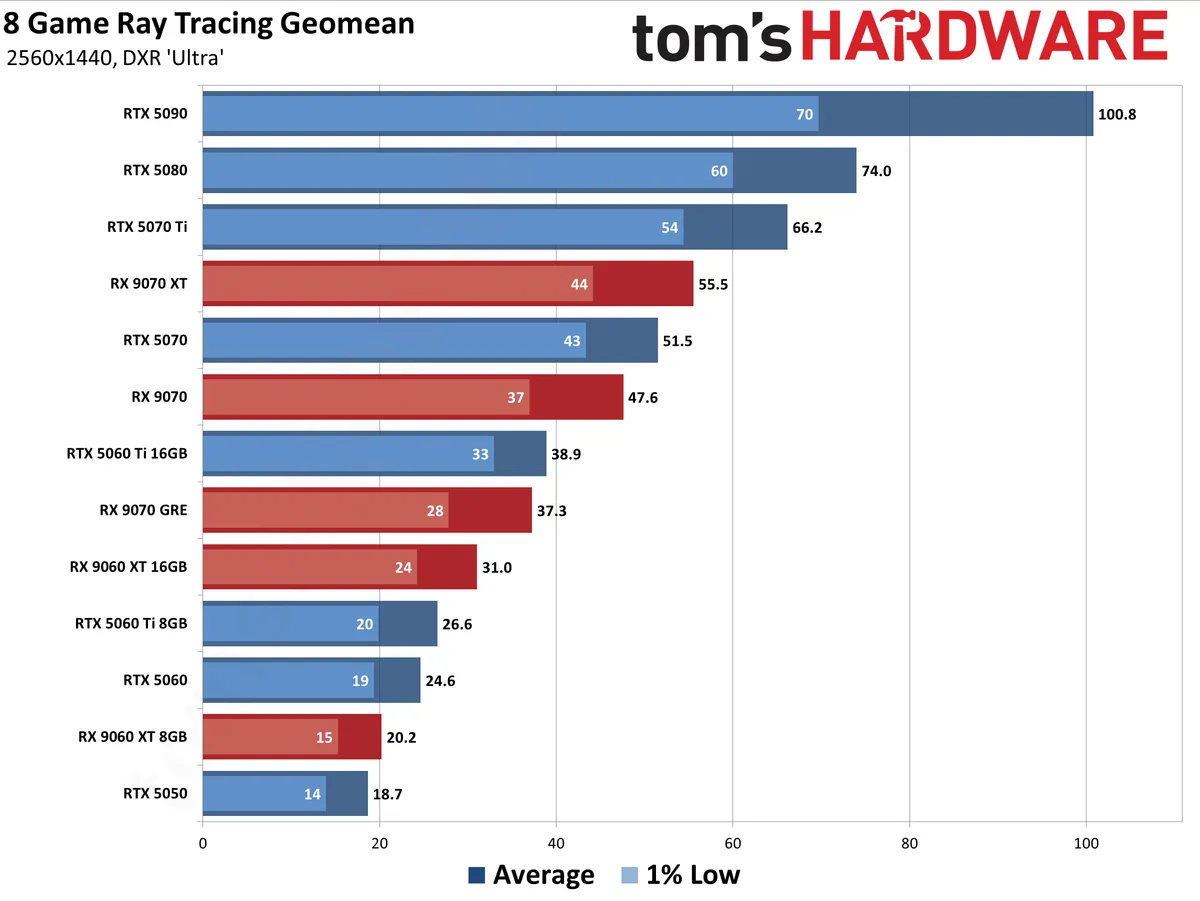
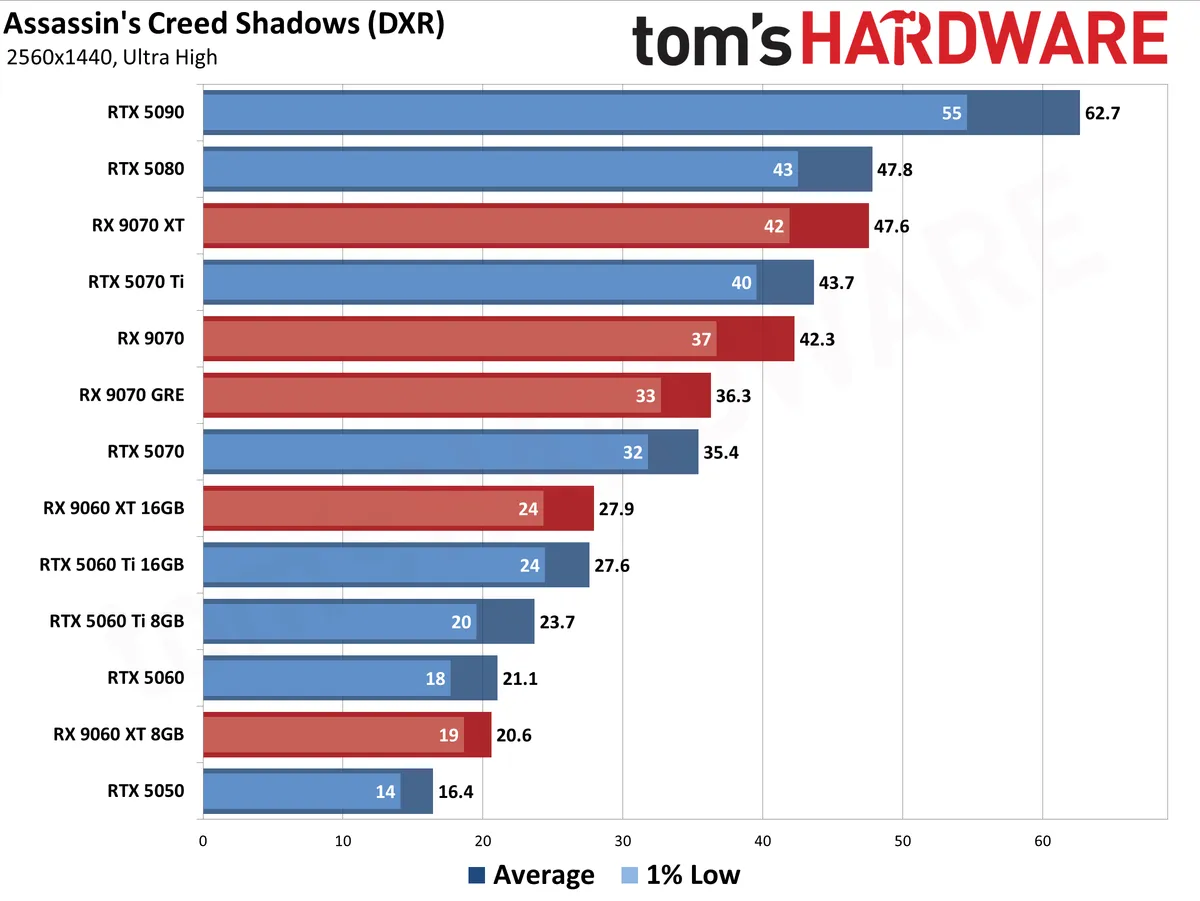
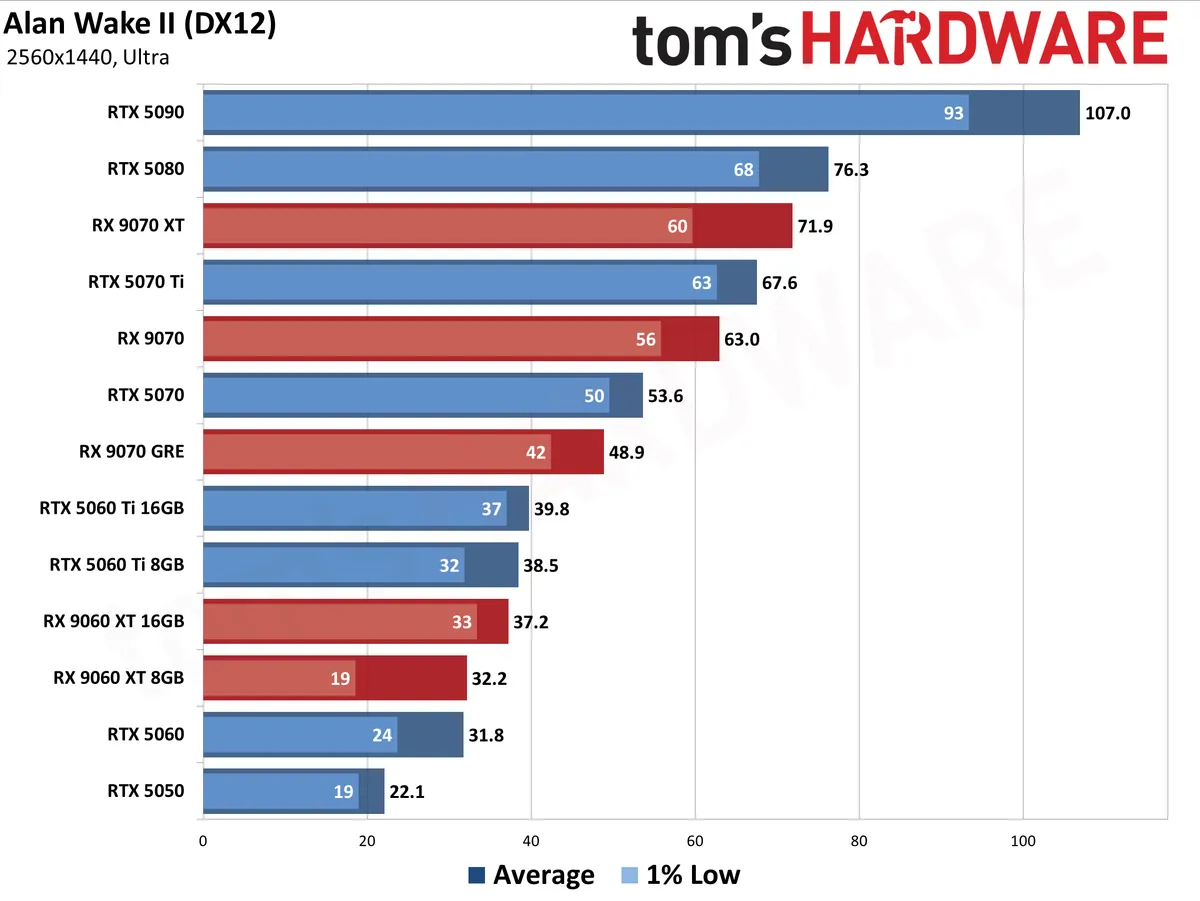
We test without any upscaling or frame generation technologies enabled. We expect that most gamers will want to enable these features, but they complicate apples-to-apples comparisons between GPU vendors due to inherent differences in output image quality. To keep it simple, we present native resolution performance as a baseline.
The data in the following charts is from testing conducted during the past several months. We've tested all of the latest GPUs at every resolution and setting, even where it generally doesn't make sense (e.g. 4K with ray tracing at single digit framerates).
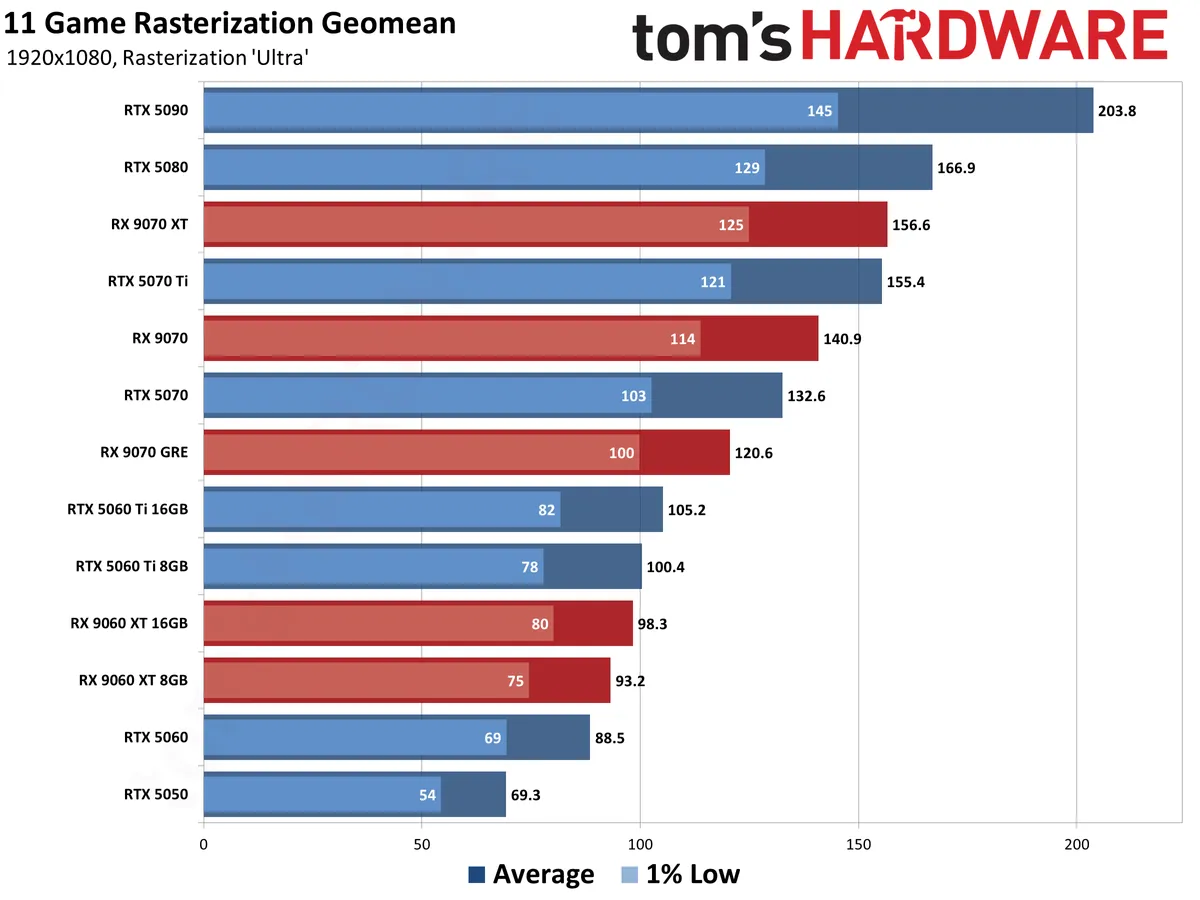
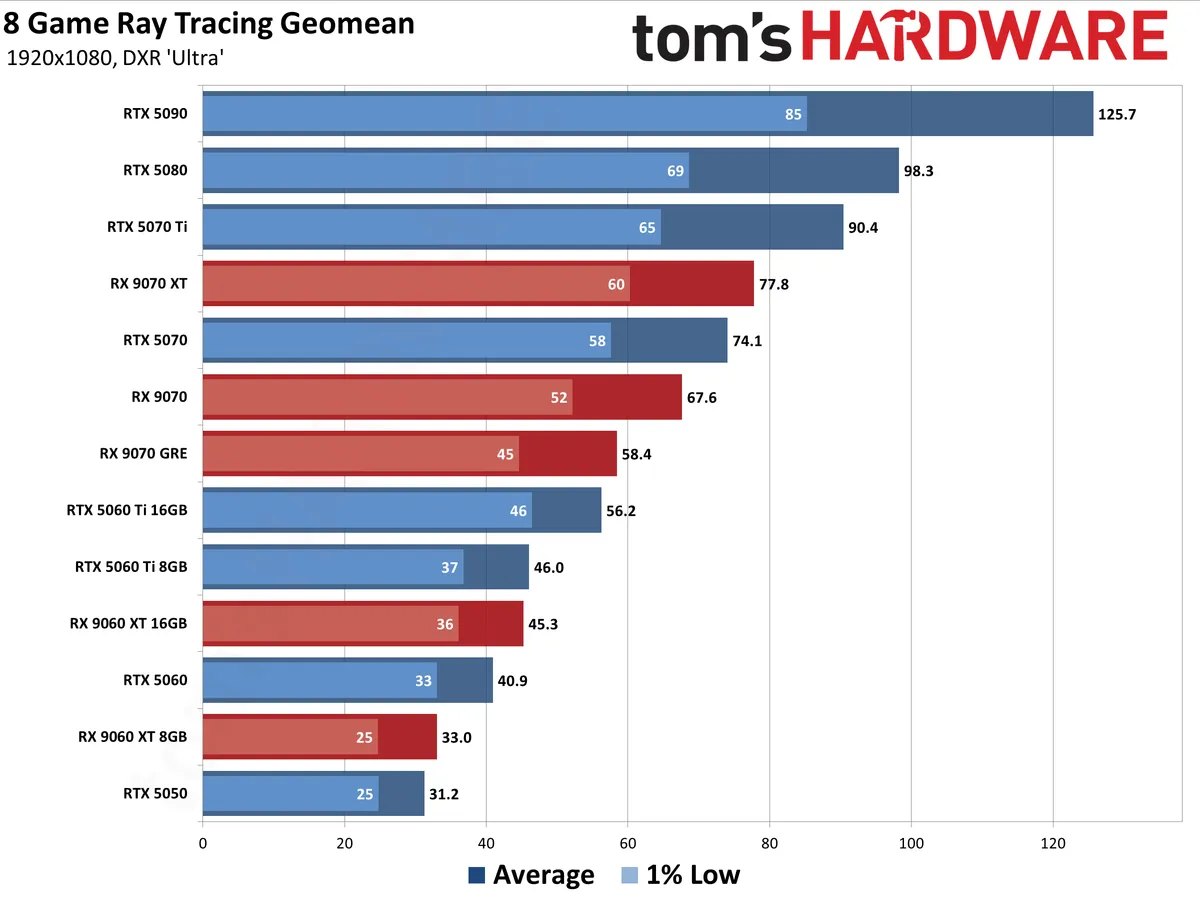
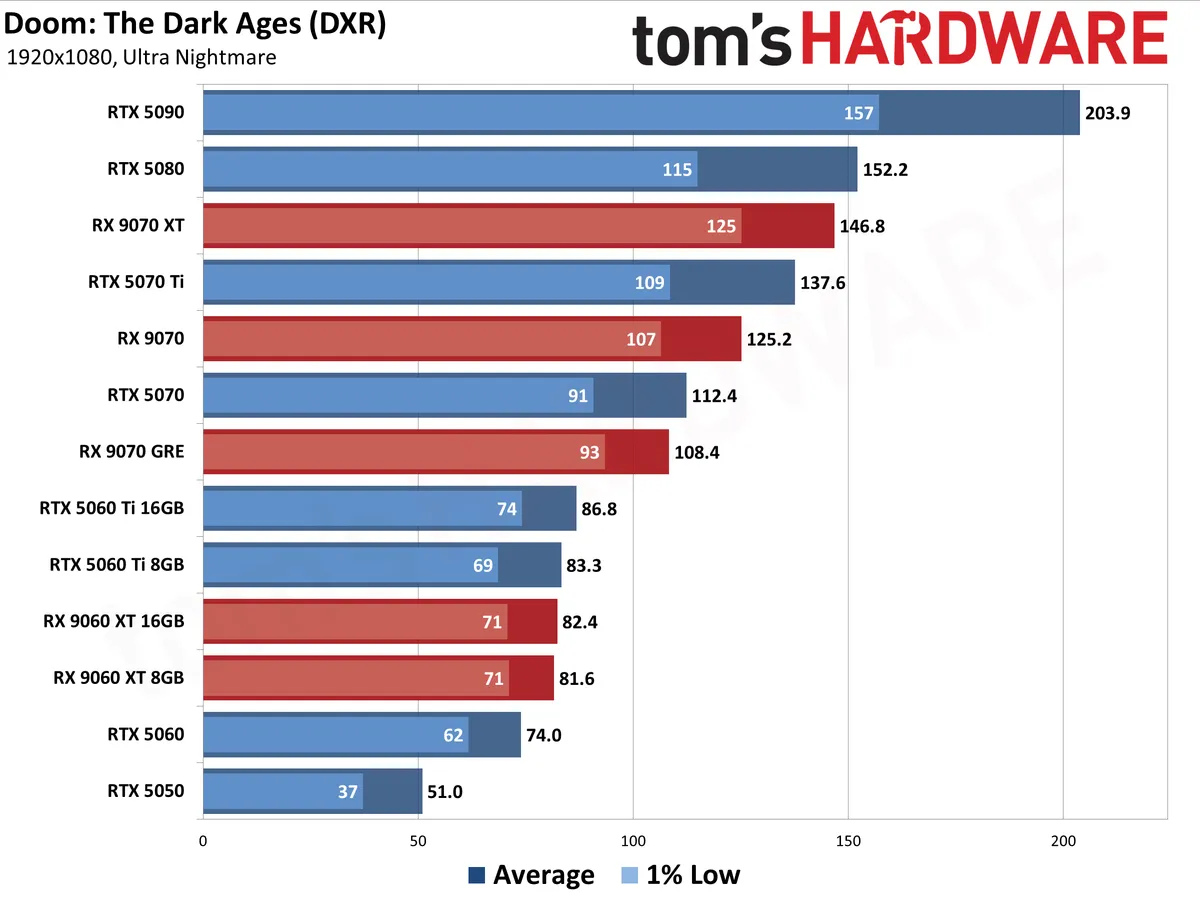
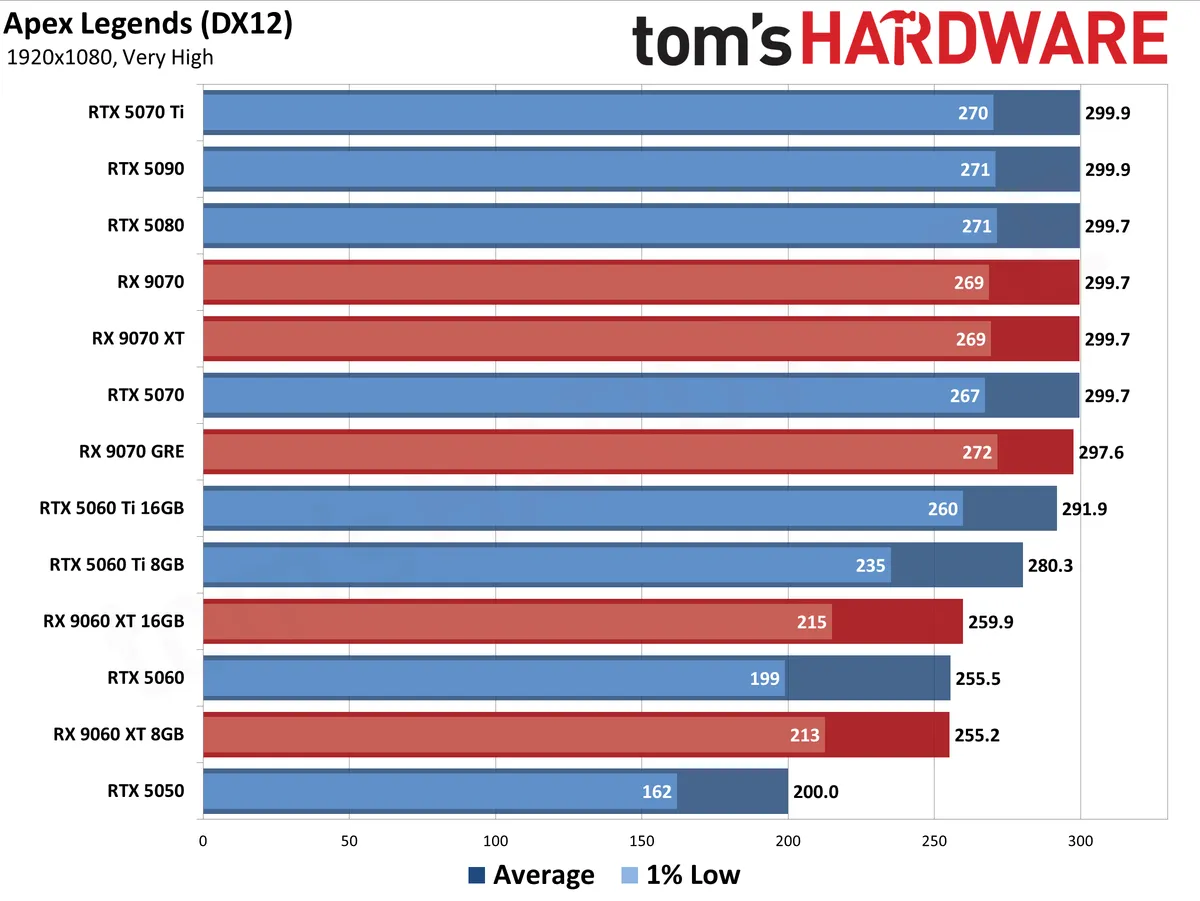
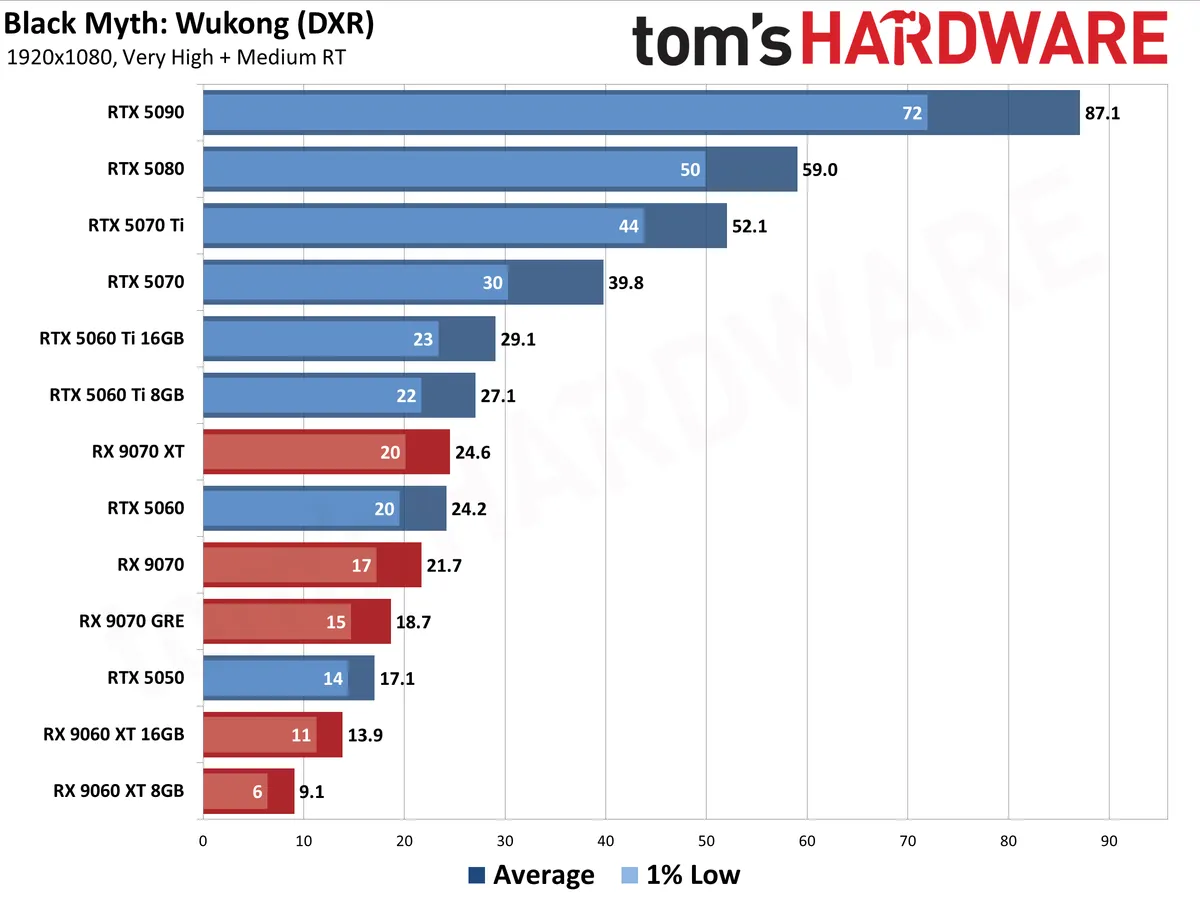
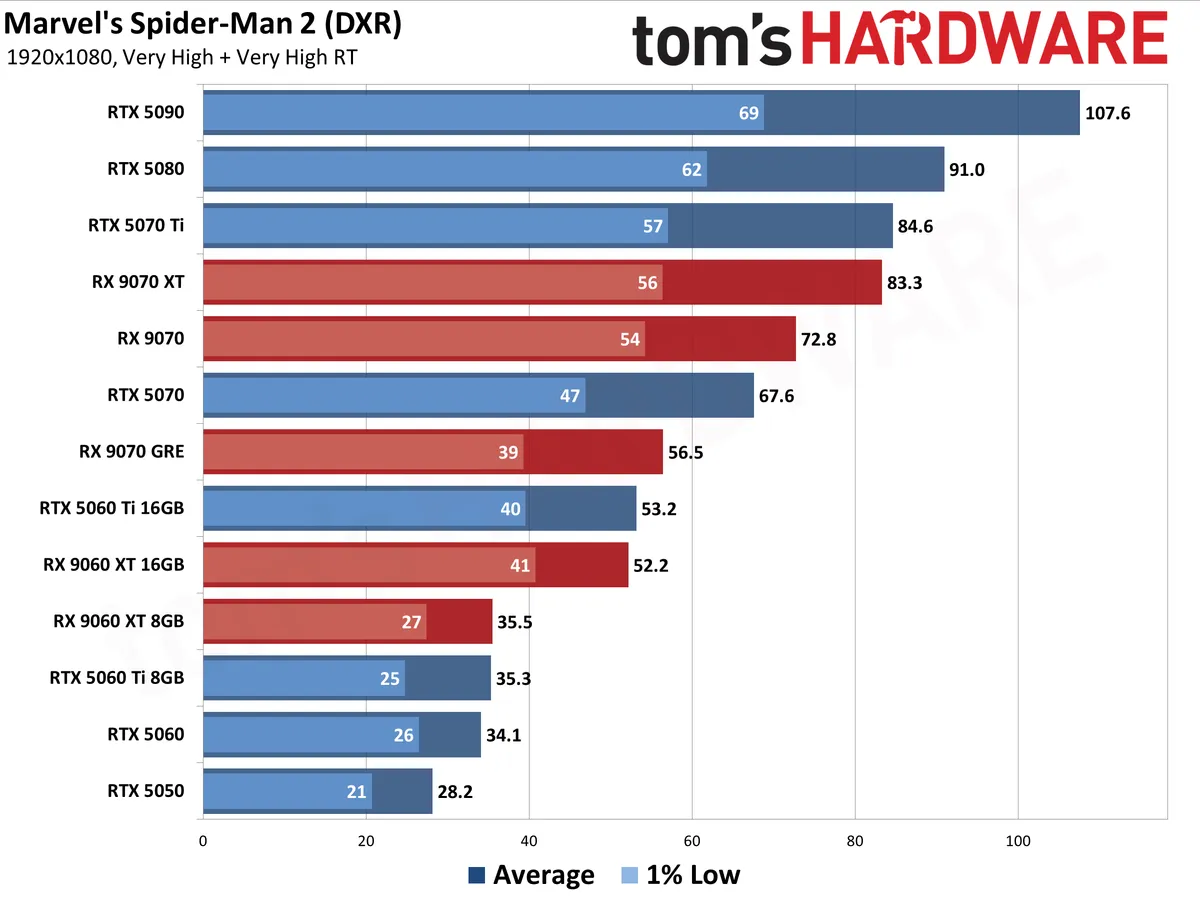
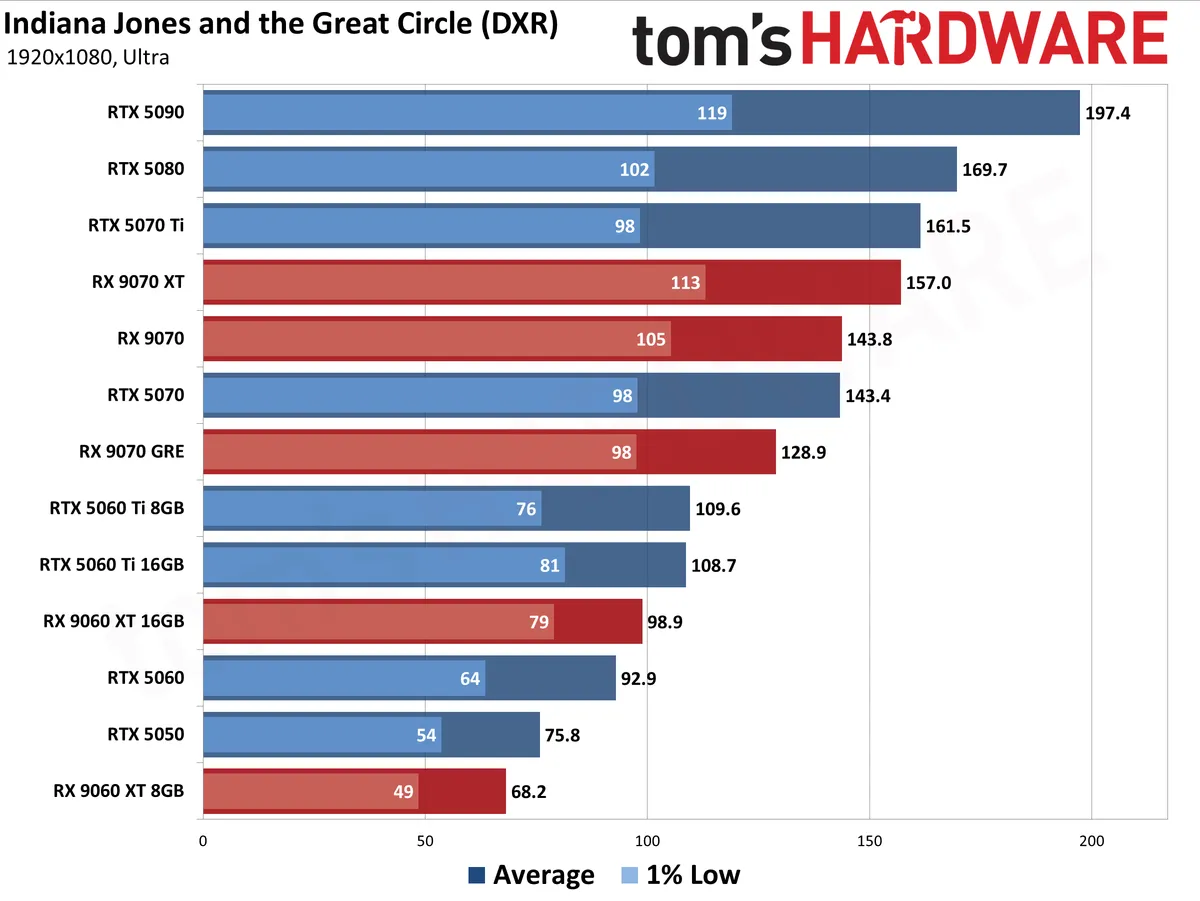
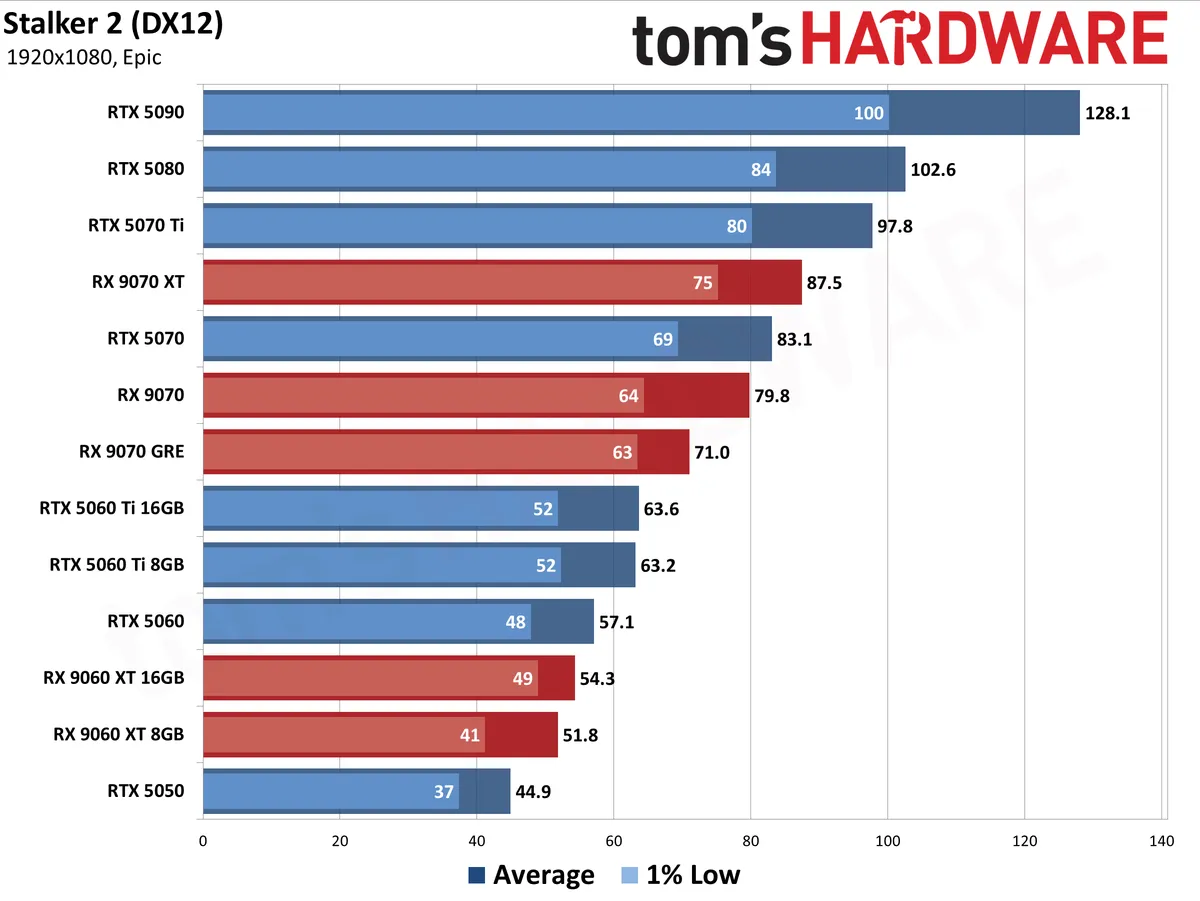
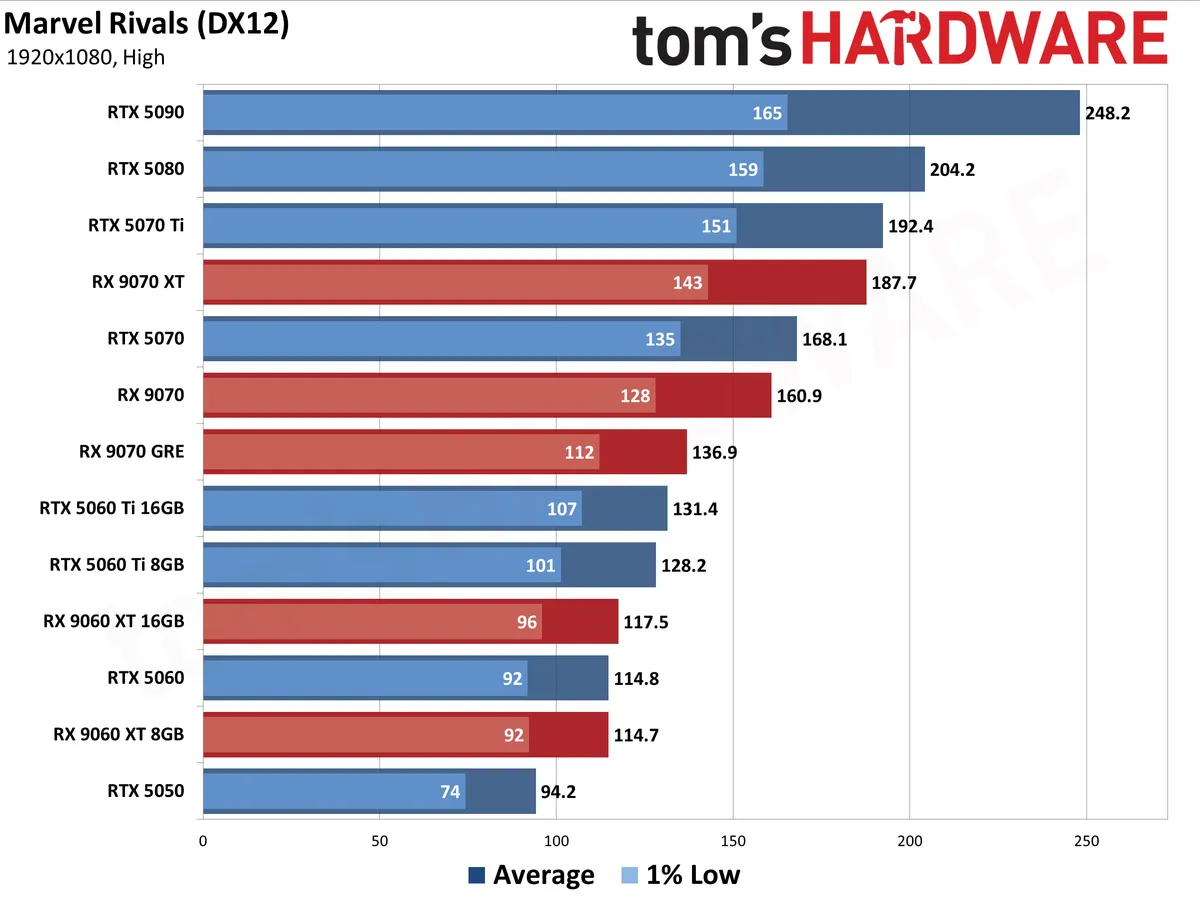
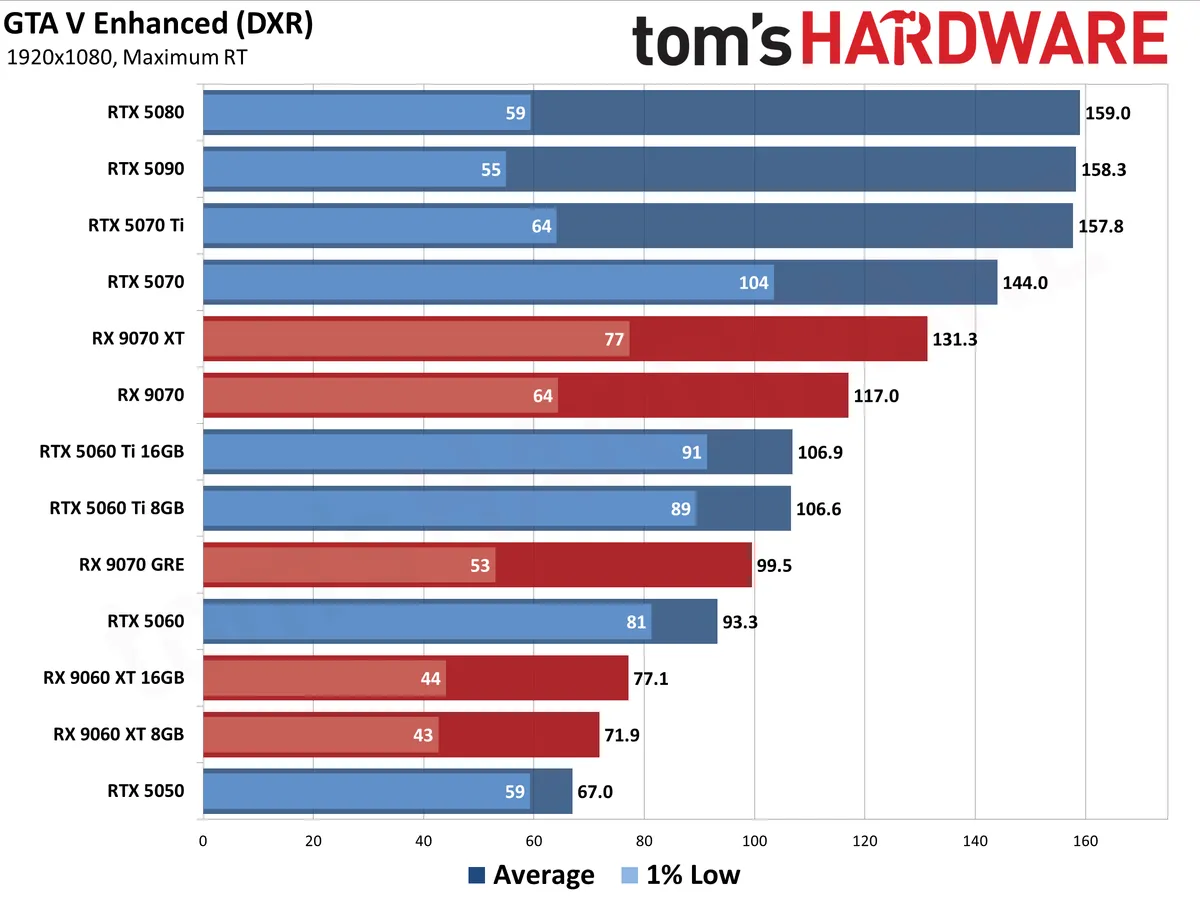
For each resolution and setting, the first chart shows the geometric mean (i.e. equal weighting) for all tested games. The second chart shows performance in the 11 pure raster games, and the third chart focuses in on ray tracing performance in eight games.
The charts below contain all the current Nvidia RTX 50-series and AMD RX 9000-series graphics cards. We're leaving Intel Arc cards out of the standings for now due to software compatibility issues with our test suite, and we'll include those results when those issues are corrected and we have the opportunity to retest them.
Our GPU benchmarks hierarchy contains additional data for every GPU spanning multiple generations of hardware. The charts are color coded with AMD in red, Nvidia in blue, and Intel in gray to make it easier to see what's going on.
The following charts are up to date as of June 2026.
Best Graphics Cards — 1080p
View Original

View Original

View Original

View Original

View Original

View Original

View Original

View Original

View Original

View Original

View Original

View Original

View Original

View Original

View Original

View Original

View Original

View Original

View Original

View Original

View Original

View Original

Best Graphics Cards — 1440p


View Original

View Original

View Original

View Original

View Original

View Original

View Original

View Original

View Original

View Original

View Original

View Original

View Original

View Original

View Original

View Original

View Original

View Original

View Original

View Original

View Original

View Original

Best Graphics Cards — 4K


View Original

View Original

View Original

View Original

View Original

View Original

View Original

View Original

View Original

View Original

View Original

View Original

View Original

View Original

View Original

View Original

View Original

View Original

View Original

View Original

View Original

View Original

Additional Shopping Tips
When buying a graphics card, consider the following:
- Monitor Resolution: The more pixels you're pushing, the more performance you need. You don't need a top-of-the-line GPU to game at 1080p, but you will certainly want more power at 1440p or 4K.
- PSU: Make sure that your power supply has enough juice and the right 6-, 8- and/or 16-pin connector(s). Nvidia, AMD, and Intel board partners will all make PSU recommendations alongside their products that you can use as a baseline, so if you're unsure whether your PC can provide enough power, be sure to check those spec sheets first. If you have an older PSU, be mindful that power supplies do lose capacity with time, so if you're contemplating a high-end GPU, it might be time to upgrade your GPU, too.
- Video Memory: In 2026, 8GB of VRAM is the bare minimum you'll want to play the latest games at 1080p, and it's the smallest amount of memory you'll find on a new card. Midrange cards tend to feature 12GB of VRAM, which is generally enough for raster gaming all the way out to 4K but may present limitations for RT even at 1440p. If you're planning to push a 4K display without upscaling or want to explore RT gaming without restriction, we recommend a 16GB card.
- FreeSync or G-Sync? Either variable refresh rate (VRR) technology will synchronize your GPU's frame delivery with your screen's refresh rate. Nvidia supports G-Sync and G-Sync Compatible displays (for recommendations, see our Best Gaming Monitors list). And most every G-Sync Compatible display also supports AMD FreeSync these days, so this vendor war is largely over.
- Upscaling and Frame Generation technologies: Nvidia's DLSS is in practically every game, and the latest DLSS 4.5 tech provides high-quality upscaling and frame generation (on RTX 40-series to boost performance to taste with practically no loss of image quality. AMD FSR 4 provides AI-enhanced upscaling on RX 9000-series cards, and a version compatible with RX 7000-series cards arrives in July 2026. Intel XeSS can deliver better image quality than older versions of FSR, but the core upscaler hasn't been updated in some time, and it's not as widely adopted as either DLSS or FSR, so it shouldn't influence your buying decision either way.
Finding Discounts on the Best Graphics Cards
While deep discounts are rare on graphics cards in 2026, you might find some particularly tasty deals on occasion. Check out the latest Newegg promo codes, Best Buy promo codes and Micro Center coupon codes for potential savings.
Want to comment on our best graphics picks for gaming? Let us know what you think in the Tom's Hardware Forums.
MORE: HDMI vs. DisplayPort: Which Is Better For Gaming?
MORE: GPU Benchmarks and Hierarchy
Get Tom's Hardware's best news and in-depth reviews, straight to your inbox.

As the Senior Analyst, Graphics at Tom's Hardware, Jeff Kampman covers everything that has to do with graphics cards, gaming performance, and more. From integrated graphics processors to discrete graphics cards to the hyperscale installations powering our AI future, if it's got a GPU in it, Jeff is on it.