For a college student, there is no more important tool than a laptop. It's a catch-all for note-taking, studying, homework, collaboration, procrastination (don't tell your professors), and extracurricular activities. When you pick one, you're likely choosing a tool for at least four years of education, if not further studies or just life after college.
Picking a college laptop can feel like homework in itself. There are a ton of laptops on the market, and you may get some help by checking out recommendations from your school or department. In our opinion, most students should prioritize portability, battery life and then performance, unless your school recommends something specific.
This semester, the latest parts in laptops include Intel's Core Ultra Series 2 CPUs, AMD's Ryzen AI 300 processors, Apple's M4 chips, and Nvidia's RTX 50-series GPUs. Looking ahead, there's rumors of a budget MacBook that could be a serious player on college campuses.
If you're taking classes remotely, be sure to take the webcam into consideration. More and more laptops are finally getting 1080p webcams or better, which often include higher-quality lenses for better images. (Many, but not all, also have privacy shutters for when you're not making calls.)
Also, don't forget whatever student discounts are available. Many vendors may give you some percentage off, a gift card, or a free extra when you can prove that you're a student, either with a .edu email address or a college ID card.
Best College Laptops You Can Buy Today
Why you can trust Tom's Hardware Our expert reviewers spend hours testing and comparing products and services so you can choose the best for you. Find out more about how we test.
Best College Laptop Overall

Apple's MacBook Air is reliably one of the most popular notebooks on college campuses. It's thin, fanless, and the brand still carries premium cache.
The M5 release isn't a huge bump up from M4, with one exception: it now starts with a 512GB SSD and 16GB of RAM. That being said, the 13-inch model we tested now starts at $1,299.99 (it was $1,099.99 when we reviewed it, but has gone up since then due to the RAM crisis).
You still get strong performance, long battery life (the 13-inch version lasted 15 hours and 28 minutes on our battery test), and a best-in-class trackpad alongside a comfortable keyboard. Put that all in a package that feels barely-there in your backpack, and it's no wonder you'll see a lot of these on campus.
Read: MacBook Air (M5) review
The best budget Windows laptop for college

The Dell XPS 13 is an excellent Windows-based answer to the MacBook Neo, assuming you prioritize a premium, thin design and long battery life over power.
Dell's budget XPS uses Intel's Series 3 Core "Wildcat Lake" processors. These aren't exactly powerhouses, and the MacBook Neo's aging A18 Pro was faster in our testing. Still, it's enough for light multitasking, writing, and web browsing. The 8GB model can get a bit laggy simply running Windows, so you may want to pony up for a 16GB upgrade for a bit more room.
The design is exactly as thick as the MacBook Neo, though its curved edges make it appear less blocky, but the XPS is lighter at a slight 2.2 pounds.
The XPS 13 also happens to come with a very discrete, small, 65W battery charger with a detachable USB Type-C cable. We often don't see this on premium laptops, so that's also a nice touch.
Read: Dell XPS 13 review
The best budget Mac for college

When the MacBook Neo launched at $599, it was a game changer. At $699 post-price hike, it's still the best deal you can get on a Mac, and you're likely to see them on campus.
The A18 Pro chip, which debuted on the iPhone 16 Pro, runs macOS well enough for multitasking, though the 16GB of RAM and M-series chip on the Air is undoubtedly smoother. But performance here is still better than what we've seen on Windows laptops with Intel's Wildcat Lake chips.
Apple's premium feel is still on display here. The four colors are fun, but my favorite part is that while Apple didn't use a haptic trackpad here, it built a mechanical one that can be clicked anywhere. There are a few losses, however, like a keyboard that isn't backlit, and two USB-C ports with different speeds and capabilities.
But if you want a bright display, long battery life, and a premium Mac feel on a budget, this is your best bet.
Read: MacBook Neo review
The best business laptop for college

For business majors or Windows users who want something a bit more upscale, the ThinkPad X1 Carbon is a great laptop to prepare you for professional life. The 2.15-pound notebook powered by Intel's Series 3 Core Ultra "Panther Lake" processor has a slim, light design.
We also appreciated the vivid OLED display with variable refresh that goes up to 120 Hz, as well as impressive audio for such a thin device.
For virtual classes, you'll appreciate the 5MP webcam, which we found in our tests to be sharp.
The downside, like many things is that this system is very pricey. When we tested it, it was over $2,200.
Read: Lenovo ThinkPad X1 Carbon (Gen 14) review
Best college laptop with a GPU
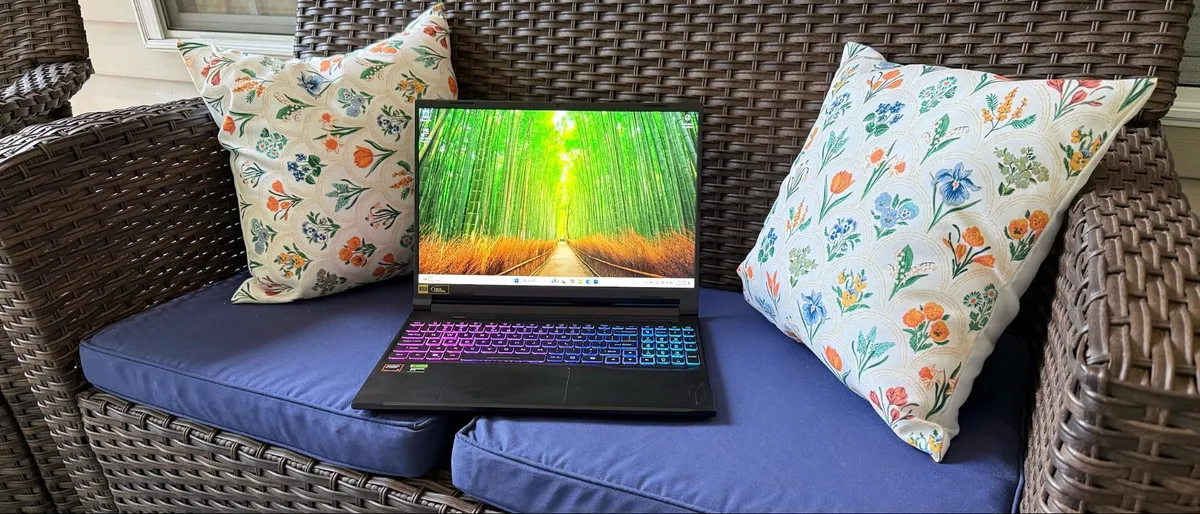
Sometimes, you need some graphics power. That makes a gaming laptop a solid choice for students in finance, science, engineering, or certain creative fields.
The Acer Nitro V 16S AI is in part on this list because we can still find it. Maybe laptops in a college student's price range have gone out of stock. But we also like its large, vivid screen and fast storage, as well as a strong collection of ports.
If you're using it for gaming, you might find that it lags behind some peers, but given the market, this is still a value. For that value, though, you'll have to uninstall Acer's bloatware.
Read: Acer Nitro V 16S AI review
Quick College Laptop Shopping Tips
💻 Consider your major or specialization
Science majors and liberal arts majors may have different needs. An engineering major working with computer-aided design software might want a notebook with a discrete graphics card, while students who primarily do research and write papers may be fine with a thin ultrabook. Your school or department may also have recommended specifications (as well as a list of software that you'll need to run), so be sure to check those out.
💻 Learn if your work will live locally or in the cloud:
Find out if your school or department uses cloud storage, such as Google Drive or Microsoft OneDrive. If they do, you may be able to get by with less internal storage. Of course, if you want your own copies of your work or would like to keep personal files as well as school files, budget for a bit of extra space.
💻 Weight and battery life matter
After all, you'll be carrying this laptop around all day in a backpack as you move from class to class. Lightweight and long battery life can both save your back and leave more room for books.
💻 Consider how you take notes
A good keyboard is always important, especially when you're writing papers. But some students still prefer to take notes by hand, and those people will want to consider a convertible or detachable 2-in-1 with a stylus.
💻 See if you can get a student discount
Some stores will offer you a discount with your proof of affiliation with a university or college. It's also possible that your school will have a relationship with a vendor for deals on certain models. Others may just throw in a gift card or some free earbuds. If you can find a deal, great; school is expensive enough.
Finding Discounts on the Best College Laptops
Whether you're shopping for one of the best gaming laptops or another model that didn't quite make our list, you may find some savings by checking out our lists of Dell coupon codes, HP coupon codes, Lenovo coupon codes, Razer promo codes or Newegg promo codes.
Tom's Hardware Gaming Laptop Coverage
Best Premium Laptops | Best Gaming Laptops Under $1,500 | Laptop Reveiws | Apple MacBook Pro (M5) Review | Apple MacBook air (M4) Review | Lenovo Yoga 9i 2-in-1 Review | Dell 16 Premium Review | Lenovo ThinkPad T14s Review | How to Upgrade a Laptop SSD | How to Upgrade Laptop RAM