









Best Wireless Keyboards 2026: Our Tested Picks for Gaming, Typing, and Traveling
One step closer to a cable-free life.

Your keyboard is the main way you interface with your computer, which means it's one of the most important parts of your PC. Wireless gaming peripherals have gotten a bad rap in the past, but they've since caught up to — and have even surpassed — their wired counterparts when it comes to latency and connection quality.
There are many wireless gaming keyboards on the market — the best one for you depends on how and where you plan to use it, and what you plan to do with it. Wireless gaming keyboards come in all sizes, from mini (60-percent) layouts to larger-than-full-size, with extra macro keys and programmable knobs and buttons. You'll also want to consider switches: most gaming keyboards come with smooth, silent linear switches, but gaming companies are starting to cater to enthusiasts more — and many gaming keyboards now feature multiple switch options and hot-swappable PCBs.
Whether you're a couch-bound console gamer trying to chat with teammates or a productivity-focused coder trying to clean up your workspace, there is a perfect wireless keyboard out there for you. We've tested hundreds of gaming keyboards over the years, and these are our favorite wireless keyboards for every setup.
If you're looking for a great gaming keyboard and you don't mind a cable or two, take a look at our list of best gaming keyboards.
The Quick List

Best Wireless Gaming Keyboard
This impressively built, hot-swappable wireless keyboard has extra sound-dampening case foam and offers a whopping 1,500 hours of battery life over 2.4GHz wireless. It's a 96-percent keyboard, which means it crams 96% of a full-size keyboard into a compact footprint — it has a 10-key numberpad but takes up only slightly more room than most TKLs.

Best Full-Size Wireless Gaming Keyboard
This full-size wireless keyboard comes with a magnetic leatherette wrist rest and features a multi-function dial, media keys, and bright per-key RGB lighting.

Best Budget Wireless Gaming Keyboard
This ~$70 keyboard lacks a little polish, but it features dedicated macro keys, media keys, and a volume roller, and comes with a wrist rest. It's a TKL layout (no numberpad), but it has an extra line of macro keys on the left side.

Best Low-Profile Wireless Gaming Keyboard
This slim, low-profile wireless TKL gaming keyboard features a sturdy build with an aluminum top plate, a roomy layout, attractive backlighting, and excellent battery life. You can have a low-profile gaming keyboard with minimal sacrifices!

Best Optical Switch Wireless Gaming Keyboard
This full-size wireless keyboard has low-profile, speedy optical switches and a slim, lightweight build. It features tri-mode connectivity and dedicated media keys, and Razer's optical switches come in two flavors: linear or clicky.

Best TKL Wireless Gaming Keyboard
This wireless keyboard features a compact TKL layout, a sturdy, well-built chassis, and dual-actuation OmniPoint 2.0 Adjustable HyperMagnetic switches with Rapid Trigger. It's highly customizable and you won't have to sacrifice too much of your desk space.

Best Wireless Keyboard for Productivity
This hot-swappable keyboard sports a 96-percent layout and Akko’s ASA keycaps. It features a classic, retro terminal look and offers tri-mode wireless connectivity.

Best Portable Wireless Keyboard
This compact 75-percent keyboard has a slim chassis and hot-swappable, low-profile switches. It's also got tri-mode connectivity (2.4GHz wireless and Bluetooth, as well as wired), so it's a great traveling companion.

Best Magnetic Switch Wireless Keyboard
This 75-percent keyboard features Gateron 2.0 double-rail magnetic Nebula switches in a hot-swappable PCB, and fully-aluminum chassis that's about as solid as you can get. It has all the features of magnetic switch keyboards (e.g. Rapid Trigger), and it's also got a programmable knob for volume (or anything) control.
The Best Wireless Keyboards You Can Buy Today
Best Wireless Gaming Keyboard
Specifications
Reasons to buy
Reasons to avoid
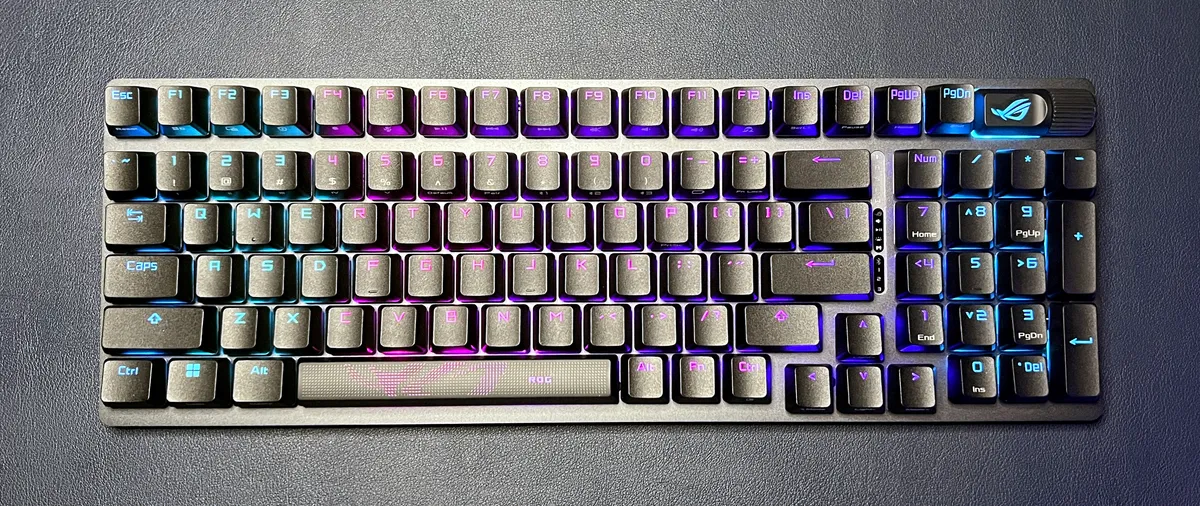
Asus's ROG Strix Scope II 96 Wireless is just about everything you could want in a wireless gaming keyboard — it's speedy, responsive, and reliable while gaming, customizable, and it gets up to 1,500 hours of battery life over its low-latency 2.4GHz wireless connection. It has a 96-percent layout, which means it's relatively compact (it measures just 14.84 x 5.16 x 1.57 inches / 377 x 131 x 40mm) — saving desk space without sacrificing the 10-key numberpad.
The ROG Strix Scope II 96 Wireless is sturdily-built, with an aluminum alloy top plate and double-shot PBT keycaps. It does have a plastic chassis (necessary — according to Asus — for reliable wireless connectivity), but it's got multiple layers of sound-dampening foam inside to minimize case ping. It comes with Asus's second-gen ROG NX Snow linear mechanical switches, which have an actuation force of 45g and are stable, smooth, and quiet. It's also got a hot-swappable PCB, so you can swap the NX Snows out for the switches of your choice.
This keyboard is wireless (that's why it's on this page), with both low-latency 2.4GHz wireless and Bluetooth 5.1 connectivity. Asus says it will get up to 1,500 hours of battery life over 2.4GHz wireless with the lighting turned off, which is fantastic (though this number drops precipitously with the lighting turned on). The ROG Strix Scope II 96 Wireless isn't quite as fancy as its pricier sibling, the Asus ROG Azoth, but it's close — and it's $70 cheaper.
Read: Asus ROG Strix Scope II 96 Wireless Review
Best Full-Size Wireless Gaming Keyboard

Specifications
Reasons to buy
Reasons to avoid
The Razer BlackWidow V3 Pro is our favorite wireless keyboard for gaming because it offers you a full-size, full-height mechanical switch experience, plus all the features you’d expect in a premium gaming clacker. You also get a cozy, plush leatherette magnetic wrist rest and four onboard memory profiles. Unfortunately, you’ll need the software to use any RGB besides the 7 effects stored in the keyboard’s memory. And there are no macro keys, like the Logitech G915 Lightspeed offers.
The BlackWidow V3 Pro can connect with a wireless dongle, via its included charging cable or through Bluetooth, which lets it pair with up to 3 additional PCs. Battery life varies based on backlight brightness and effect but can range from 5-25 hours with lighting and reach 192 hours without. And at 3% battery life, the BlackWidow V3 Pro can get wonky, with delays in registering keypresses and issues with the software finding it.
But ultimately, the BlackWidow V3 Pro delivers everything you’d expect from an expensive, top-of-the-line gaming keyboard, except a mandatory cable. There's also a newer BlackWidow V3 Mini model, although it doesn't bring as much to the table for its price as its larger sibling.
For more gaming recommendations, with or without cables, see our Best Gaming Keyboards page.
Read: Razer BlackWidow V3 Pro review
Best Budget Wireless Gaming Keyboard

Specifications
Reasons to buy
Reasons to avoid
Redragon isn’t exactly a well-known gaming brand in the U.S., but it’s hard to argue with the $70 price of the K596 Vishnu. This 2.4 GHz wireless gaming keyboard packs RGB, dedicated macro and media keys, a metal volume rocker, linear switches and even a wrist rest (albeit a hard plastic one) all into a tenkeyless package. And that's at well less than half the price of the more well-known competition.
The K596 Vishnu also feels solid and was comfortable to use while gaming and typing; although, the plastic used for the shell does look a bit cheap. There’s also some funkiness going on with the design, like the fact that F1-F8 are labeled as secondary media controls, despite there also being a bank of dedicated media buttons directly to their right.
The second bank of programmable G keys are also oddly narrow and jammed up. And there are light bars on either side of the keyboard that, while look cool, are only going to drain your battery faster while you’re gaming without the USB-C cable plugged in. You can turn these off by hitting Fn and the Pause button repeatedly, but that’s a pain. The extra lights should default to only turning on when the keyboard is plugged in via a cable. The Vishnu is also heavier than competing wireless keyboards.
Still, despite its oddities and minor flaws, this is one heck of a keyboard for $70, when you consider Logitech’s G915 TKL costs more than three times as much and doesn’t include a wrist rest. If you’re after a compact, colorful wireless gaming keyboard on a budget, the K596 Vishnu easily earns a top spot in the pantheon.
Read: Redragon Vishnu K596 review
Best Low-Profile Wireless Gaming Keyboard

Specifications
Reasons to buy
Reasons to avoid
Logitech's update to its G915 keyboard — the G915 X — comes in both TKL and full-size layouts (we tested the TKL layout for our review). Its dimensions are identical to those of its predecessor, the G915 TKL: 15.2 x 5.91 x 0.88 inches (368 x 150 x 22.6mm), though it is slightly heavier at 1.9lbs / 860g (versus the original's 1.8lbs (810g). But the added weight isn't a bad thing, as the G915 X TKL feels very premium and sturdily built, and the extra heft only adds to this.
This isn't the thinnest or most low-profile gaming keyboard you'll find, but that's not necessarily a bad thing — the G915 X TKL manages to offer a typing and gaming experience that's almost as satisfying as a full-height keyboard, but in a much slimmer package. You can grab the G915 X TKL with Logitech's new low-profile switches in linear, tactile, or clicky variants; the switches feature a POM cross-style stem for a more stable keypress and are compatible with third-party keycaps. They have an increased total travel distance (3.2mm vs. 2.7mm) and are factory-lubed, but you will still get some rattling from the keycaps (similar to what we saw on the more budget-friendly version of this keyboard, the G515). Still, the G915 X TKL offers a very good typing experience — especially for a low-profile board — and an excellent gaming experience that won't require much compromise if you're moving from a full-height board. Add in a battery that will last up to 1,000 hours over 2.4GHz wireless (with the backlighting turned off, of course), and it's a great upgrade from the original G915.
Read: Logitech G915 X TKL Review
Best Optical Switch Wireless Gaming Keyboard

Specifications
Reasons to buy
Reasons to avoid
Razer’s DeathStalker V2 Pro is a totally different animal from its predecessor, and that’s a good thing. It’s an attractive low-profile keyboard that has basically all the features you need — connectivity, customization and pretty lights, plus a surprisingly decent typing experience and an excellent gaming experience. It’s not exactly, as Razer claims, “built like a tank,” but it’s pretty durable for how small, slim and lightweight it is.
Read: Razer DeathStalker V2 Pro review
Best TKL Wireless Gaming Keyboard

Specifications
Reasons to buy
Reasons to avoid
SteelSeries' Apex Pro TKL Wireless borrows the Apex Pro Mini’s sturdy, minimal, and more generic-looking chassis design, adding the company's updated, highly customizable dual-actuation OmniPoint 2.0 optical switches. The keyboard also packs plenty of premium features like an aluminum alloy top plate, double-shot PBT keycaps, bright per-key RGB, and a detachable magnetic wrist rest. The Apex Pro TKL/Apex Pro TKL Wireless’ roomier layout allows for dedicated media keys and a customizable OLED smart display. Also, unlike its predecessor, it comes in both wired and wireless versions.
The Apex Pro TKL Wireless is an excellent, highly customizable gaming keyboard in a TKL layout, which is much less restrictive than the Apex Pro Mini’s 60 percent layout — but we’re still holding out for an update to the full-size SteelSeries Apex Pro to rival Razer's excellent DeathStalker V2 Pro.
Read: SteelSeries Apex Pro TKL Wireless review
Best Wireless Keyboard for Productivity

Specifications
Reasons to buy
Reasons to avoid
A typist’s dream, the Akko 3098B combines the company’s comfy, ASA keycaps with a compact, 96-percent layout and the ability to hot-swap in your favorite switches if you don’t like the defaults. The curved surface of the keycaps made it easier to feel our way around while touch typing and the default CS Jelly White switches are the best linear switches we’ve ever used.
The keyboard also has a classic, retro terminal look that made us feel like we were hacking into the Pentagon mainframe from Matthew Broderick’s house. Once we upgraded to our favorite clicky switches, it felt more like we were finishing a story on deadline in the newsroom of the Daily Planet. If you want a touch of modern flair, you can turn on the vibrant RGB lighting that lies beneath the keys.
All nostalgia aside, the Akko 3098B comes loaded with features, including the ability to connect via 2.4-GHz, Bluetooth 5.0 / 3.0 or USB-C. Switching between entry methods takes a single keystroke and less than a second so you can easily use this keyboard with your desktop, a laptop, a Raspberry Pi, your tablet and your phone at the same time.
The Akko 3098B’s 96-percent layout makes it nearly the same width as a tenkeyless model, but with almost all the keys of a full-size keyboard, including the numpad and arrow keys. Two sets of flip-out feet let you adjust the height to your liking.
Akko also sells an identical looking keyboard for $20 more under the model name 3098N. The 3098N just uses a different controller card inside, different client software and has a different selection of switches, but is otherwise the same.
Read: Akko 3098B / N Wireless Keyboard review
Best Portable Wireless Keyboard

Specifications
Reasons to buy
Reasons to avoid
You’ll have to spend extra on Keychron’s $25 travel pouch (or find something else to protect the keys), but the Keychron K3 offers a lot to like for typists on the go. With its appealing looks, attractive backlighting, svelte frame, and hot-swappable low-profile switches, there's a lot to like about the Keychron K3. It's easily the best portable low-profile mechanical/optical keyboard we've used in terms of comfort, looks, and versatility. The fact that Keychron was able to keep things this thin while retaining the ability to swap switches is especially impressive.
That said, battery life, as well as overall frame rigidity are compromises you'll have to make in favor of the slim package. If there’s room in your backpack for something taller, the Keychron K2 gets better battery life and feels like it’s built tougher — so it's worth considering exactly how much portability you need before buying.
Read: Keychron K3 review
Best Magnetic Switch Wireless Keyboard
Specifications
Reasons to buy
Reasons to avoid
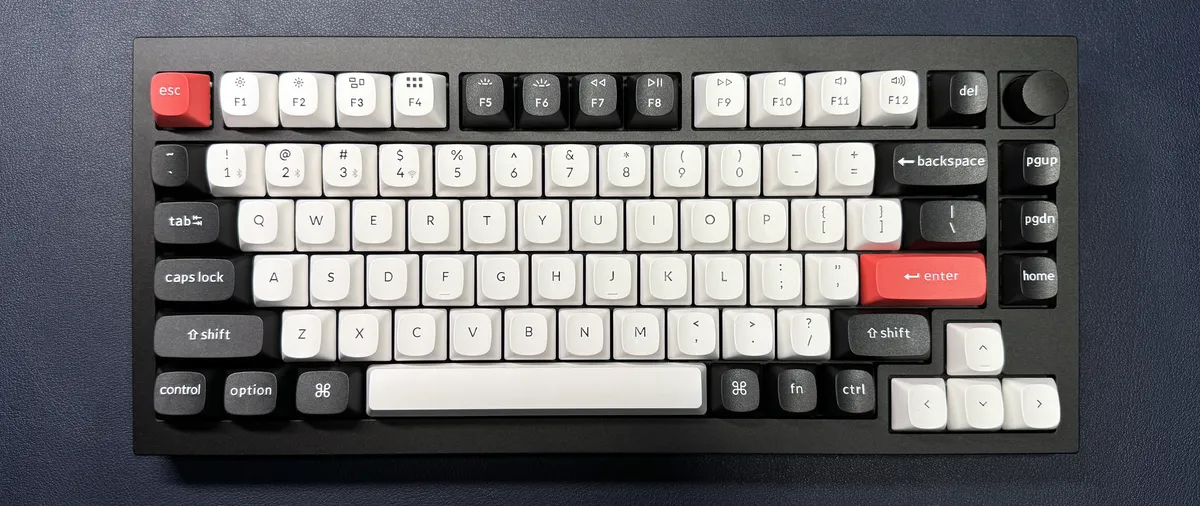
Hall Effect magnetic switches are all the rage these days, especially for gamers — they're popular for their speediness and their adjustable actuation, and while this is not technically a gaming keyboard, it does have low-latency 2.4GHz wireless connectivity with a 1,000 Hz polling rate. The Keychron Q1 HE is a wireless mechanical keyboard with a 75-percent layout (slightly smaller than the more common TKL layout). It features linear magnetic HE switches with an actuation range of 0.5 - 3.8mm and a bottom-out force of 60g and a hot-swappable PCB (though it's only hot-swappable with similar magnetic switches — a common issue with all magnetic switches) gasket-mounted inside a solid chassis made of aluminum.
The Q1 HE offers a comfortable, nice-sounding typing experience, thanks to sound-dampening foam and an acoustic pad to reduce ping. It's not the absolute best-sounding keyboard we've ever used, but it sounds very good — especially for magnetic switches. The keycaps are high-quality double-shot PBT with printed legends and Keychron's OSA profile (the same height as OEM profile, but with angled, spherical tops). For gaming, you'll find the standard suite of magnetic switch options: wide range, precise adjustable actuation, multiple inputs on a single key, and Rapid Trigger. The switches' actuation can be set individually and have a sensitivity of 0.1mm.
The Q1 HE also has built-in Bluetooth 5.1, for those who don't need that low-latency 1,000 Hz polling rate. It features a switch on the back for switching between 2.4GHz wireless, Bluetooth, and wired, as well as a switch for switching between Windows and Mac modes. It's housed in a hefty chassis that weighs 3.75 pounds (1,700g), so it's not the best keyboard for traveling — but it's not going anywhere on your desk, even if you're an aggressive typist. The Q1 HE has received a price increase since we reviewed it a year ago — it's now $239.99 (previously $219.99), and it comes in either "carbon black" or "shell white."
Read: Keychron Q1 HE Review
Other Wireless Keyboards We Tested
Asus ROG Strix Morph 96 Wireless
Asus' ROG Strix Morph 96 Wireless is sort of like a successor to one of our all-time favorites, the Asus ROG Strix Scope II 96 Wireless — sort of. It's a wireless, hot-swappable gaming keyboard with a gasket mount design and a 96-percent layout. It has three forms of connectivity, a semi-customizable multi-function knob, bright per-key RGB lighting, and a solid build.
It's a cheaper version of the ROG Strix Scope II 96 Wireless, though. It comes with fewer accessories, has double-shot ABS keycaps instead of double-shot PBT keycaps, and has excellent battery life — 590 hours over a 2.4GHz wireless connection with the lighting turned off — that still manages to be less than half of what the ROG Strix Scope II 96 Wireless gets (1,500+ hours). It debuted with a retail price of $140, while the ROG Strix Scope II 96 Wireless is currently on sale for $130. So, while this keyboard may eventually make its way onto our best list as its predecessor (sort of) leaves shelves, it's not quite there yet.
Read: Asus ROG Strix Morph 96 Wireless Review
Epomaker RT82
This retro-inspired wireless keyboard has a magnetic detachable mini color LCD screen designed to look like an old-school computer monitor in the upper right corner. It's a little gimmicky, sure, but this keyboard is otherwise pretty impressive, with quiet, hot-swappable switches, lower-profile dye-sub PBT keycaps, and five layers of sound dampening in the case.
It's not quite a gaming keyboard, but it does have a 1,000 Hz polling rate and N-key rollover, so you can use it for gaming if you want to. And it's priced right, too — it retails for $85.99, but we've seen it on sale for less. If you like the look and you're looking for something quiet, this is a nice nostalgic option.
Read: Epomaker RT82 Review
Asus ROG Azoth X
Asus' most recent addition to its Azoth lineup brings a new look and a new price tag of $300 — $50 more than the original Azoth and just $200 than the Azoth Extreme. Like the original, it features a hot-swappable PCB with a gasket-mount design and five layers of sound-dampening foam, but the typing experience is less-than-perfect thanks to an over-dampened space bar (you can remove the sound dampening in the space bar, but for $300, should you have to?).
It also comes with Asus' new second-gen "refined" linear or clicky switches, tri-mode connectivity, and up to 1,600 hours of battery life. It's a solid wireless gaming keyboard, but you can get much more for the price.
Read: Asus ROG Azoth X Review
Asus ROG Azoth Extreme
The Asus ROG Azoth Extreme is the anticipated "extreme" version of Asus' flagship premium gaming keyboard, the ROG Azoth. The Azoth Extreme takes the already-pretty-extreme Azoth to the next level with a full aluminum alloy chassis, a carbon fiber positioning plate, refined sound dampening and stabilizers, a full-color, customizable, touch-gesture-enabled OLED screen, an adjustable gasket mount, and a wrist rest. But all this doesn't come cheap: the Azoth Extreme is a whopping $500 — twice the price of the already-expensive $250 Azoth.
The Azoth Extreme is a very, very well-built 75-percent mechanical gaming keyboard, with a meticulously machined case, per-key RGB backlighting, double-shot PBT keycaps, and your choice of Asus' ROG NX Snow (linear) or ROG NX Storm (clicky) mechanical switches. It also has a hot-swappable PCB, a carbon fiber positioning plate, and a gasket mount that can be adjusted via a switch on the back for a softer or firmer typing feel. Out of the box, the Azoth Extreme sounds and feels even better than the original Azoth (which already sounded and felt fantastic).
Like its predecessor, the Azoth Extreme is wireless with 2.4GHz wireless, Bluetooth, and wired connectivity, and it packs an impressive 92 hours of battery life with both the OLED screen and the RGB backlighting turned on. With both of those turned off, it gets over 1,600 hours of battery life, which is not quite as good as the original Azoth (which was rated for over 2,000 hours with its screen/RGB turned off), but is still impressive enough to be considered overkill.
The Azoth Extreme is definitely extreme. And it's so well-built that it arguably earns its high price — but that doesn't necessarily mean it's worth buying. The Azoth Extreme is highly customizable, but most of that customizability will likely go unused by the majority of gamers — you're not paying $500 for a keyboard you then have to turn around and customize.
Read: Asus ROG Azoth Extreme Review
Logitech G515 Lightspeed TKL
The Logitech G915 Lightspeed is one of our favorite low-profile gaming keyboards, but at $250 it's not exactly budget-friendly. The new Logitech G515 Lightspeed TKL, however, features the same general design as the rest of the GX15 lineup, but with updated switches, access to Logitech's KEYCONTROL, and a much more budget-friendly price of $140.
The G515 Lightspeed TKL is a wireless mechanical gaming keyboard with Logitech's low-profile GL switches (linear or tactile), which now have a POM cross-style stem for reduced wobble and a better typing experience. It sports a slim, all-plastic build with premium-feeling double-shot PBT keycaps and bright per-key RGB backlighting. While it's not quite as satisfying to type on as a similarly-equipped full-height gaming keyboard, the G515 Lightspeed TKL offers a very pleasant typing experience with consistent tactile feedback and solid (if not perfect) gaming performance.
It features both 2.4GHz wireless and Bluetooth connectivity and gets 36 hours of battery life over 2.4GHz wireless with the brightness turned up all the way — and up to 600 hours with the backlighting turned off.
Read: Logitech G515 Lightspeed TKL Review
How We Test Wireless Keyboards
Peripherals — especially wireless peripherals — are as much about comfort, convenience, and aesthetics as they are about performance. We begin by inspecting each wireless keyboard's build quality, taking note of any premium materials used, such as metal/aluminum chassis or double-shot PBT keycaps. We also look at any included accessories, including wrist rests, cables, replacement parts, and cases.
We spend a couple of weeks using each keyboard as our daily driver for writing, gaming, and everything else. We take a typing test at the beginning of our time with each keyboard and several throughout testing — typing tests don't objectively tell us much, but they give us a good handle on how well a keyboard is laid out and how well its elements fit together, as well as how easy it is to adapt to the keyboard if it's an unusual size or layout.
We test each keyboard's gaming performance by playing a variety of games, ranging from fast, precise first-person shooters to more endurance-based RPGs. We want to see how each keyboard performs in terms of speed, accuracy, and latency, as well as how comfortable and convenient it is for longer, more button-heavy games.
If the keyboard is hot-swappable, we swap in our favorite switches and assess how that changes the typing experience. We also test and review the included switches, because most people aren't going to immediately swap out switches in a brand-new keyboard.
For wireless keyboards, we test the strength, consistency, and latency of the wireless connection through gaming, as well as the battery life with lighting turned on and off. We also try to run each keyboard all the way down, battery-wise, so we can see how the wireless connection performs at lower battery levels.
Customization is especially important on keyboards, so we analyze each keyboard's customizability using any included companion software.
Wireless Keyboard Shopping Tips
⌨ Mechanical or not? If you’re a gamer and/or will also be doing a lot of writing, a mechanical clacker will be the best wireless keyboard for you. Keyboards with mechanical switches are also usually more durable — although membrane models hold up better to spilled liquids.
⌨ Backlighting / RGB: The least-expensive wireless keyboards won’t likely have backlighting, which is OK if you always use your keyboard in a well-lit space. But if you work or game late into the night and don’t want to (or can’t) switch on overhead lights, a keyboard with backlit keys is what you should be looking for. A single light color will get the job done, but RGB backlighting lets you change things up.
⌨ Pick your switch: Not all of the best wireless keyboards will use mechanical switches. But for those that do, you’ll have plenty of switch options, depending on the model you choose. Many gamers prefer linear switches (often labeled as red or brown) because they make it easier to mash the same buttons repeatedly in quick succession. But, this kind of switch often results in more mistakes (often repeated letters) when typing.
Those who type for a living often prefer “clicky” switches with a tactile bump (often labeled as blue, white, or green) that you can feel when the switch actuates. But clicky switches are noisy, which can bother those around you.
There are dozens of other switch types, including optical-mechanical and membrane. The latter tend to have a mushier feel but are much better at surviving things like spilled drinks. The type of switch that’s best for you depends on personal preference and your use cases and needs. So whenever possible, get an inexpensive switch tester to try out different options, or try to find a keyboard you’re considering in a store to get a feel for it before buying.
⌨ Magnetic switches? You've probably seen a lot of "Hall Effect" magnetic switch keyboards popping up in the gaming space. Magnetic switches are technically mechanical switches, but they actuate via disruption of a magnetic field rather than physical contact — so they don't have the same moving parts that traditional mechanical switches have. The benefit of this type of actuation is that it's highly adjustable — you can adjust each key's individual actuation level, and turn on features like Rapid Trigger, which matches the actuation and reset point so you can hit keys even faster. The downside of these switches is that they're all feel pretty similar — because there's no physical actuation, any tactile bump or click is manufactured. Magnetic switches aren't for everyone, but certain types of gamers will appreciate the extra speed.
⌨ Full-size, tenkeyless, or smaller? Tenkeyless keyboards ditch the number pad, while 65% models often eliminate navigation keys, and 60% boards also usually cut the arrow keys. While some will want every possible key, others prefer a smaller keyboard to save space on their desk, or something that's smaller for easier travel.
⌨ Bluetooth or 2.4GHz: If you want a wireless keyboard that you can use with smartphones and tablets, opt for a Bluetooth keyboard. Most laptops and many desktops these days support Bluetooth. So these are good if you want to use your best wireless keyboard with multiple devices.
That said, if you're only going to use your keyboard with a PC or Mac, and you plan on gaming, you'll want to go with a 2.4GHz connection. A 2.4GHz connection uses a USB dongle, so you'll need a spare USB port — but pairing is a lot simpler and the latency will be reduced drastically when compared to Bluetooth.
It's also handy to have a keyboard that works when plugged in via USB, even if you plan to be wireless most of the time. If you can plug the keyboard in and use it while you're charging, you won't have to worry about downtime.
MORE: How to clean your keyboard | How to build a custom mechanical keyboard | How to lube switches on your mechanical keyboard | Best budget mechanical keyboards | Best gaming keyboards
Finding Discounts on the Best Wireless Keyboards
Whether you're shopping for one of the best wireless keyboards or a model that didn't quite make the cut, you may find some savings by checking out our lists of the latest Newegg promo codes, Best Buy promo codes, Razer promo codes or Corsair coupon codes. You can also check out our Best Tech and PC Hardware Deals page for daily updates on discounted peripherals and other hardware.
Get Tom's Hardware's best news and in-depth reviews, straight to your inbox.

Sarah Jacobsson Purewal is a senior editor at Tom's Hardware covering peripherals, software, and custom builds. You can find more of her work in PCWorld, Macworld, TechHive, CNET, Gizmodo, Tom's Guide, PC Gamer, Men's Health, Men's Fitness, SHAPE, Cosmopolitan, and just about everywhere else.
- Matt Safford Managing Editor
-
amacbabe I am looking for a sleek wireless silver or white keyboard for a PC - I am building my own computer and want something with a thin profile and charge on usb. How is the microsoft surface keyboard? I have read things that they don't work well with non surface computers- No gaming but work as a designer and do a ton of CAD and 3-rendering- looking for mouse too- ANy advice?Reply -
jonathanbecker There's an odd bias in this article. The Lenovo TrackPoint II is a productivity model, and designed to be used a desk. Yet, it's deemed "expensive", even though it has an integrated pointing device. Meanwhile, all the other keyboards on the list are the same price, if not higher. While none of these keyboards are as inexpensive as the Logitech K400 Plus (which I use as an HTPC keyboard because it's really, really good in that setting), I believe it is unfairly labeled expensive on this list.Reply
I do not work for Lenovo. I do however own the Thinkpad USB keyboard (which is wonderful), and the wired Thinkpad Compact keyboard, which is the same layout and design as the Trackpoint II, but not wireless). The Compact is a great desktop keyboard and I really think you should reconsider this review. -
JorgeLaMo Reply
I recently was in the same boat. I was using a mid range Microsoft keyboard and mouse set and it wasn’t great. The scroll wheel was mushy on the mouse and my hand would cramp after a long day working. I bought the Logitech MX3 master mouse and enjoyed it so much I paired it with the MX Keys keyboard t. It’s been a few months and I’ve been very happy with the combo. I can easily switch between my two towers and IPad Pro throughout the workday.amacbabe said:I am looking for a sleek wireless silver or white keyboard for a PC - I am building my own computer and want something with a thin profile and charge on usb. How is the microsoft surface keyboard? I have read things that they don't work well with non surface computers- No gaming but work as a designer and do a ton of CAD and 3-rendering- looking for mouse too- ANy advice? -
voyteck I would vote for Microsoft Sculpt Ergonomic if not for horrible quality control (so far it was either space button, function keys, mouse buttons or signal strength). Out of five only one turned out acceptable although still not without issues. If you have time and inclination for trying - go for it because it's shape is simply fantastic (barring way too narrow wrist pad and small sticky function keys).Reply -
durahl Who else does it strike as <Mod Edit> weird to put a CON for not having a USB Passthrough on a friggin' WIRELESS Keyboard?Reply
And WHY is it only the Logitech ones that get this CON? Same for the lack of a CONing Logitech for the lack of a Wrist Rest!
It's almost like they're that good you basically have to fish for CONs 🙄
Writing on my Logitech Craft Wireless Keyboard... -
Bastard2k I have the 915 Logitech and although it is an excellent keyboard there are a couple of downsides:Reply
Alts of numbers and symbols are not backlit, so if you dont know where the "$" is finding it in the dark can be a trick.
Labels on keys are not very visible, and difficult to see in low light or even fairly well lit rooms so shutting down the backlighting might not work.
This is clearly meant to be a desktop keyboard. The weight combined with the keys being close to the edge means its actually kind of difficult to pick up and put down without hitting keys.. There is not much area on the keyboard to actually grab it.
Its not terribly hard to use on your lap though. I don't particularly miss having a wrist rest either. -
RichardtST Can't believe the Logitech G915 got fourth. I love my 915s. I have one for home and one for the office.Reply -
mu7med I was interested in the redragon k596 but I was wondering if the macro settings save its configuration to the keyboard chip or in the Windows app.Reply
For example I have multiple machines and VMs so can I use the keyboard interchangeably without the need to reconfigure the macro settings on each machine? -
Cryolithic I don't understand why the Blackwidow v3 Pro is always on the top of the list. I've had mine replaced by Razer twice, and still I have to use it with the usb connected or else I get double keypresses, stuck keypresses, along with short battery combined with nonexistant/poor notifications. It's useless as a wireless keyboard.Reply