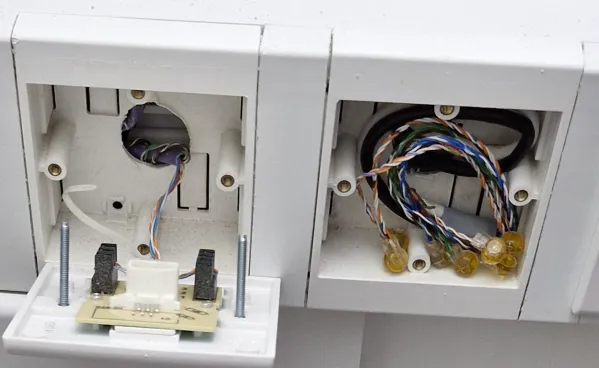
Clever Brit successfully repurposes telephone wiring for gigabit internet throughout his vintage home — Lad converts "incomprehensible mess of wires" into high-speed ethernet links
Powered by GIGA Copper modems.
A diligent British citizen has successfully converted his archaic telephone wiring into high-speed networking that gives him gigabit speeds basically anywhere in his house. For our amusement, he documented the entire process — from contemplative dilemma to victorious outcome — on his "The HFT Guy" blog.
Like most American homes, older houses in the UK aren't built with ethernet in mind; they have telephone lines running throughout the walls. Our tinkerer was using powerline adapters previously to cope with this, using the home's existing electrical wiring to distribute internet.
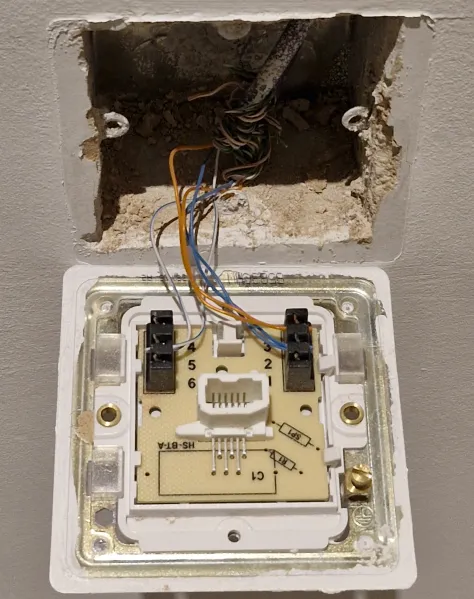
This way, the connection is noisy and laced with signal degradation that leads to latency. So, switching to telephone cables is a major upgrade since both ethernet and land-line use copper cabling as the medium. In this instance, it was Cat5 spread across the place.
Image credit: The HFT Guy
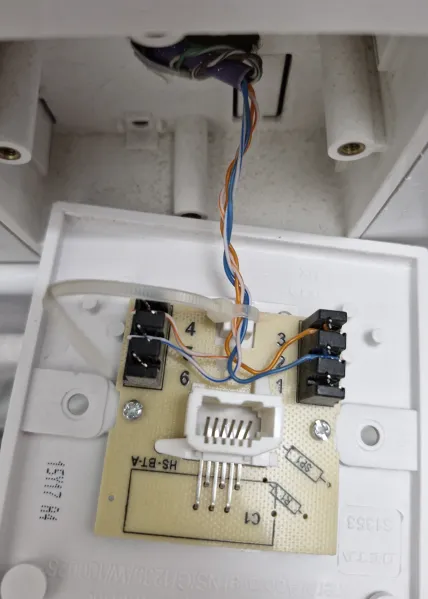
Ethernet uses the RJ45 connector and all eight wires inside the bundle, while land-line is limited to only two wires and employs an RJ11 connector, so the solution isn't as simple as just converting the plugs. Moreover, British households, including this one, have daisy-chained telephone lines, which means a single central point branching off into several sockets, whereas ethernet requires a star topology where every end needs to be directly connected to the mains.
Therefore, you need a powerful device that does the conversion, so a modem, while maintaining the signal properly, is the special part. Our guy chose the GIGA Copper G4201TM which uses G.hn modulation to break the signal into lots of tiny sub-carriers spread across a wide frequency band. Then, it basically plays a game of tug of war, balancing bit-loading in real time with robust error correction.
You connect the tool to your modem/router using a standard RJ45 ethernet cable, then an RJ11 cable goes into the telephone line wall socket. Homes in the UK have the BT631A connector so an RJ11 to BT631A cable was used here. Once set up, your internet connection is now in your walls. All you need is to "pull" it out the other side.
Let's say, across the house you have your office where you need gigabit connection. The telephone port in that room would then be set up the same way, acting as a bridge. The land-line coming from the wall, going into the adapter and the ethernet coming out from the same device, finally being plugged into your computer. Voila, the link has been established and you have wired gigabit ethernet potentially throughout your house.
Get Tom's Hardware's best news and in-depth reviews, straight to your inbox.
The HFT Guy then tests the connection and shows near-gigabit speeds on his phone, so the project was a success. The original blog includes a lot more details like the ordering and shipping process, which was a bit of a nightmare for the Englishman. He also breaks down the differences between the "InHome" and client-server variant; you need the former.
He also describes the dire state of his telephone wiring, arranged incompetently by an "idiot" that basically necessitated the use of this method. "The gigacopper device to do gigabit Ethernet over phone line is a miracle," he wrote while ending his blog with an open-ended suggestion to companies to tap into this lucrative market.

Follow Tom's Hardware on Google News, or add us as a preferred source, to get our latest news, analysis, & reviews in your feeds.

Hassam Nasir is a die-hard hardware enthusiast with years of experience as a tech editor and writer, focusing on detailed CPU comparisons and general hardware news. When he’s not working, you’ll find him bending tubes for his ever-evolving custom water-loop gaming rig or benchmarking the latest CPUs and GPUs just for fun.
-
bill001g So some guy goes out and buys a product that has been on the market for years and hooks it up and make him "clever". What does that make the rest of us that drive to the grocery store and buy food so we don't starve.Reply
Saying it is better than powerline adapters when it is using exactly the same signally methods is stretch. G.hn has been around for many years with no updates or replacements. Now maybe because there is nothing else connected unlike a the power wires it might get less interference. The wires are still very small with no twist so they can pick up signals. There is not a lot of market of this product so I suspect powerline are cheaper.
They did not talk speed but I bet it is not faster than a couple 100 mbps at best.
They used to make a big deal about running G.hn over coax cables in your house but MoCA is a lot faster so nobody used G.hn equipment. -
chaz_music I bet there are a ton of people that did not know this tech exists, so it is a good article for those folks.Reply
I was curious as to how they could advertise such a high data rate with the old G.hn standard, and found that there is a Wave 2 variant that can go "up to 2400 Mbps". I would expect that there aren't many vendors that can achieve that, but even half of that will stream video throughout you house for several streams. And without having to run wiring or cutting into walls. I've used MoCA for years without any issue and that tech gets into the same data rate range.
There are also some G.hn Wave 2 vendors that have POE / POE+ products that appear to run power and data down the wiring. So you could use this run a camera with POE, or maybe a doorbell camera. -
wakuwaku Reply
Looks its fine if you didnt read the source article. But in this case you should complain about tom's writer not including important techy details in a tech website. The original blog post clearly showed screenshots of a speedtest, a iperf test and a ping test. while not the most "comprehensive", it is good enough to show that he indeed manage to reach gigabit speeds on his setup.bill001g said:So some guy goes out and buys a product that has been on the market for years and hooks it up and make him "clever". What does that make the rest of us that drive to the grocery store and buy food so we don't starve.
Saying it is better than powerline adapters when it is using exactly the same signally methods is stretch. G.hn has been around for many years with no updates or replacements. Now maybe because there is nothing else connected unlike a the power wires it might get less interference. The wires are still very small with no twist so they can pick up signals. There is not a lot of market of this product so I suspect powerline are cheaper.
They did not talk speed but I bet it is not faster than a couple 100 mbps at best.
They used to make a big deal about running G.hn over coax cables in your house but MoCA is a lot faster so nobody used G.hn equipment.
You wanna complain about something at least don't be lazy and do it right!
Heres a quote from the blog for you lazy people:
Still, I really wanted to verify that the device can do a full Gbps, I procured an USB-C to Ethernet adapter.
I dont want to steal images from some ones blog so go ahead and go the linked blog to see the screenshot of iperf.
It works!
Full speed achieved, testing from a phone to a computer with iperf3. -
Stomx One guy famous for his reselling of somebody's software for technophobic masses would probably say: "Even 640k would be fine for everyone" and this guy has 1 Gig here.Reply
Kudos to him of course.
But we need "moar".
Any way to securely wirelessly transfer 4K-8K signal from the videocard displayport/HDMI to remote monitors over the entire house? Optical cables are the only way I found but they require professional installations or you will be stepping on them everywhere, they are still not easy to hide under the carpet. Same problem with USB3/USB4 secure transfer where the real cables with repeaters every 10 meters are needed. Speeds there are 10-100x higher than this mentioned 1 Gig -
abufrejoval Reply
The PC market is practically dead, so they have to hunt down news elsewhere...bill001g said:So some guy goes out and buys a product that has been on the market for years and hooks it up and make him "clever". What does that make the rest of us that drive to the grocery store and buy food so we don't starve.
I've done a few generations of powerline, and they were not just terribly slow, but tended to fail rapidly: I'm glad that's over!bill001g said:
Saying it is better than powerline adapters when it is using exactly the same signally methods is stretch. G.hn has been around for many years with no updates or replacements. Now maybe because there is nothing else connected unlike a the power wires it might get less interference. The wires are still very small with no twist so they can pick up signals. There is not a lot of market of this product so I suspect powerline are cheaper.
I'll vouch for MoCA, which has been a true life saver for me!bill001g said:They did not talk speed but I bet it is not faster than a couple 100 mbps at best.
They used to make a big deal about running G.hn over coax cables in your house but MoCA is a lot faster so nobody used G.hn equipment.
I started 45 years ago via phone modems at 300 Baud (up to 34.000 in the end, I believe), gradudated to DSL at 768kBit, used it to 250/50Mbit, then switched to ADSL on Coax (up to 500/50Mbit I think, and am currently on fiber 1000/500 Mbit/s, with up to 2500/1000 available locally.
The main issue has always been an 1830's co-owned three-story villa in semi-rural Germany with mostly 1980's internals, so putting in the newest technology just wasn't an option, mostly because any new hole or cable run meant having to confirm to current building codes (all existing stuff was protected). When the place was completely redone and subdivided in the 1980's, nobody thought to include copper for fiber Ethernet, not even proper cable tunnels. Any vertical opening was sealed tight with cement for fire protection, while the massive wooden staircase was protected by being a historical monument...
All lines came in buried from the street in the cellar, but the only internal connections was power lines (all over), phone lines, and coax cables from the rooftop into each of the 5 units, originally meant for terrestial UHF and VHF TV and radio.
I'd seen plenty of old hotels e.g. in France using phone lines to provide digital TV networking etc, but those phone lines were deeply buried into the walls without any visible or accessible service panels. So for anthing beyond DSL, they were out.
Running any new cabling, optical or copper Ethernet turned out to be a nightmare issue with building codes: yes, the entire staircase was a giant fire trap, but if anyone were to drill a hole, it would now have to be fire-proofed!
So the coax antenna cables seemed pretty near ideal, except that they reached the rooftop, not the cellar, where the external lines came in.
Help came when the heating was converted from a normal gar burner to a more efficient low-temperature exhaust burner, which attempts to recycle the exhaust heat to warm the incoming air: essentially the air is no longer drawn from a separate (inlet) chimney, to then be exhausted to an outgoing chimney, but a metal exhaust pipe is stuck into the former exhaust-only chimney, which then allows the exhaust heat from that pipe to heat the incoming fresh air around it.
Why did that help? Because it freed up the former inlet chinmey to become a 'cable tunnel', running from the cellar to the rooftop without opening the building codes can of worms.
So both the ADSL coax and a few years later the fiber cables could travel from the cellar to the attic, where small holes into the unused chimney provided cable entry and exit points in the cellar and the attic.
For ASDL the cable and signals were coax already and could be fed right into the existing antenna splitter in the attic, and then be distributed down again into the differnt units by the pre-existing coax (antenna) cables: easy!
But fiber came with its own cable up the chimney, and only Ethernet was supported at the customer end of that modem.
That's where MoCA saved the day, converting the Ethernet output into comething that ran on the old antenna cables to the units, where it would be converted to 1GBase-T again, actually it would even support 2.5Gbase-T.
That sort of thing may be a non-issue in most typical US suburban sprawl areas, where few buildings are made from solid bricks or used for centuries. But both the last mile and even the last few meters can present quite a few connectivity challenges and I am sure glad solutions exist to bridge those gaps.
BTW those solid brick walls (and valted cellar roofs) also block WIFI signals rather significantly, with 5 and 6 GHz bands a single wall or ceiling becomes a true barrier. Luckily that means interference is also low, so within a room we can use the bandwidth, while the 2.4 GHz range did become a bit crowded once the neighbours caught up. -
mitch074 Yeaaaah...? My house used PTT298 phone cabling throughout. Because I didn't want to spend a couple days replacing it with CAT6, I checked its specs out : 4 pairs of twisted copper cables.Reply
I mounted CAT5E nuts on both ends of one : tested with a ethernet tester, it worked. So, I plugged a Gigabit computer on one end and an old NAS on the other.
Full Duplex Gigabit achieved. Ping under 1ms, transfer at close to max Gigabit theoretical speed
So I did all the others and mounted an ethernet switch in my basement right next to my cable box and main NAS, replacing all of the old T phone plugs with ethernet wall sockets.
Gigabit Ethernet in the whole house : Done. -
Dav_Daddy Reply
I'll say it's better because it would be hard to be much worse.bill001g said:Saying it is better than powerline adapters when it is using exactly the same signally methods is stretch. G.hn has been around for many years with no updates or replacements. Now maybe because there is nothing else connected unlike a the power wires it might get less interference. The wires are still very small with no twist so they can pick up signals. There is not a lot of market of this product so I suspect powerline are cheaper.
This was quite a few years ago but myself and friend both tried to network our homes through the power lines and it was a terrible experience that I wouldn't wish on anyone. Slow, unstable, a big latency spike if not a dropped connection everytime someone started:
The microwave oven
The AC compressor cycled
A heater turned on
I know there was at least one other common household item that it didn't get along with maybe two? The washing machine, and air compressor maybe?
It was terrible and didn't last a month is my point.
Tell me you didn't read the article without using those words. He says it like three separate times for crying out loud!bill001g said:
They did not talk speed but I bet it is not faster than a couple 100 mbps at best. -
timsSOFTWARE I did the opposite - not much of a conversion, but for whatever reason, the previous owner of my house had installed CAT-5 ethernet to power a whole home phone system, and all of the cables come together in a utility closet. So, all I needed to do was just plug those cables into a switch instead.Reply -
ferdnyc One correction: Most Ethernet, even at gigabit speeds, does NOT use all four pairs in a Cat5 cable. It only uses two of them. And it's a good thing, too, because RJ11 only has 4 pins. (The identically-sized RJ12 has 6.) So if the project is adapting from RJ11 to RJ45, all 8 wires can't possibly be connected.Reply
He's just lucky his house was wired with Cat5. Most US homes wired before the 1990s (and some even after) use silver satin for phone lines, which is 4-wire, not twisted-pair, and therefore isn't rated to carry any speed Ethernet without signal issues due to near-end crosstalk (NEXT). -
TechHeadComputers I had to tregister just to comment on this Joke of an Article. And I never do this!!Reply
Back in 1999 I worked for a wholesale company and we imported things like Y2K cards and Network Cards that specifically used the existing phone lines in your home! 27 years ago!!!
I remember trying to pitch the RJ11 PCI cards to a retail partner, Cal's Computer Warehouse in Vancouver, Canada. He had never heard of them and was sceptical they would work, I gave him a small sample order at cost just to get the account.
You can probably still find them on eBay.