Tom's Hardware Verdict
Silverstone’s IceMyst Pro provides excellent thermal performance, and the unique ability to cool RAM directly, which will be appreciated by DDR5 overclockers.
Pros
- +
Low DDR5 temps from VRM fans
- +
Exceptional noise-normalized performance
- +
Industry-leading thermals, with low CPU temperatures
- +
Supports Threadripper Pro and consumer CPUs
Cons
- -
At $189.99, it’s not for everyone
Why you can trust Tom's Hardware Our expert reviewers spend hours testing and comparing products and services so you can choose the best for you. Find out more about how we test.
Introduction to Silverstone IceMyst Pro 360 Pro
SilverStone has been busy churning out coolers, power supplies, expansion cards, and other PC equipment since its founding in 2003. The company is perhaps best known for its computer cases, like the retro-inspired PC FLP02.
A few years ago we tested the company’s unique IceMyst 360 AIO with Intel’s Core i7-13700K. Since then, the bar for AIOs has been raised – we’ve seen improvements in affordability and performance of high end AIOs, with the best liquid coolers becoming stronger and more competitive every year.

Today we’re looking at Silverstone’s IceMyst 360 Pro, which, like its predecessor, features the ability to add multiple VRM fans to provide direct cooling to specific motherboard components. This feature will be appreciated best by those who overclock their RAM, as DDR5 is more sensitive to temperature than older DDR4.
Will this liquid cooler make our list of the best CPU coolers? You betcha! But let's take a look at the specifications and features of the cooler, then we’ll go over thermal and noise benchmarks so you can decide if this is the right AIO for your next build.

Cooler specifications
Cooler | Silverstone IceMyst Pro 360 |
Colors | Black |
MSRP | $189.99 |
Lighting | ARGB |
Warranty | 3 years |
Socket Compatibility | Intel LGA 1851/1700/1200/115x |
| Row 6 - Cell 0 | AMD sTR5/TR4/AM5/AM4 |
Radiator dimensions | 396 (L) x 120 (W) x 28mm (H) |
Maximum TDP (Our Testing) | >250W with AMD’s Ryzen 9 9950X3D |
Features of the IceMyst Pro 360 AIO liquid cooler
● Packaging

The outside of the box is brown and blue, highlighting the cooler’s image on the top. As with most AIOs, the inner contents are protected with molded carboard and plastic coverings.

Included with the AIO are the following parts:
● 120mm fans
There’s more to an AIO than just the liquid pump and radiator. The fans included have a direct impact on noise levels and cooling performance. Silverstone includes three model CC12025H12S fans, which are 120mm in size and feature nine fan blades.

To simplify cable management, these fans feature a quick-connect that integrates ARGB and PWM into a single cable.

● 360mm radiator and liquid pump

The radiator is that it includes an accessible refill port, which will come in useful if you ever need to refill the liquid coolant after the unit’s three-year warranty.

This “Pro” version of the IceMyst 360 features a new pump with a three-phase, six-pole motor. Silverstone claims that this pump delivers twice the flow rate of its previous products.

● A small tube of thermal paste

● Hardware ARGB Control Box
Included with the AIO is a hardware ARGB controller that lets you control and power the lighting without needing an available motherboard connection.

● Mounting for modern AMD and Intel platforms, and even ThreadRipper Pro!
Like most other liquid coolers, the Silverstone IceMyst Pro 360 supports modern AMD and Intel consumer platforms. It includes a very large copper CPU contact plate, because the cooler also includes mounting hardware for Threadripper Pro systems.

● The killer feature: (Optional) IMF70 VRM/DDR5 fans
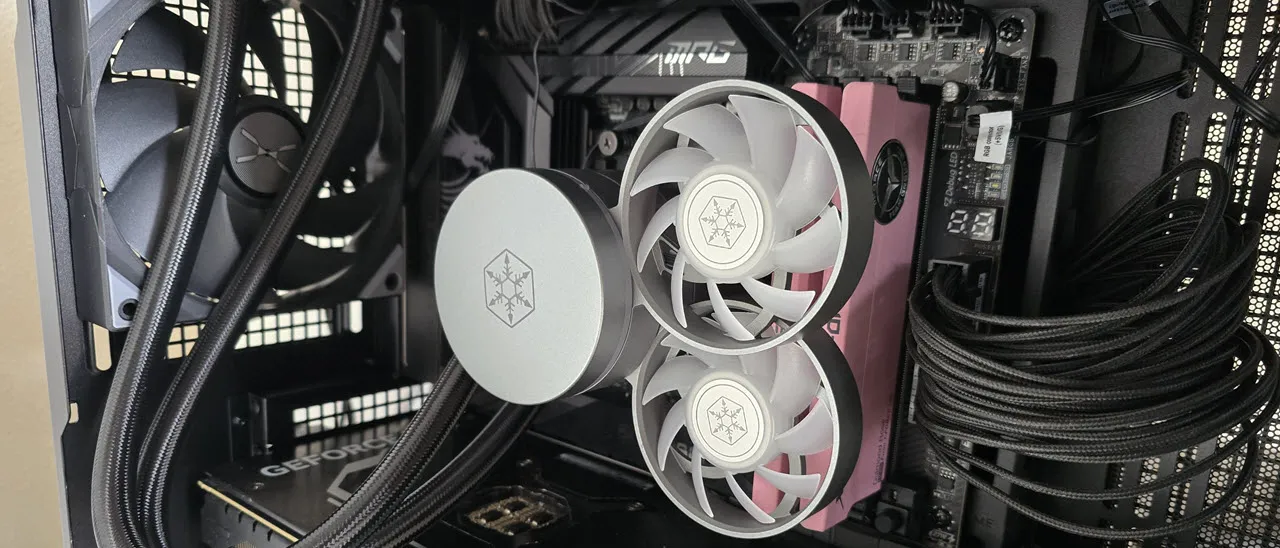
The feature that sets the IceMyst Pro 360 Pro apart from competitors is the ability to mount mulitple IMF70 fans on top of the CPU block.

You can install as many or few fans as your case will fit, and you can move the fans to cover different spots on your motherboard as appropriate. For the purposes of this review, we’ve tested the AIO in multiple fan configurations above our TeamGroup T-Force Xtreem DDR5-7200 RAM. And we’ve run the ultimate RAM stress test, Karhu, to benchmark thermals and determine how effective these fans are.

● AM4/AM5 Installation
The installation of this liquid cooler is simple, but it doesn’t come with the fans pre-installed. So first you’ll want to secure the fans to the radiator, and then mount the radiator to your computer’s case.

Next, you’ll remove the default AM4/AM5 mechanism, and then place studs on the mounting holes.

It’s time to apply the included thermal paste now. If you’re not sure how to do that, we have a handy thermal past guide. Once the paste is applied, simply place the pump block on top of the CPU and secure it with the included parts.
With that step completed, you have the option to install an optional IMF70 VRM/DDR5 fan.

The last step is to connect the PWM and ARGB headers and power on your system.

Real-world testing configuration – AMD AM5 platform
The 9950X3D setup that we were testing coolers with last year has suffered an early death, likely caused by electrically defective equipment. While we were waiting for the CPU to be replaced, we tested coolers with AMD’s Ryzen 9 9950X instead and observed some interesting findings.
There are some differences in how the 9950X and 9950X3D CPUs are impacted by thermal events – while the heat output of the CCDs of AMD’s 9950X3D are relatively balanced, the 9950X I use has one CCD that runs much hotter than the other, with a difference of over 10 degrees Celsius in some scenarios, shown below.

The benchmark results shared in these reviews may differ from others because I place an emphasis on having results that are comparable to real-world use.
This means that I generally test CPU coolers inside of a closed desktop case, which increases cooling difficulty compared to other testing method. Many will test CPU coolers outside of a case, on an open test bench. Open benches have lowered ambient temperatures, which in turn makes weak coolers appear stronger than they really are. Some publications have used generic thermal plates to test cooling solutions. I reject both of these methods because they don’t accurately reflect the real-world PC cooler conditions.
CPU | AMD Ryzen 9 9950X3D |
GPU | MSI Ventus 3X RTX 4070Ti Super |
RAM | TeamGroup Diamond Rose T-Force Xtreem DDR5-7200 |
Motherboard | MSI X870E Carbon Wifi |
Case | Tryx FLOVA F50 |
Our latest testing setup uses the FLOVA F50 computer case from Tryx.

This case features a unique “crossflow” fan that pulls air from the side, which the company claims is more effective than traditional intake fans.