Open source IDE-ATAPI drive emulator launches for vintage computers — drop-in 3.5-inch bay solution can save oodles of optical and HDD images to a microSD
PicoIDE is a convenient alternative to worn out old drives and media priced from $69.
PicoIDE launched earlier this week, touted as “an open source IDE/ATAPI drive emulator for vintage computers.” This single 3.5-inch bay fitting device can replace those aging optical drives (and media) and HDDs, that your retro-PC relies on, with the convenience and capacity that modern microSD cards provide. It uses an appropriate retro-design aesthetic (in beige or black). You can back this project for as little as $69 for the base model, will free shipping in the U.S. and an expected June 14 dispatch date.
Polpotronics LLC, the outfit behind the PicoIDE, highlights the increasing issue of “worn out lasers, crashed heads, or bad sectors,” that even the best maintained vintage PCs can be prone to. At the same time like-for-like hardware replacements are getting scarcer, so a modern retro-embracing, transparent, open-source alternative becomes a compelling project.
Two versions of the PicoIDE are being made available, the PicoIDE Base ($69, beige), and the PicoIDE Deluxe ($110, beige or black). Whichever you choose, you get the following features:
- Full 3.5-inch drive bay enclosure (injection molded)
- Standard 40-pin IDE connector
- 4-pin Molex power connector
- Headers for external activity LED and action button
- SPI header for future expansion
- Emulates ATAPI CD-ROM drives and IDE fixed hard drives
- Images stored on microSD card (FAT32 or exFAT)
- CD-ROM formats: .bin/.cue (with audio track support), .iso
- HDD formats: .img, .hda, .vhd (with CHS geometry), .hdf
- LBA and CHS addressing modes for maximum compatibility
- Configurable vendor/model strings for compatibility with picky systems
- Supports PIO modes 0-4 and multi-word DMA modes 0-2
- Powered by Raspberry Pi RP2350
- IDE bus operations accelerated with PIO state machines
- Double-buffered read-ahead for optimal throughput
- Hot-swap image selection when inserting mickroSD
- Configuration via ini file on microSD
- Firmware updates from the micoSD
- High-quality TI PCM5100A DAC for audio out
- MPC-2 header for internal sound card connection
- 3.5 mm line-out jack for external audio
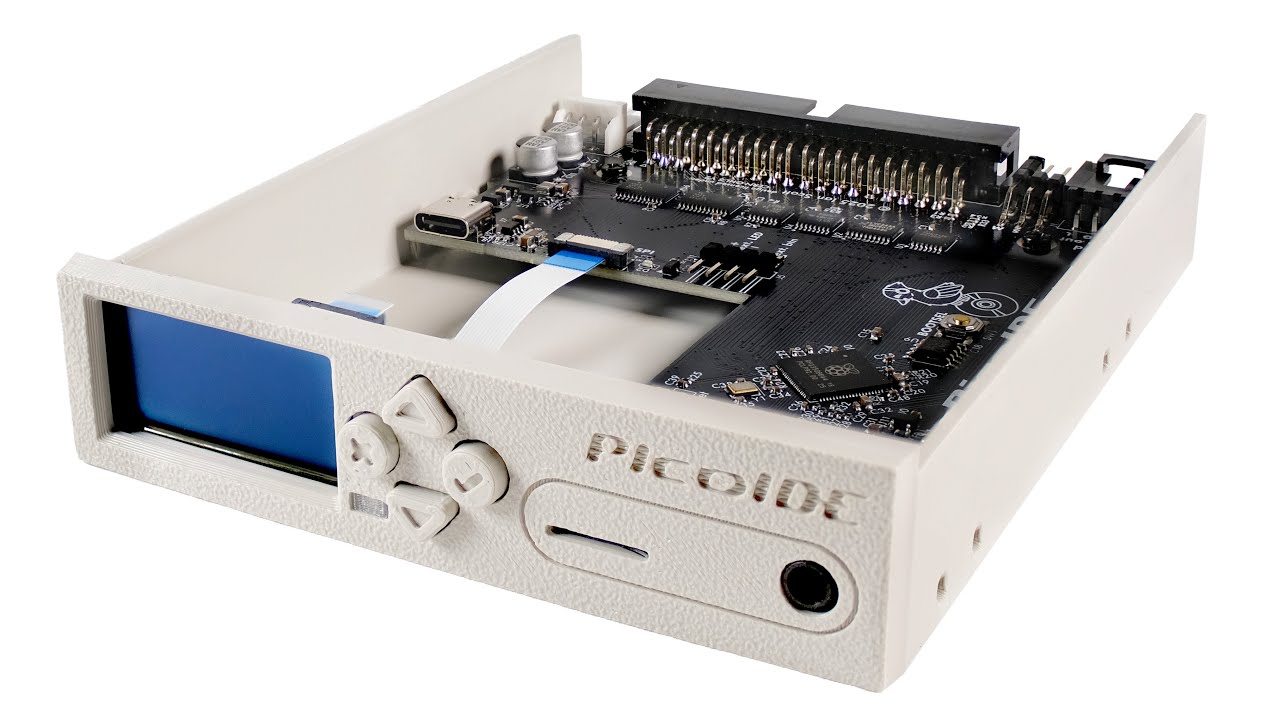
A killer convenience feature of the PicoIDE is its ability to hold multiple drive images, say with different DOS, Windows, OS/2 and other installations, and on-the-fly switch to load your chosen image at next-boot – all from a single micoSD card. Moreover, PicoIDE emulates a multitude of drive geometries.
PicoIDE is also truly open source. That permeates the hardware, firmware, and documentation. With all design and source files promised to be available via GitHub before the device begins shipping. Documentation is already there.
In the intro, we mentioned that you can back this project for as little as $69 for the base model, with free shipping in the U.S., and an expected June 14 dispatch date. But please remember that crowdfunding a project is not a guarantee of receiving a finished product within the timescale highlighted, if at all. Backing a crowdfunded project is more like an investment; you believe in the project and want it to succeed. You are not purchasing a retail product.

Follow Tom's Hardware on Google News, or add us as a preferred source, to get our latest news, analysis, & reviews in your feeds.

Get Tom's Hardware's best news and in-depth reviews, straight to your inbox.

Mark Tyson is a news editor at Tom's Hardware. He enjoys covering the full breadth of PC tech; from business and semiconductor design to products approaching the edge of reason.
-
timsSOFTWARE Reply
It sounds like it's a drive emulator - sort of like what a emulation software provides to VMs. It can pretend to be old IDE-based disks or CD-ROMs, while the actual storage must be flash memory. It would be for use in old computers that can't handle modern drives/drive interfaces.Sam Hobbs said:I do not understand what it is. -
Sam Hobbs Reply
Except it is hardware. VMs and emulation software are software. And I do not see a physical drive for floppies or whatever. I do not understand what the hardware is; what it is doing. By definition of VM we do not need additional hardware for VMs.timsSOFTWARE said:It sounds like it's a drive emulator - sort of like what a emulation software provides to VMs. It can pretend to be old IDE-based disks or CD-ROMs, while the actual storage must be flash memory. It would be for use in old computers that can't handle modern drives/drive interfaces. -
USAFRet Reply
This is to merge old hardware with new motherboards.Sam Hobbs said:Except it is hardware. VMs and emulation software are software. And I do not see a physical drive for floppies or whatever. I do not understand what the hardware is; what it is doing. By definition of VM we do not need additional hardware for VMs.
'old hardware' might mean old old CD drives or hard drives. Things that existed long before SATA or PCIe. -
Tanooki2025 I honestly don’t see the purpose of this at all. IDE-to-SD adapters have been dirt cheap and all over eBay for years, they already do the job cleanly and without reinventing the wheel. I even use a IDE to SD adapter for my vintage 486 laptop because the original mechanical Drive died and I don't feel like replacing it with another mechanical drive.Reply
This feels like the creator is treating vintage DOS and early Windows PCs like Commodore 64s, Apple IIs, or Atari STs, systems that actually require exotic imaging formats. DOS and early Windows PCs use standard, readable file systems. Who exactly is out there making disk images for DOS games and Windows 3.1 productivity software?
If you want to mount a virtual CD drive on your vintage Windows computer, you can use Damon Tools, Virtual CD-ROM, or Alcohol 52% tp mount common CD-ROM/DVD images. That stuff has long existed, especially for people wanting to bypass game copyright protections back then. Heck there's also a program called Virtual Floppy to create and read floppy disk images also for Win9x.
And before any of you ask "Umm but what about mounting a CD image for DOS?" Well let's answer that question with another question. Even if your DOS computer has a physical CD-ROM, do any of you know or remember how to mount a CD ROM drive in DOS without having to use Windows?? 🤷. Anyone??.. Nope I didn't think so.
This might make sense if the PC world had moved entirely to Linux and DOS/Windows standards were considered archaeological artifacts, but that’s not reality. What this really is, is a fancy 3.5-inch bay SD card reader with extra unnecessary steps.🤷
Sure, this... contraption might have niche value for a handful of oddball systems that need a BIOS partition or weird boot setup, but for normal retro PC use, games, apps, day-to-day software, it’s completely unnecessary.
Honestly, this is one of the most absurd pointless and useless pieces of retro hardware I’ve seen in a while. Just because you can build something doesn’t mean there was ever a need for it.🤦 -
ravewulf ReplySam Hobbs said:I do not understand what it is.
It's a GoTek floppy emulator, but for hard disks and CDs. Swap between multiple hard drive images on a single device without swapping SD cards, and the virtual CD drive has real analog audio out where Daemon Tools may not work or simply isn't possible due to overhead or using DOS instead of Windows. The Deluxe version can also be controlled via WiFi, including file transfers for adding new images on the fly.
The PicoGUS is another option for CD emulation with analog audio output, as covered by PhilsComputerLab.
AkzHC6B1bKY -
TerryLaze Reply
It's the future sonny, the "there will be a time were this whole room sized computer will fit on a stamp" time has long come, the raspberry pico is many times as powerful as the PCs that this thing is made for.Sam Hobbs said:I do not understand what it is.
And now you can use it (the raspberry) to take over many jobs in an old computer that would not have been possible otherwise.
You don't have to know, there are boot disks for that, even back in the day many game installations would come with the option to make a boot disk that would enable cd and have all the options to save enough ram to make the game work.Tanooki2025 said:Even if your DOS computer has a physical CD-ROM, do any of you know or remember how to mount a CD ROM drive in DOS without having to use Windows?? 🤷. Anyone??.. Nope I didn't think so.
The windows installation cd would make you a boot disc that would mount the cd, everybody was using that disk to mount cds in dos.
I mean sure cd/dvd drives are not really in short supply and you can be sitting there burning the remainder of whatever empty discs you still have, (are they still being made? )Tanooki2025 said:Sure, this... contraption might have niche value for a handful of oddball systems that need a BIOS partition or weird boot setup, but for normal retro PC use, games, apps, day-to-day software, it’s completely unnecessary.
Honestly, this is one of the most absurd pointless and useless pieces of retro hardware I’ve seen in a while. Just because you can build something doesn’t mean there was ever a need for it.🤦
OR
you can use something that is much more convenient.
The main benefit of this picoide is that it can play audio for game discs which is not possible by mounting isos in dos, you would need a real disc.
But also the wifi interface so you can send isos directly to it without having to uninstall the whole unit and fiddle out the microsd (with your senior hands) and fiddle it into a reader to copy over files and do the same in reverse again...big draw for people of that age. -
Ogotai Reply
i read it as a product to emulate a old hardware, on old hardware where replacement hardware cant be found any more... eg., ide cdrom or ide hdd... while using new hardware to do that....USAFRet said:This is to merge old hardware with new motherboards.
i have a few comps that this could work well with... as the mother boards dont have sata ports.. like the K6 and K7 comps i have... -
_deXter_ No doubt this is cool, and that some folks might find this useful, but as a vintage PC enthusiast myself, I can't see myself using this - because the whole point of vintage PCs is to preserve the charm of computing of that era - and this includes inserting and installing software from (sometimes multiple) floppy disks, using a mechanical HDD - complete with all the spinny sounds and mechanical feedback that you get when accessing your drives, plus the optical feedback from the blinking FDD/HDD lights..Reply
All the sounds, the lights, the tactile feedback, the loading times, the bad sectors, running DEFRAG, SCANDISK, SpinRite - it's all part of the experience of a bygone era. Using this emulator gets rid of all that, and I don't like it.

