









G.Skill explains how AMD EXPO ULL unlocks additional performance — expanded profiles allow memory makers to include subtiming tweaks for the first time
But more involved binning could mean more expensive memory, and X3D chips see less benefit
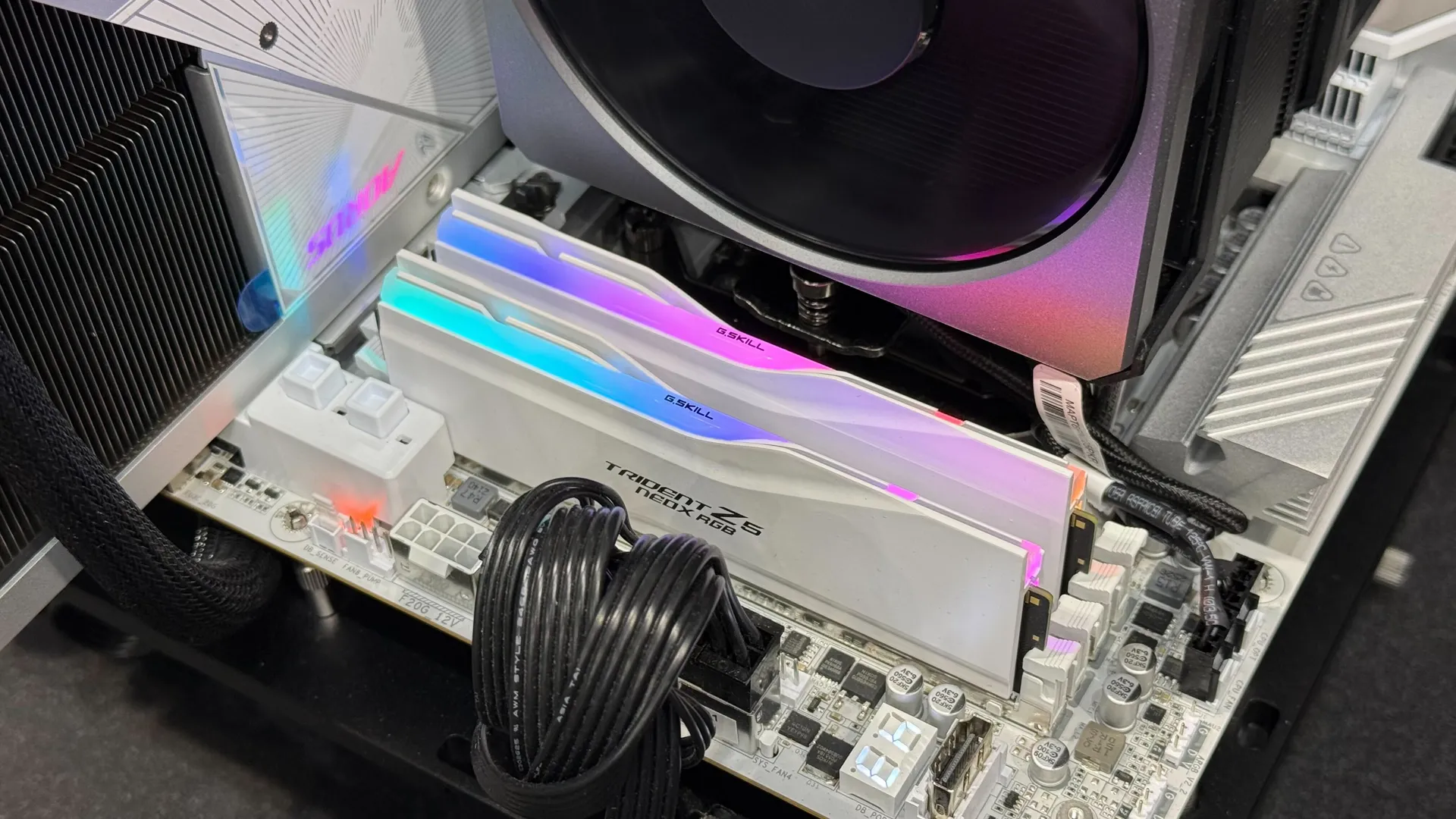
AMD's EXPO Ultra Low Latency program, announced at Computex 2026, aims to give users a one-click route to lower memory latencies than its existing EXPO profiles, but the company's initial announcement was light on details. To learn more about EXPO ULL, I stopped by G.Skill's Computex booth, where the company demonstrated four new kits that offer EXPO ULL support.
Memory latency directly affects how long the CPU has to wait in order to get data back from RAM, and so it has a major impact on CPU performance. But even as new DDR standards and ever-faster DIMMs have boosted memory bandwidth, DDR latency has improved at a much slower pace over time.
For some very high-level background, when selecting memory, PC builders will generally consider a given memory kit's speed and its CAS latency (CL). If you compare two CL30 memory kits, for example, the one with the higher clock rate will have a lower effective latency in nanoseconds (because CL30 expresses a number of clock cycles).
Knowing this, your first instinct for reducing latency might be to seek the highest-clocked memory you can find with the lowest CAS latency (like DDR5-8400 or even faster modules).
But on modern AMD platforms, it's not that simple. Reaching memory speeds higher than 6000 MT/s generally requires the use of a 1:2 multiplier mode between the clock of the integrated memory controller (the UCLK), which generally tops out around 3000 MHz, and the memory clock (MCLK). This 1:2 multiplier adds latency, and so it can counterintuitively reduce performance even as memory speeds climb above 6000 MT/s. (Remember that DDR memory moves bits at twice the clock rate, hence MT/s).
With this 1:2 multiplier active, by the time additional memory clock speed even begins to bring latency back down to where it would generally be in the 1:1 mode, you're looking at wildly expensive and exotic memory kits, and so most enthusiasts running Ryzen 7000 and Ryzen 9000 CPUs consider it desirable to choose memory that lets them run the UCLK and MCLK in 1:1 lockstep for the best balance of low latency and (relatively) low cost.
All that is why using memory faster than 6000 MT/s on AMD platforms is generally counterproductive for gaming performance. That's why modules in the range of DDR5-6000 CL30 are widely regarded as the overclocking "sweet spot" for Ryzen 7000 and Ryzen 9000 CPUs.
Get Tom's Hardware's best news and in-depth reviews, straight to your inbox.
But that doesn't mean there isn't further room for improvement, as the introduction of EXPO ULL suggests.
G.Skill told me that until now, DRAM module makers were only permitted to change the four primary timings within EXPO (and XMP) profiles, leaving performance on the table. EXPO ULL affords memory makers more freedom to adjust the sub-timings within each of those four primary timings for even lower latencies, and to include those results in the memory's SPD.
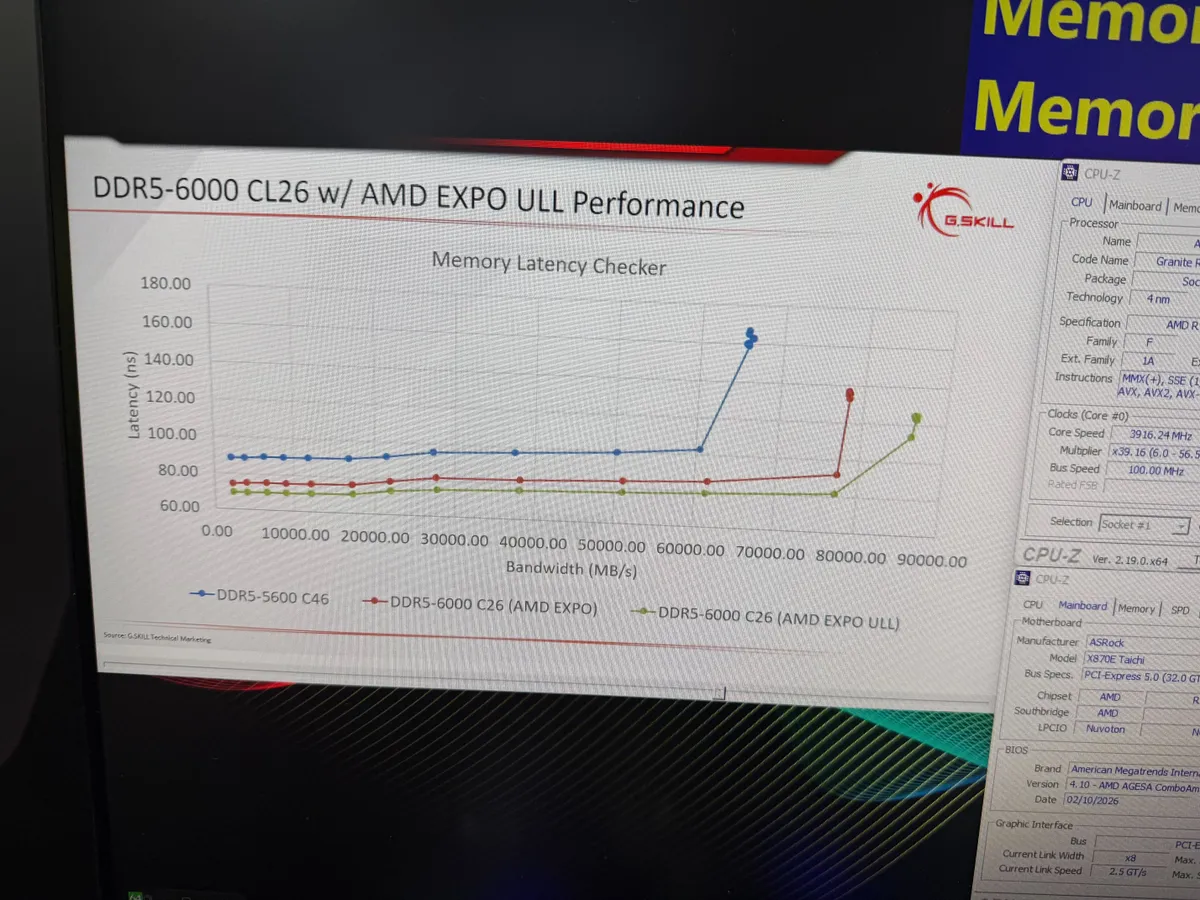
Tweaking memory sub-timings on Ryzen platforms using community-made tools to determine the best potential settings used to be a fairly common practice for those seeking the best performance from their AMD systems, but Ryzen X3D processors and their massive slices of 3D V-Cache reduced those CPUs' sensitivity to those finer adjustments. It's become much more common to just get a DDR5-6000 CL30 kit, enable EXPO, and call it good.
But if you are focused on achieving the absolute lowest memory latency, EXPO ULL removes the need to perform the (tedious and tricky) process of determining those improved sub-timings by allowing memory makers to shoulder that work and include it as part of the one-click boost that EXPO provides.
For all that, EXPO ULL doesn't change the fundamental performance characteristics of X3D versus non-X3D CPUs, so while you can certainly pair an X3D chip with an EXPO ULL kit, G.Skill tells me that you're not going to see as large of a difference in performance from that pairing as you would with a non-X3D chip. That's why AMD is touting the performance gains of EXPO ULL with a Ryzen 7 9700X and not the Ryzen 7 9850X3D you might expect.
G.Skill also told me that EXPO ULL-ready memory requires stricter binning of individual memory chips during production, so it isn't just a software change that can be applied to existing modules. The company says the extra work involved in this stricter binning process means that modules supporting the feature are likely to be more expensive than kits that haven't undergone the same characterization.
Overall, then, EXPO ULL is likely to be a premium (and somewhat niche) addition to the EXPO program instead of a broad replacement for non-ULL EXPO profiles. Demanding gamers who need the lowest memory latency for the best performance in CPU-bound gaming scenarios will likely want an EXPO ULL kit regardless of the type of Ryzen CPU they're using. But we'll have to see just how much extra cash these kits demand in today's already eye-watering memory market and what benefit they have, if any, for AMD's massively popular X3D chips.

As the Senior Analyst, Graphics at Tom's Hardware, Jeff Kampman covers everything that has to do with graphics cards, gaming performance, and more. From integrated graphics processors to discrete graphics cards to the hyperscale installations powering our AI future, if it's got a GPU in it, Jeff is on it.
-
-Fran- The secret to unlocking more EXPO performance is very simple: gambling.Reply
Do you like your odds your CPU's IMC can actually do it? Your motherboard can run those speeds and latencies with no issues with its topology?
Well, there you go. Nothing like paying more for something you're not even guaranteed to get!
What a steal, right?
--
Perhaps too heavy on the sarcasm? Well, consider it the spice of life. The one you don't want.
Regards. -
TechieTwo IME there is no tangible DRAM improvement beyond running 1:1, DDR5-6000 as AMD has advised. If you have too much money and time you can fiddle with the DRAM settings to your heart's content and likely see no real world improvement.Reply
Have at it. ;) -
bit_user I just wish EXPO provided curves, rather than a single collection of presets. For instance, I might like to improve my timings somewhat, but without going nuts on power, thermals, or voltage. So, maybe I'm willing to run my DIMM as fast as it'll go at just 1.2V. I wish it had a way of specifying what timings & sub-timings could safely be used at that voltage level.Reply -
-Fran- Reply
No. There is, for sure.TechieTwo said:IME there is no tangible DRAM improvement beyond running 1:1, DDR5-6000 as AMD has advised. If you have too much money and time you can fiddle with the DRAM settings to your heart's content and likely see no real world improvement.
Have at it. ;)
Tweaking RAM, while the "pay off" is not as big or grandiose as a straight up CPU clock increase (most of the time), does offer increases in tangible ways. The immediate example I can bring is (from a games perspective) Spider Man 2 for PC: that game loves tweaked and healthy RAM BW.
To your point though: it can take A LOT of time to tweak. Having a "rock solid" OC with RAM will depend on how your tolerance to "the occasional failure" looks like. Not every software will hammer memory the same way, so in a general sense, I do agree the "safe" OC AMD recommends is "just good enough".
I have my memory running at 6400MT/s in 3:3:2 ratios for Memory, External Clock (3200Mhz) and Infinity Fabric (2133Mhz). I haven't tweaked timings, since I've barely been able to keep these speeds stable with my 9950X3D. I can run these timings, but I know the IMC has not much left with the RAM kit (GSkill Royal). Numbers for the CPU look healthy and better than 6000MT/s across the board, except on latency sensitive software, where I'm equal to regular fast kits, but under ultra-tweaked timings from some people. You can watch Buildzoid for a lot of good information on how the AMD's memory subsytem can be tweaked effectively and how to get tangible improvements to your workloads.
Again, to your point: it's really a pain to tweak RAM. AMD is trying to sell you the solution, but I'm calling out the fine print as loudly as I can.
If you want more examples of "properly tuned" memory gains, I can find you a few. Just checking Buildzoid's YT channel (https://www.youtube.com/@ActuallyHardcoreOverclocking) will give you plenty already.
Regards. -
usertests Reply
In these trying times, we should be running our RAM at lower voltages, not higher. We should also be dumpster diving.-Fran- said:To your point though: it can take A LOT of time to tweak. Having a "rock solid" OC with RAM will depend on how your tolerance to "the occasional failure" looks like. Not every software will hammer memory the same way, so in a general sense, I do agree the "safe" OC AMD recommends is "just good enough". -
-Fran- Reply
Yes and no... I guess?usertests said:In these trying times, we should be running our RAM at lower voltages, not higher. We should also be dumpster diving.
I mean, you're right, for sure. Even in the irony of it.
You can still tweak timings and keep speed/clocks the same. You will see benefits on the specific workloads that benefit from them and you won't put your kits at risk by doing so. The tangible benefits would be on things which are latency sensitive only though, but still noticeable I'd say.
On the other hand, as long as you're not going too overboard with the VDDQ and VDD, you can still use only slightly higher voltages for a "tier" jump in performance, I'd say? 1.3v to 1.4v is widely accepted as "safe", as long as your memory temps are under 70°C I think? Whereabouts. Anything higher than 1.4, for me, goes into "FAFO" territory :D
The whole "evolution" of DDR as a technology has been around keeping time latency somewhat consistent, but improve bandwidth per generation by memory speeds and relaxing the access latency. Among other things, obviously.
So, in conclusion, my point is that while your sentiment is shared by me, for sure, you can still do tweaking for things that can show benefit only by focusing on the timings.
Regards. -
bit_user Reply
LOL, not exactly. It's not like a conscious decision was made not to decrease latency. Latency is stayed relatively high because that's just how DRAM works. Any type of DRAM. LPDDR, GDDR, even HBM! And no, DDR signalling doesn't change that.-Fran- said:The whole "evolution" of DDR as a technology has been around keeping time latency somewhat consistent, but improve bandwidth per generation by memory speeds and relaxing the access latency.
Actually, there is one example I'm aware of that they made a conscious decision to accept more latency, as a design tradeoff. That's LPDDR, where the address and data get multiplexed over the same pins. This adds an amount of latency that's proportional to the clock speed. It also sacrifices a little bit of bandwidth, relative to DDR memory running at the same clock speed. -
thestryker Reply
People should be mindful of their memory temps and that's about it. The voltage being pumped through DDR5 isn't going to kill it (at least not any XMP/EXPO voltage) but it running hot sure will. Most DRAM has mediocre heatspreaders and then there's video cards with pass through cooling which dumps hot air right into the DRAM (I really hope Cooler Master actually makes the MasterFlow concept into a product). The PMIC also isn't attached to the heatspreader on a chunk of memory modules which can be its own problem (though if you have active cooling this is a non-issue).usertests said:In these trying times, we should be running our RAM at lower voltages, not higher. We should also be dumpster diving.
There are plenty of DRAM cooler options (Thermalright has finally started shipping the MC-3 and MC-2) and there's always 3D printing or the awful way I did mine because my AIO tubes are too short for where it's mounted to use a proper DRAM cooler: 80mm fans on a pair of long standoffs. The temperature differences from using some sort of active cooling is very high since DRAM doesn't use much power (mine dropped ~10C under load). -
thestryker I still haven't seen anywhere saying what settings they're actually changing with the ULL profile addition. There is some low hanging fruit, but some of it can cause DRAM temps to go up which is problematic because these are also settings which often can cause issues at temperatures which would otherwise be fine. I think it's a very good thing that they're addressing subtimings in general, but I can't help be a little leery with regards to how this will behave in people's systems. I'm not expecting miracles but the overall impact will probably be in the 1-2% range.Reply