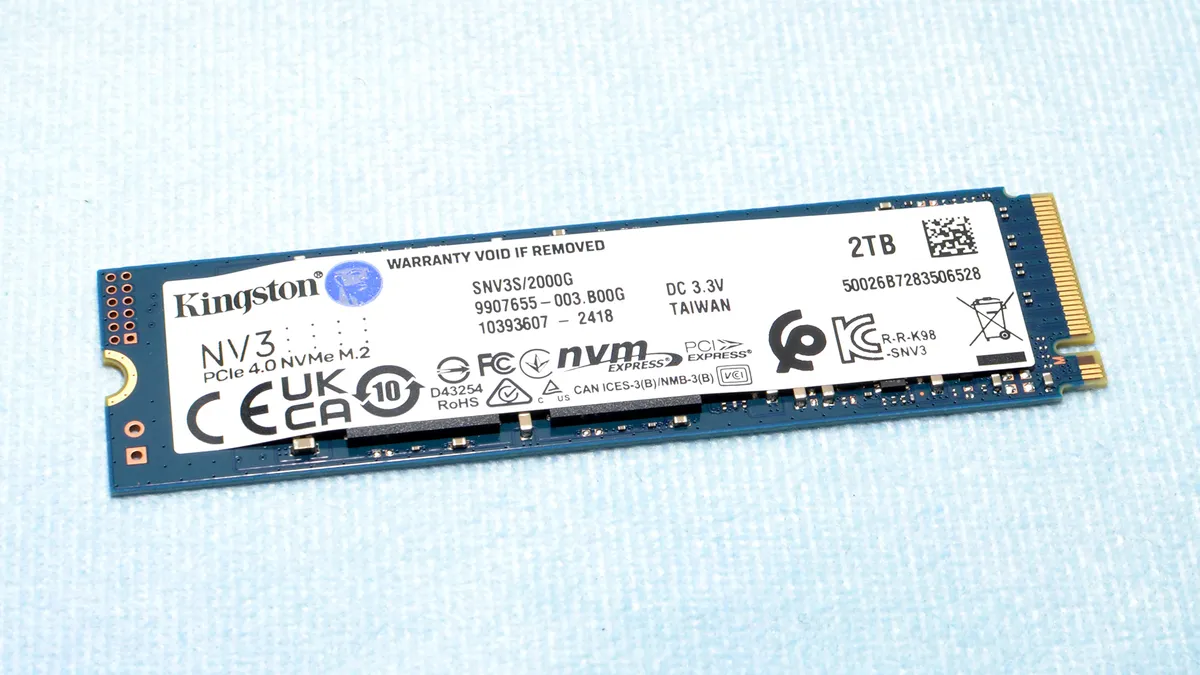
The Kingston NV3 is a marked improvement on the NV2 and a reasonably good budget SSD. It’s power-efficient and runs cool, but there are some performance missteps.
Pros
+
Decent power efficiency
+
Runs cool
+
Decent performance for a budget drive
+
Should end up being inexpensive
Cons
-
Variable hardware
-
Weak sustained performance
-
Initially high MSRP
Why you can trust Tom's Hardware
Our expert reviewers spend hours testing and comparing products and services so you can choose the best for you. Find out more about how we test.
The Kingston NV3 targets the budget-friendly SSD market, with QLC NAND and an updated controller. The company started as a DRAM distributor, but like most memory companies, it also branched into the realm of SSDs. It’s a storied brand that's seen its share of triumphs and fiascos — for memory as well as SSDs. If there’s one thing the company does well, it’s budget drives like the Kingston NV3. Depending on pricing and availability, it could make its way onto our list of the best SSDs.
Kingston knows how to produce and market its drives around the globe in a way that appeals to PC builders who want to save some money. The A400 remains one of the most popular SATA SSDs on the planet, and for good reason. On the NVMe front, we weren't too fond of the previous generation budget NV2, but it still moved a lot of units. The KC3000 and Fury Renegade were much better and continue to be great-selling enthusiast SSDs — though if you’re already an owner, upgrade your firmware now, as some issues have recently surfaced with the hardware.
The Kingston NV3 for its part follows the same general philosophy of the NV2, with improvements. The central pillar of Kingston’s budget approach is to create a baseline product that's a moving target in terms of its hardware — the controller and flash can vary. This has its advantages and disadvantages, which we’ll get into in the review, but it’s simply a reality of the times, particularly in the budget SSD world. This creates complications in reviewing a drive like the NV3, because the drive you buy may not be the same as the one we received for review.
In this respect, the NV1 was in some ways easier to quantify than the NV2. The two basic controllers it used — the SMI SM2263XT and Phison E13T — were very comparable. The NV2 initially used the SMI SM2267XT and Phison E19T, which were also similar, but later added the faster SMI SM2269XT and Phison E21T. That's four different core hardware specs for the same product name, a whole mess of controllers thrown at the user.
Then there are the flash memory types. The NV1 only had a few, but the NV2 had more. You never really knew what you’d get, and despite claims to the contrary there were some decent differences between the best and worst combinations. Peak sequential speeds might have been relatively close, but more rigorous testing would suss out a lot of differences.
Enter the NV3. Kingston seems to have learned its lesson, again tailoring the drive’s specifications so that it fits a wide range of hardware while limiting it to respectable hardware. It currently uses either the SMI SM2268XT2 or Phison E27T controller, both excellent budget controllers. As for the flash, BiCS6 TLC and QLC flash will be the most common at launch, and this flash is underrated. It’s more power-efficient than previous BiCS and is flexible for a wide range of capacities. If you prefer that translated to real-world terms, you'll always get something at least halfway decent, for a budget drive, with hopefully less variation in performance than before.
The NV3 improves upon the NV2 in other ways, particularly in the areas of power efficiency and thermal output. In fact, the overall package seems designed to reduce problems with the drive regardless of environment. Kingston didn’t have to do this, as customer reviews for the NV2 are surprisingly good despite the fact there were probably a good number of returns over time.
But Kingston is a bit late to the game with the NV3 when looking at other budget drives that have been available for quite a while. It probably didn’t want to end up in the same spot as Samsung's 990 EVO, but the variable hardware doesn't immediately encourage confidence. There are certainly better budget drives, so the NV3 needs to be priced right. The NV3 will undoubtedly sell well based on the Kingston name, but whether or not it's the drive for you depends on your priorities and your location. In some regions, the NV3 will become the budget go-to SSD, just like the A400 and NV2; other areas will find more promising alternatives at better prices.
The Kingston NV3 is or will be available for purchase at 500GB, 1TB, 2TB, and 4TB. That's a decent range of capacities, a valuable characteristic for a budget-oriented SSD. If you just need to upgrade or update an old machine, 500GB will do. On the other hand, if you want an inexpensive drive for games or file storage, 2TB and 4TB fit the bill. The 1TB capacity remains a good option for primary drive if you’re pinching pennies on a new build, with the Netac NV7000-Q being a good example of that approach.
Current prices for the NV3 are $42.99, $64.99, and $124.99, with no firm price currently on the 4TB. We would probably recommend the Patriot Viper VP4300 Lite at 500GB or 1TB for about the same price, and the Teamgroup MP44 at 2TB. These two drives tend to be the best-priced budget drives with relatively high performance, so the NV3 will have to come down a bit to compete. That said, in many regions the NV3 might be less expensive or might be only one of a few drives available.
Performance is not exceptional with a maximum of 6,000 / 5,000 MB/s for sequential reads and writes. Random read and write IOPS will vary from controller to controller and from flash to flash — the NV3 will use multiple types of both over its lifespan — but could reach 1M/1M or more. For the most part, this is still plenty of performance, especially for a budget SSD.
The warranty is set to three years with up to 320TB of writes per TB capacity. This number may seem low as 600TB per TB is more common. However, with the shorter warranty period the NV3 actually is rated for 0.29 drive writes per day (DWPD), which is relatively high for any QLC-based SKUs. As always, we recommend looking more at the warranty period than the TBW, except in specific cases like the Addlink NAS D60.
Kingston NV3 Software and Accessories
Kingston doesn’t leave you stranded when it comes to support. Its SSDs are supported by the in-house Kingston SSD Manager software package and one year of Acronis True Image cloning/backup software. The former is your typical SSD toolbox with information and health data for the SSD, as well as offering a way to update the drive’s firmware. Acronis needs no introduction — it’s useful for cloning or backing up your drives and data, a common practice when installing a new drive.
The 2TB Kingston NV3 comes in a single-sided design, so it has that going for it. Single-sided drives are generally preferred, especially for budget drives. There’s not a whole lot going on here with just the SSD controller — there’s no DRAM — and two NAND flash packages. Preferably there would be four packages to make it easier to keep the drive single-sided at 4TB, but two is sufficient and shouldn’t introduce any overheating issues. No heatsink is provided or necessary, but it’s certainly something you can apply if desired.
(Image credit: Tom's Hardware)
The NV3’s controller is the SMI SM2268XT2, an improved version of the SM2268XT. The latter is most prominently found on the Kioxia BG6. The primary difference between the old and the new is flash support — the SM2268XT2 can handle newer flash with a higher I/O rate. This could offer Kingston some flexibility in changing hardware around. The Phison E27T SSD controller — found in the Corsair MP600 Elite and updated MP600 Mini, the Sabrent Rocket 4, and more — would be a suitable alternative controller.
These two controllers are roughly equivalent in performance capability but do have distinct architectures with different core types. Both should be pretty efficient, but there may be cases where one would be preferred over the other. The E27T has more surface area that could improve cooling, while the SM2268XT2’s design might present a better power profile. Getting one controller over the other on your NV3 is not something that should keep you up at night. The SM2268XT2 stayed cool enough in our testing — see the Power Consumption and Temperature section — that we have no problem embracing either one.
To understand the potential advantages of using newer flash, we have to look at the flash specification. Newer flash has the ability to optimize data capture, which compensates for signal integrity issues, allowing a higher I/O speed that improves bandwidth and also latency to a small degree. As with DRAM, the idea is to increase the data rate while not impacting reliability. The careful tweaking of flash timings can also increase compatibility, improve power efficiency, and in some cases reduce cost. Quite simply, Kingston’s choice of controllers provides them a pathway forward for extending the working lifespan of the NV3 without having to make any major compromises down the road.
(Image credit: Tom's Hardware)
Kingston promises that all variants of the NV3 will meet the baseline performance specifications. This makes the 6,000 MB/s ceiling a bit strange and reminds us of the Samsung 990 EVO's OEM variant with a similar limit. In that case, it was due to the drive using 2,000 MT/s flash — presumably V7 V-NAND TLC — but that’s not the case with our sample. It’s reasonable to suppose that Kingston just runs the controller at 2,000 MT/s — we saw something similar with early Phison E26-based SSDs before things were ratcheted up to 2,400 MT/s with the Max14um reference design. There are advantages to doing this, such as reduced power consumption and a higher tolerance for flash quality. Both of those are goals of a budget drive like the NV3.
Speaking of flash, what we have today is Kioxia 162-Layer (BiCS6) QLC flash. Other versions of this drive have been spotted with BiCS6 TLC flash instead. Kingston is by no means limited to BiCS6 and will likely use whatever is most available or least expensive. At 500GB, given the performance specifications, the NV3 is more likely to have TLC flash. At 2TB and 4TB, QLC flash is more likely. And we’ve seen both TLC and QLC flash at 1TB. The NV3 isn’t going to be using old flash with its performance specifications, so there’s no worry there, but the coin flip for flash type might deter some buyers.
I would love to see the 4TB version get a review when it comes out.
In particular, if it retains its single side or not. That was one of the selling points of the NV2 4TB.
Truly impressive showing from a 3rd party ssd maker, Economical and super efficient gen 4 drive with decent endurance that scales as expected with higher density. Hats off to Kingston, this is a great drive. They should really consider making a 2230 version.
SM2267XT here (TLC). So, the slower one. But still works fine after nearly two years of use for OS, drivers, and browser. CrystalDisk says the NV2 is at 98%, 16TB written. And that's after I moved the drive with 100% to the spot next to the GPU without a heatsink. And there it says 58°C, idle. That's noticeably higher than it was at the spot next to the CPU with a heatsink. But still fine. Not that the drive would get pushed much i.e. by the OS, which was designed to run on HDDs as well. And I did split stuff up on several drives, so basically I have like a stack of storage read/write capacity, run through 12 PCIe lanes, and likely adding a Gen5 at some point.
Even Gen3 is still a huge step-up from a Sata SSD though - not only because of the "max speed", but also due to having way more queues, which helps to remove a sort of "desktop lag" that can be easily seen on older rigs (incl. CPU) when there is stuff going on, like downloading and installing something (which takes up HW capacity), running the browser, which also wants to access something, such as RAM and that HDD/SSD, all on an internet connection which may in some cases exceed the speed of HDDs (like, what gets downloaded to the HDD, waits around the modem to be able to actually get processed onto the HDD).
So, what I am tryingto say is that a "budget M.2 SSD" is plenty for casual use of a PC. Even when one pushes for like 4K/8K gaming capability of a rig, or something, (such as being able to fill the entire VRAM within seconds, and a 12GB VRAM within a second with a Gen5 SSD), there is still some use for a simple drive, to chill alongside.