









Windows In Your Pocket
Adapting Hardware
To make Bart PE work on your PC, there are a few additional tweaks you must make to load the network interface and a DSL (or other Internet) connection.
Configure A DSL Connection
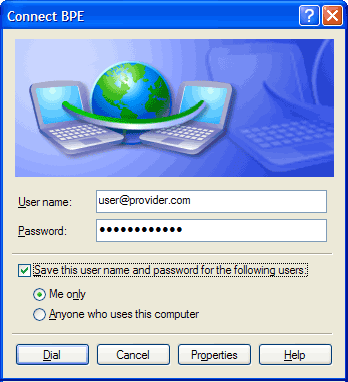
Configuring DSL: Enter your user name and password for access
If you want to use Bart PE to access the Internet, you must activate the freeware PPPoE plug-in and configure it for your DSL connection. Create a folder named "C:\Program Files\pebuilder313\plugin\pppoe_xp and extract the contents of the pppoe_xp.cab (Freeware) into that folder. To establish a PPoE connection, after you boot Bart PE you must also start the Network service and the PPoE service. Select "New Connect..." from the available options, accept the connection name you're granted, then provide your username and password as prompted.
Get Tom's Hardware's best news and in-depth reviews, straight to your inbox.
-
you should try puppy linux on a usb stick, its not windows, but its got its benefits, its free, secure and we,, you'll might enjoy one of the fastest linnux distros aboutReply
-
follow above link, it works!!! only comment, in Step 3 it refers you to step 1, instead it should be referring you to Step 2 command prompt window. Also, there is no need to download their software, i haven't used it to create a boot key, just start with step 2 right away! Best of luck and Thanks for the link post!!!Reply
-
looking for a"FREE" Mini Windows XP ISO for install on a Mini Netbook with only 3Gb HD .. PLease AdviseReply
-
dvijaydev46 Have you tried SARDU? You can create a multi OS USD drive with that tool. It's not only limited to Wondows, but also can you add Linus, antiviruses and other troubleshooting tools.Reply -
dvijaydev46 Have you tried SARDU? You can create a multi OS USD drive with that tool. It's not only limited to Wondows, but also can you add Linus, antiviruses and other troubleshooting tools. http://mytechencounters.wordpress.com/2012/02/27/create-a-multi-bootable-usb-drive-with-linux-and-windows/Reply
-
gosim05 Step "Install Windows" the sentence "Open Windows Explorer and erase all files on the USB flash drive."Reply
DO NOT erase all files, leave BOOT.INI, NTLDR, and NTDETECT. Otherwise peinst.bat won't start the installation.