




Microsoft will allow users to indefinitely pause updates in Windows 11 — first change in over a decade to the mandatory update policy

Windows 11
(Image credit: Microsoft)

Microsoft announced in a blog post yesterday that it would allow users to pause updates in Windows 11 indefinitely. This would be the first time the company officially allowed indefinite update pausing for everyday users since the launch of Windows 10 in 2015. The change is in response to countless user complaints over the years about its “mandatory update” policy.

Updates are necessary for the seamless functionality of the Windows OS and for security. However, users have had limited control over when and how these updates happen. You could postpone updates, but never for more than 35 days. There have been reports of forced update restarts right in the middle of meetings or gaming sessions after the extension period expires.

Article continues below

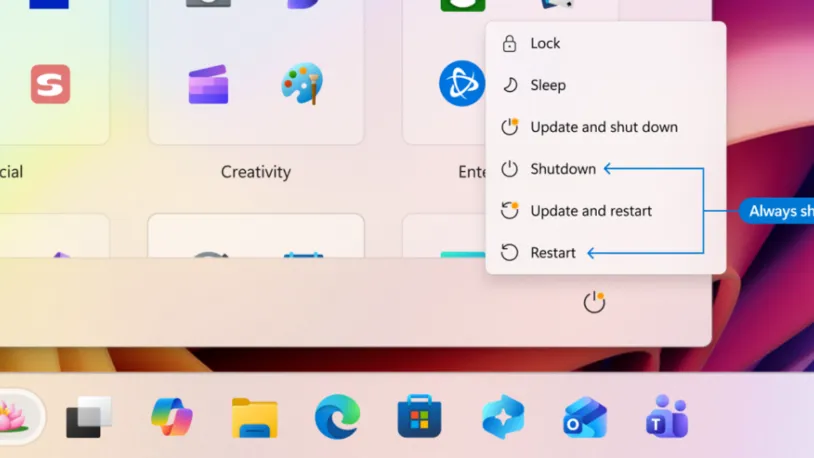
The next change is the ability to shut down or restart your PC normally, even when updates are pending. Previously, whenever updates were due, the usual power options would change to “Update and shut down” or “Update and restart,” often accompanied by the familiar yellow notification dot beside the Shut down icon. This meant you couldn't simply perform a quick restart or power off your system without first installing pending updates. This change fixes that, allowing you to shut down or restart on your own terms, without being held hostage by a pending update.
Windows 11 new restart and shutdown options

The Power menu will always show the standard Restart and Shut down options, even with updates pending (Image credit: Windows)

“With this change, the Power menu will always show the standard Restart and Shut down options, meaning you will always have a choice to just restart or shut down your device without having to install the pending update. At the same time, update‑specific choices like Update and restart and Update and shut down will still be available when applicable,” said Hanson.

As the final key change, Microsoft would provide more insights on available updates, ensuring you know exactly what's being updated.

“Often, driver updates would have similar, if not identical, titles. To help provide you with more insights, we have added the device class to the driver title – ensuring pending or installed driver updates clarify whether they apply to display, audio, battery, extension, HDC, or other applicable driver update classes,” explained Hanson.

In addition to these changes, Microsoft said it will try to unify updates so that users won't have to deal with multiple system updates in a month.

With these changes, Microsoft is simply giving you more control and making updates far less disruptive to your workflow. That said, Microsoft is clear that updates remain critical for security, performance, and system stability — so the intention isn't to skip them altogether, but to plan them around your schedule rather than be ambushed by them at the worst possible moment.

Google Preferred Source

Follow Tom's Hardware on Google News, or add us as a preferred source, to get our latest news, analysis, & reviews in your feeds.

Etiido Uko
News Contributor

Etiido Uko is an engineer and technical writer with over nine years of experience in documentation and reporting. He is deeply passionate about all things gadgets, technology, and engineering.

  • -Fran-
    I'll take the little wins. Good on you MS for realizing not all your customers are drooling idiots. Some of us have bibs around our neck for it.

    Regards.
    Reply
  • USAFRet
    The current forced updates are the direct result of being able to turn the updates off, back with XP/Vista/7.

    People that do not know enough to be able to work safely, WILL have the updates turned off, because some fool told them to.
    Reply
  • Rabohinf
    USAFRet said:
    The current forced updates are the direct result of being able to turn the updates off, back with XP/Vista/7.

    People that do not know enough to be able to work safely, WILL have the updates turned off, because some fool told them to.
    Right. And we cannot let the morons make that decision, can we. We must intervene on their behalf and disable their decision making abilities.
    Reply
  • emitfudd
    My work laptop has Windows 11 and I have noticed that when there is a pending update and I neglect to install it for a few days, my laptop becomes unresponsive until I CTR/ALT/DELETE and am forced to choose the update and shut down or update and restart option. This has happened multiple times.
    Reply
  • Math Geek
    my guess is this is an acknowledgement by them that 75% of the updates are untested and causing more problems that they solve. so allowing them to be "paused" at least lets the user avoid the unexpected issues from such update debacles.

    would love to be able to go back to being able to pick and chose what updates to install instead of the all or nothing method adopted. that way you can give it a week and chose the ones that don't actually break the OS and ignore the others until the patches get patched to unbreak what they broke.
    Reply
  • USAFRet
    Math Geek said:
    my guess is this is an acknowledgement by them that 75% of the updates are untested and causing more problems that they solve. so allowing them to be "paused" at least lets the user avoid the unexpected issues from such update debacles.
    You can already pause, for 35 days.
    Thats what I do. Let other people and my nonessential system be the guinea pig.

    This changes that to sort of indefinite.
    Reply
  • Math Geek
    "Secondly, and most likely the answer to most complaints, users can now schedule updates for specific days or pause them indefinitely, in increments of up to 35 days. The initial 35-day extension limit remains, but this time, upon expiration, you can extend for another 35 days, and you can keep doing this as many times as you like."

    so still gonna make you keep clicking the button every month, but i guess it's better than nothing. my guess is at 35 days it will turn off the pause, auto-update and then ask if you'd like to extend the pause once it's done with the update. lol
    Reply
  • USAFRet
    Math Geek said:
    "Secondly, and most likely the answer to most complaints, users can now schedule updates for specific days or pause them indefinitely, in increments of up to 35 days. The initial 35-day extension limit remains, but this time, upon expiration, you can extend for another 35 days, and you can keep doing this as many times as you like."

    so still gonna make you keep clicking the button every month, but i guess it's better than nothing. my guess is at 35 days it will turn off the pause, auto-update and then ask if you'd like to extend the pause once it's done with the update. lol
    And before long, someone will come up with a script to auto-extend.
    Reply
  • Dr3ams
    In the last 26 years I have had zero problems with updates from Microsoft. All the update problems I experienced were in the 90s. I don't know why others claim to have so many issues. It's an easy operating system to work with.
    Reply
  • micheal_15
    Too little too late.

    Microsoft fired ALL it's QA department and replaced them with AI.

    Then they decided the AI would develop patches with zero human oversight and the AI would QA its own work.

    The UK, french, german, spanish, Italian, portugese, norwiegan, danish, greek, australian, austrian, romania and various other governments have declared they cannot trust microsoft anymore, since they announced Enterprise customers would be Forced to have updates that admins cannot stop. So they're ALL moving their official machines to Linux.

    Somewhere around 10 MILLION high-end enterprise customers lost.

    Gaming users are the biggy. Linux is becoming actually useable as a gaming platform finally, and THOSE users are the future "recommenders" of OS to their workplaces. No-one is going to use Linux at home personally and recommend "something else" at work. That would be twice the OS to learn......

    THEN to top it all off, the CEO of microsoft announced "we are not an Operating System Company anymore. We are an AI Company". No-one is too big to fail.
    Reply